This week,
Raiser's Edge NXT introduces several features such as an update to the
Gmail add-on, and (for some) the ability to display an insight's data proportionally.
Assign fundraisers to actions created in Google Gmail. With the
Raiser's Edge NXT for Gmail add-on, you can view constituent details about email senders and recipients and create actions from their messages in your Google
Gmail inbox. When you add an action with the add-on, you can now select
Assign fundraisers to search for who to assign it to. For more information, see
Raiser's Edge NXT for Gmail.
Note: To ease fundraiser assignment, actions created in
Gmail are automatically assigned to the same fundraisers assigned the previous action. To assign actions to yourself, your constituent record must be marked as a fundraiser.
View proportions in bar, column, and area charts in Insight Designer. To help you better compare your data, you can now display an insight's data proportionally in
Insight Designer. Bar, column, and area charts now have the option to stack your data by percentage so you can see your information as proportions of the total.
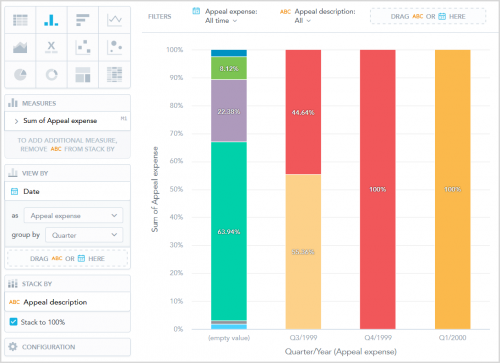
When you view a measure in a bar, column, or area chart and you add an attribute under
Stack by, you see the size of each value.
Now, you can select
Stack to 100% under
Stack by if you prefer to see the values as percentages of the total.
For more information, see
Measures and Counts.
Note: Don't see this feature? No need to worry. If all goes well based on feedback and usage, expect its wider release in a future update.