What's New In Raiser's Edge NXT The Week Of June 11





This week Raiser's Edge NXT introduces a new option to share dashboards with anyone. Also, everyone now has access to role-based security. Share dashboards with anyone. T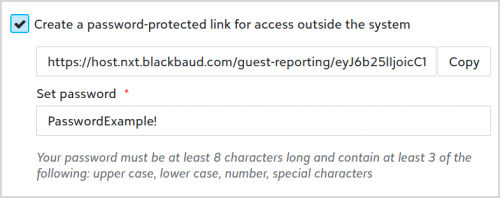 o help you share information with anyone inside or outside your organization, you can now send a temporary read-only link to a dashboard in Analysis, Report builder.
Open the dashboard you want to share and select Properties. Under Sharing, select Create a password-protected link for anyone to use. To copy the link to the dashboard, select Copy and enter a password, which you can then share along with the link. This link displays a read-only dashboard for anyone you choose to share it with, whether or not they have access to Raiser's Edge NXT. The link automatically expires in 10 days. To deactivate it sooner, clear this field and save the dashboard.
Note: Admins! In Control Panel, Security, you can choose which roles can access Analysis, Report builder. For more information, see Report Builder Rights.
For more information, see Dashboard Properties.
Invite users and manage their access with roles. In Control Panel, Security, admins can now invite users and manage their security based on roles. A role combines tasks and permissions to determine a user's access to features in the web view. While similar to security groups, roles enable you to:
For more information, or to catch up on previous releases, check out the What's New Help and What's Recent Help. Enjoy!
 o help you share information with anyone inside or outside your organization, you can now send a temporary read-only link to a dashboard in Analysis, Report builder.
 Open the dashboard you want to share and select Properties. Under Sharing, select Create a password-protected link for anyone to use. To copy the link to the dashboard, select Copy and enter a password, which you can then share along with the link. This link displays a read-only dashboard for anyone you choose to share it with, whether or not they have access to Raiser's Edge NXT. The link automatically expires in 10 days. To deactivate it sooner, clear this field and save the dashboard.
Note: Admins! In Control Panel, Security, you can choose which roles can access Analysis, Report builder. For more information, see Report Builder Rights.
For more information, see Dashboard Properties.
Invite users and manage their access with roles. In Control Panel, Security, admins can now invite users and manage their security based on roles. A role combines tasks and permissions to determine a user's access to features in the web view. While similar to security groups, roles enable you to:
- Invite users to your organization and the web and database view of its Raiser's Edge NXT with a single invitation. When they accept the invitation, they can access tasks and features in the web view based on their assigned role. After you add a user, you can manage their access to your organization and Raiser's Edge database as necessary. For more information, see Users.
- Apply default tasks to grant common permissions to roles, and customize roles' tasks for more granular permissions. For more information, see Role-based Security Overview.
For more information, or to catch up on previous releases, check out the What's New Help and What's Recent Help. Enjoy!
2
Comments
-
Love the Share Dashboards with anyone release, this is a great feature to share report-able information we want to with our parishes, and not have to give them a log in right away. Creating a log in is confusing and time consuming for just needing to access dashboards. Question I have:
The link automatically expires in 10 days. Is that only if they do not click on the link and use the password to log in? I would hate to have to send an a new link with the same password after each 10 day period, it would be best if we can issue them a link to their personal dashboard and that link will be available 24/7/365 for them to access updated information.
Thanks0 -
Hi Christine! Thank you for your comment. The 10 days begin when you generate the link. We designed it to expire on purpose, because we envision these links for one-time use. If you have someone who would benefit from accessing dashboards on a more regular basis, then we encourage you to create a user account for them. You can of course restrict that account's permission to fit your needs, but anyone who's going to consume dashboards (or even just one dashboard) regularly would probably benefit from a login.0





Categories
- All Categories
- New YourCause Community TEST
- New SKY Community TEST
- New Grantmaking TEST Community
- New Altru Test Community
- New bbcon Community - TEST
- 12 Blackbaud Agents for Good™
- New Raiser's Edge NXT Community
- 7 Blackbaud Community Help
- 218 bbcon®
- 1.4K Blackbaud Altru®
- 409 Blackbaud Award Management™ and Blackbaud Stewardship Management™
- 1.2K Blackbaud CRM™ and Blackbaud Internet Solutions™
- 16 donorCentrics®
- 361 Blackbaud eTapestry®
- 2.7K Blackbaud Financial Edge NXT®
- 681 Blackbaud Grantmaking™
- 598 Blackbaud Education Management Solutions for Higher Education
- 3.3K Blackbaud Education Management Solutions for K-12 Schools
- 952 Blackbaud Luminate Online® and Blackbaud TeamRaiser®
- 85 JustGiving® from Blackbaud®
- 7K Blackbaud Raiser's Edge NXT®
- 3.9K SKY Developer
- 257 ResearchPoint™
- 123 Blackbaud Tuition Management™
- 165 Organizational Best Practices
- 247 Member Lounge (Just for Fun)
- 40 Blackbaud Community Challenges
- 37 PowerUp Challenges
- 3 (Closed) PowerUp Challenge: Grid View Batch
- 3 (Closed) PowerUp Challenge: Chat for Blackbaud AI
- 3 (Closed) PowerUp Challenge: Data Health
- 3 (Closed) Raiser's Edge NXT PowerUp Challenge: Product Update Briefing
- 3 (Closed) Raiser's Edge NXT PowerUp Challenge: Standard Reports+
- 3 (Closed) Raiser's Edge NXT PowerUp Challenge: Email Marketing
- 3 (Closed) Raiser's Edge NXT PowerUp Challenge: Gift Management
- 4 (Closed) Raiser's Edge NXT PowerUp Challenge: Event Management
- 3 (Closed) Raiser's Edge NXT PowerUp Challenge: Home Page
- 4 (Closed) Raiser's Edge NXT PowerUp Challenge: Standard Reports
- 4 (Closed) Raiser's Edge NXT PowerUp Challenge: Query
- 822 Community News
- 3.1K Jobs Board
- 57 Blackbaud SKY® Reporting Announcements
- 47 Blackbaud CRM Higher Ed Product Advisory Group (HE PAG)
- 19 Blackbaud CRM Product Advisory Group (BBCRM PAG)