This week, Raiser's Edge NXT includes performance improvements for gift records and updates for online registration forms. Performance improvements for gift records. To help you more quickly access information, and to support upcoming changes in
Gift Management, we updated gift records to enhance performance. As a result, any custom display settings you saved for gift records — such as moved or collapsed sections — were removed and set back to the default. To reset them, simply arrange the information again. Records remember the changes, so you only need to reset your preferences once. For more information, see
Records.
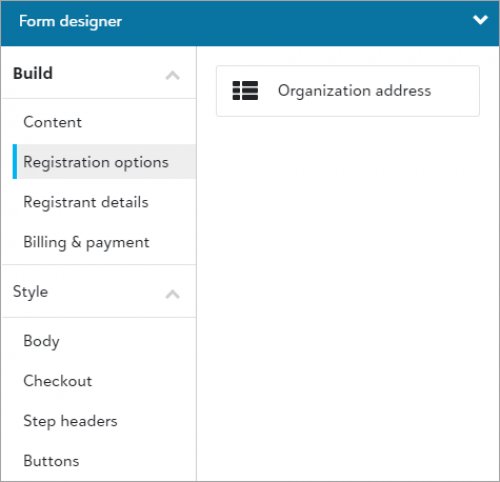 Include organization address fields on registration forms (for those with Online Registration Forms). To better track organizations that register for your events, you can now configure your online registration forms to allow registrants to enter an address on behalf of their organization. To help prevent duplicate organizations, the form uses both the organization's name and address to search for a match on existing constituents. It either updates the existing constituent record or creates a new constituent record for the organization.
From an event record, under Online registration forms, edit an existing form or create a new one. Under Get Started, select Allow organizations to register. Under Form, Form designer select Registration Options under Build and drag Organization address to the form. For more information, see Registration options.
Delete an online registration form (for those with Online Registration Forms). Did you inadvertently copy an existing registration form or create a test form you want to remove? From an event record, under
Online registration forms, you can now select
Delete from the form’s menu to remove it from the list. For more information, see
Online Registration Forms.
Note: You can't delete a registration form that contains processed transactions for registration payments or additional donations.