This week,
Raiser's Edge NXT introduces enhancements for recurring and batch gifts. For those in the US, it also includes an update for
Insight designer.
Automate manual recurring gifts paid by direct debit. To help streamline your recurring giving process, you can now automate manual recurring gifts paid by direct debit. Previously, only manual recurring gifts with a payment method of credit card were eligible for automation.
After you convert a recurring gift, automated payments begin with the next scheduled installment. For more information, see Automate Manual Recurring Gifts.
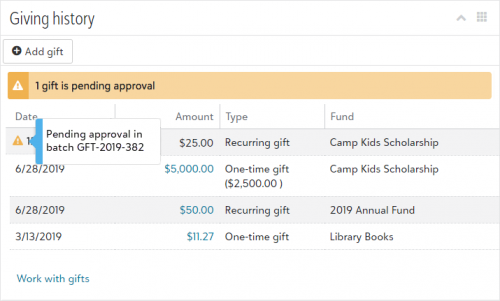 View a constituent's unapproved gifts.
 To provide a more complete view of a constituent's giving, you can now view unapproved gifts under
Giving history on a constituent’s record. An alert appears when the constituent has gifts pending approval in a batch. To view the batch number associated with an unapproved gift, select its alert in the list. For more information, see
Giving History.
Note: Gifts in unapproved batches in the database view do not appear under Giving history.
Export an insight's data from a dashboard (for those in the US). With Insight designer, you can export an insight's data when you edit the insight. Now, you can also export an insight's data from a dashboard under Analysis, Report builder, or Analysis, Reporting.
To export an insight's data from a dashboard, select the download icon on the insight and then select Export to XLSX for Microsoft Excel format or Export to CSV for a comma-separated values file, which you can use in most spreadsheet applications or to import your data.
For more information, see Export an Insight.
Note: Admins! In Control Panel, Security, you can choose which roles can access Analysis, Report builder. For more information, see Report Builder Rights.