This week, Raiser's Edge NXT includes an enhancement for those with online registration forms. For some, it also includes new fields and settings for deceased individuals. 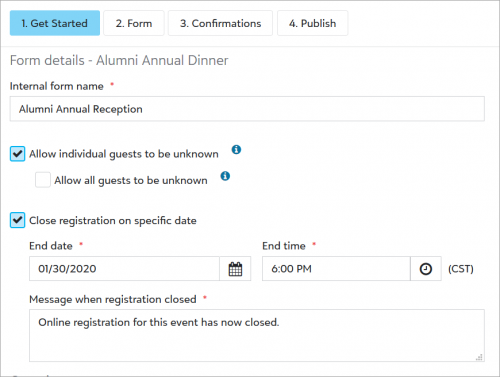 Close an online registration form (for those with online registration forms).
When you no longer want people to register for an event online, you can now close the registration form and display a message in its place. Previously, you removed the form from your website. From an event record, under
Online registration forms, edit an existing form or create a new one. Under
Get Started, select
Close registration on specific date, and then select the date and time and enter a message.
For more information, see
Online Registration Form Get Started.
Update constituent and widowed spouse information for deceased individuals (for some). To help prioritize fundraising efforts and avoid awkward interactions, you can mark a constituent or related contact as deceased when they pass away.
On a constituent record, select Mark as, Deceased to update information for an individual. Under Obituary, you can now attach a file, such as a PDF of the constituent's obituary. You can also change a widow or widower to a constituent and choose their affiliation with your organization and any start and end dates as necessary. For more information, see Deceased Individuals.
Also, to ensure consistency throughout your database, admins can now set rules for how Raiser's Edge NXT should handle constituent records, and the records of their spouses, when you mark a person as deceased. For more information, see Deceased Individuals Settings.
For more information, or to catch up on previous releases, check out the What's New Help and What's Recent Help. Enjoy!