This week,
Raiser's Edge NXT announces that online registration and donation forms are generally available to customers in the United States! Also, to help you track which forms participants use to register online, a new filter and column are now available in event participant lists.
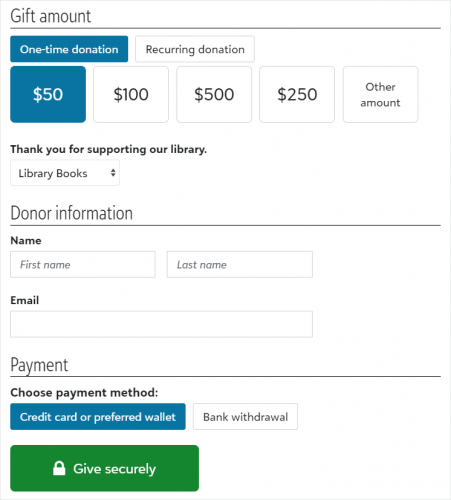 Build and manage donation forms (generally available in the US).
 To help you easily accept and process gifts from your organization's website, you can now use
Raiser’s Edge NXT to create and manage donation forms! From
Tools,
Donation form designer, design and build forms and then use automatically generated code snippets to embed them on your website.
With Donation forms, you can:
-
Quickly create forms with a drag-and-drop designer.
-
Accept recurring gifts and automatically process subsequent payments.
-
Offer credit and debit card, direct debit, and digital wallet payment options.
-
Design thank-you emails with your organization's branding.
-
Track performance and view which websites refer donors to the forms.
-
Associate an appeal with a donation form.
-
Allow donors to designate their gift across multiple funds.
For more information, see Donation Forms.
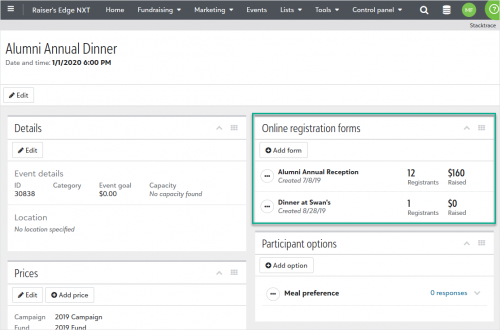 Accept online registrations for events (generally available in the US). Now you can let people register for your one-time single ticket events online through Online Registration Forms. These forms let your constituents sign themselves and others up for an event, enter their contact information, choose to make an additional donation, and pay their registration fees (for paid events). From an event record, under Online registration forms, you can add a new form, edit an existing form, or review stats of the effectiveness of your existing forms. In the Form Designer, you can style your form to mimic the branding of your organization's website. For more information, see Online Registration Forms.
View registration form information in participant lists (for those with online registration forms). To help you easily find participants who registered online, you can now include information about registration forms in participant lists. For example, you may want to confirm online registration forms correctly matched participants to their existing constituent records.
From Events, open an event record and select Work with participants under Participants. From the list, set the filter or select the column.
-
Filter based on online registration — Select Filters, Online registration form, and choose which types of participants and forms to include.
-
View form names — Select Columns and choose Registration form.
Note: Form names are only available for online registration forms in Raiser's Edge NXT and for participants who register after this update.