This week,
Raiser's Edge NXT introduces new payment methods and improvements for
Gifts. Also, you can now automate recurring gifts that have skipped payments in the past. For more of you, the ability to send an automated email series from
Workflow Designer is available.
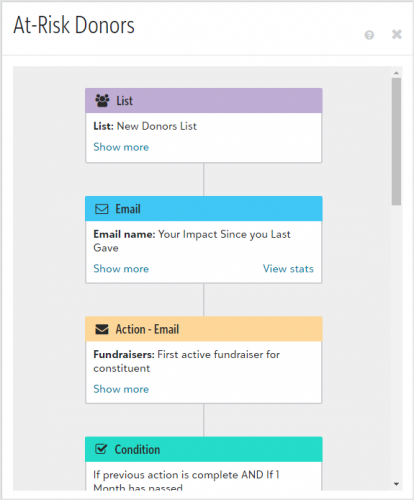 Send an automated email series in Workflow Designer (for more of you)
To easily communicate with your constituents, you can now create a workflow to send an automated series of emails from
Raiser’s Edge NXT. This allows you to have a truly automated workflow, see how many people received your emails in the workflow, and view statistics on each email sent.
From
Marketing,
Email, select
Workflow designer emails, then create an email from a blank layout or from a template. In the Email Designer, under
Set the purpose, select
Use this email for a workflow. Enter the rest of the details then publish your email. Continue to create and publish emails for your workflow, then navigate to
Workflow Designer.
Create a new workflow and add an email as the first step. Select one of the emails you created, and then add an action or condition as the next step.
Tip: When you set conditions, make sure to space emails out over a few days to prevent your constituents from receiving too many emails too quickly.
After you create your workflow and you’re ready to send the first email, activate it. To see how many recipients received your workflow, select the active workflow name in
Workflow Designer.
To see email statistics, select
View workflow from the workflow’s menu, then select
View stats on an email step. For more information, check out
this video or see
Workflows.
Automate recurring gifts with past skipped paymentsYou can now automate recurring gifts that have skipped payments in the past. Previously, manual recurring gifts with skipped payments weren't eligible to be converted.
After you convert a recurring gift, payments are automatically generated based on its payment schedule. For more information, see
Automate Manual Recurring Gifts.
Note: You can't automate a recurring gift if it's scheduled to skip payments today or in the future.
Add gifts paid by PayPal and VenmoTo help you track gifts with payments processed outside of
Raiser's Edge NXT, and to support upcoming changes in online donation forms, you can now add gifts paid by PayPal and Venmo.
When you add a gift from
Fundraising,
Home, or a constituent record, select PayPal or Venmo under
Payment method. You can also save and view any reference number and date your organization uses to track gifts. For more information, see
Payment Information.
Note: PayPal and Venmo payments currently process outside of
Raiser's Edge NXT — use these payment methods for record-keeping purposes only. In the future, donors will be able to process PayPal and Venmo payments through donation forms built with
Donation form designer. These gifts will appear in batches under
Gift management for you to review and approve.
Improvements to Add gift (for some)To save time when you add a gift from
Fundraising,
Home, or a constituent record, we made changes to the way you enter a gift's details. Under
Gift splits, you can now directly enter details into the fields that help your organization track gifts — such as the campaign, fund, and appeal. For more information, see
Gifts.