This week,
Raiser's Edge NXT introduces RSVP options in
Events. Also, a new way to build custom solutions is now available from
Blackbaud Marketplace.
Set RSVP statuses for event participants. To better plan for events, you can now use the new
RSVP status field when you add or edit participants. The new field replaces the
Registration status field and includes this expanded list of options:
-
No response
-
Attending
-
Declined
-
Interested
-
Canceled
-
Waitlisted
-
N/A
Previously in web view, you could track invitations and registrations, but not responses. With this change, participants marked as Registered and Not registered are now Attending and Declined, respectively. For more information, see RSVP Status.
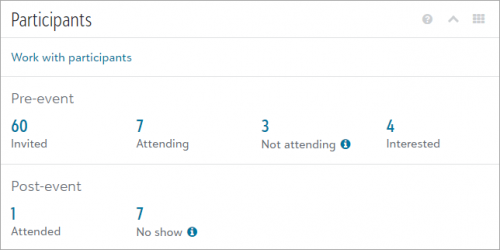
Also, to help you easily compare invitations and responses before an event to the actual turnout afterward, additional totals appear under Participants on an event record. Each total opens a pre-filtered list of participants you can use to follow up, such as to send reminders.
For more information, see Participants.
Build your own solutions. From Blackbaud Marketplace, you can now use the Blackbaud Raiser's Edge NXT certified connector for Microsoft Power Platform™ to create unique solutions with your Raiser's Edge NXT data. You can use the connector to automate processes with Microsoft Power Automate™ and build low-code mobile or web apps with Microsoft Power Apps™.
Interested in learning more? Get started with our initial setup tutorial or attend one of our webinars on September 1st or September 3rd, 2020.