This week, improvements to donation forms and event participant lists are available in
Raiser's Edge NXT. Also, the waved roll out of a new
Email history tile begins.
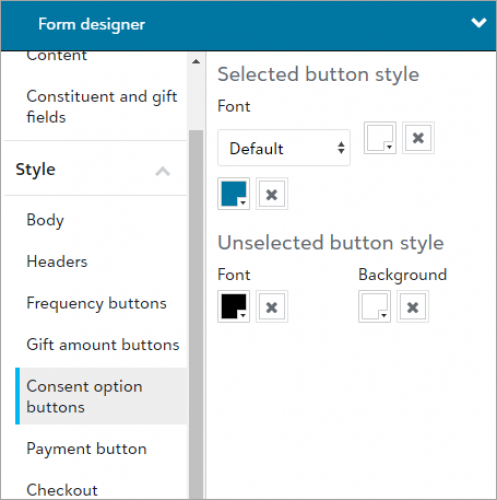 Style consent opt-in and opt-out buttons on donation forms. To add a consistent look and feel to your donation forms, you can now adjust the font size and color on the consent option buttons for the Consent component.
From Tools, Donation form designer, add or edit a donation form. Under Form, select Style, Consent buttons in Form designer and change the font size and color to match your organization's branding style.
For more information, see Donation Forms Style.
View additional payment information in participant lists.
Building on recent improvements to highlight payment information in Events, new and updated columns are now available for you to include in participant lists.
-
Donations — Displays how much each participant donated toward the event.
Note: Donations include payments entered in web view that are larger than the registration fees. They also include gifts added to a participant in database view over the registration fees, or as donations.
-
Revenue — Displays how much each participant paid toward the event, such as donations and registration fees.
-
Registration fees — Now shows how much participants have left to pay towards their fees. Previously, the column displayed how much participants already paid rather than their balances.
To include the columns, open an event record. Under Participants, select Work with participants, and then select Columns  .
.
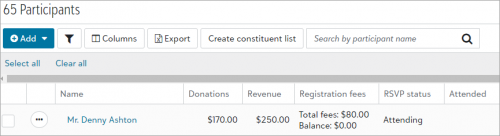
Also, you can now narrow the list based on whether participants paid their fees, such as to send reminders. From the participant list, select Filters  , Fees and payments, and then choose who to include.
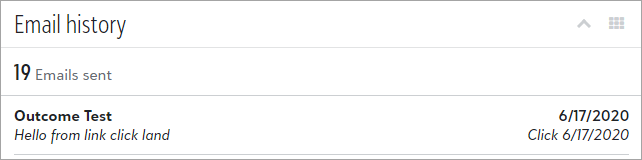 View email history on constituent records (for some of you). To help track how responsive a constituent is to your marketing and fundraising efforts, you can now view messages you send to them from Raiser's Edge NXT on their record under Email history. Previously, you had to open individual messages in Email to confirm which constituents you sent them to.
For more information, see Email History.
Note: Only messages sent from Email and Workflow designer appear under Email history. Other types of messages, such as email confirmations, don’t appear in the list. You can view messages sent since March 30, 2020.
