This week,
Raiser's Edge NXT begins the waved roll out of enhancements to lists. Also, updates to opportunity records are now generally available.
Updates to opportunity records (now generally available). To comply with the latest security standards for software, opportunity records were recently upgraded.
On opportunity records, we removed the timeline and condensed the opportunity’s status history into a flyout. Also, custom display settings you saved — such as moved or collapsed sections — were removed and set back to their defaults. To reset them, simply arrange the information again. Opportunity records save your display settings, so you only need to reset your preferences once. For more information, see Records.
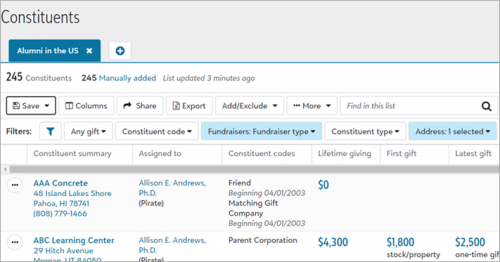 Quickly refine list criteria with the new list filtering experience (for some of you).
 To simplify the experience of refining criteria to apply to your lists, you will now be able to pick filters to narrow down your results, set default filters so that each new list appears with your most used criteria, and quickly clear filters and filter values.
To select filters, select Choose filters  and mark or clear the checkbox next to the criteria of the records to work with then select Apply changes.
Tip: To select filters that always appear at the top of the list when you open a new list, you can set default filters. Select the checkboxes next to the filters you wish to make default and select Set as default filters. If you choose not to set default filters, then commonly used filters based on the list type will appear at the top for you to easily set values for.
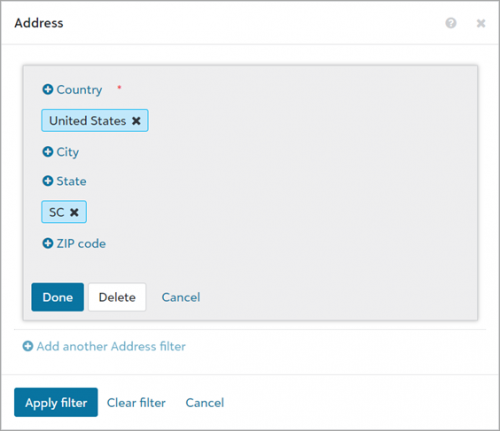 When you apply filters, they appear at the top of the list. Select the filter to choose its values then select Apply filter.
To reset a value for a specific filter, choose the filter at the top of the list and select Clear filter. To reset all filters to their original values, select Clear all values and confirm that you want to remove the values you selected.
Note: No filters will be removed from your list, just the values you applied.
In addition to a simplified filter experience, we’ve also made updates to individual filters to make them more robust:
-
You can now specify the last amount of days to filter by when you apply Gift date and Post date. Previously, you could only select to filter on the last 7, 90, or 365 days.
-
When you filter by Age, you can now narrow constituent records by more options. For example, you can now choose to view records of constituents who are equal to or greater than 18 years old. Previously, you could only filter constituents within a range of years.
-
If you select to filter gifts by Batch number, you now have more options for which gifts to include. Previously, you could only include only gifts that started with or were equal to the number you entered.
For more information, see Lists.
