Upcoming Change To Email History Permissions...





Attention Admins: A Change to Email History Permissions is Coming
On March 23rd, we’re updating who can access email history information on constituent records. The change will give greater control to admins; however, it will require you to update permissions for some users who can currently view the Email history tile.
Wait, Which Tile?
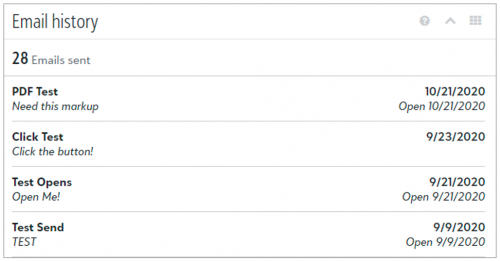
On a constituent’s record, under Email history, users can view all the messages sent to the constituent from Email and Workflow designer since March 30, 2020.
Note: Other types of messages, such as email confirmations, don’t appear in the list.
For each message, users can view the name of the email, when it was sent, and its subject line. Depending on whether the constituent interacted with the message (or didn't receive it), the history might also include an interaction and when it occurred. For detailed information, see Email History.
What’s Changing?
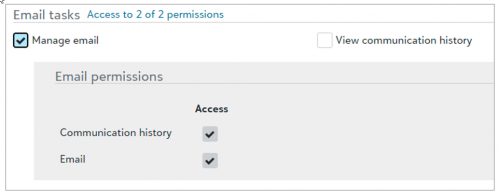
We added a new Communication history permission in Control panel, Security. When we activate it, admins and users with existing rights to manage email will have the permission selected automatically. Users without the permission will no longer see the Email history tile on constituent records.
What Do I Need to Do?
To avoid disruption to users who need to view Email history but do not already have Manage email permissions, we recommend you update their rights before the change. From Control panel, Security, under Roles, Marketing roles, add or edit a role. Under Email tasks, simply select Manage email to automatically include the new permission.
Note: If you don’t want to provide a user with access to create and send email, but you want to assign them rights to view the Email history tile, select View communication history instead of Manage email under Email tasks.
What Happens If I Don’t Do Anything?
If you don’t have time to update your users before the change, don’t worry. You can update their permissions whenever it’s convenient for you. However, users without existing rights to manage email won’t see the Email history tile on constituent records until you include them in a role with the permission. For detailed information about tasks and permissions, see Roles.
On March 23rd, we’re updating who can access email history information on constituent records. The change will give greater control to admins; however, it will require you to update permissions for some users who can currently view the Email history tile.
Wait, Which Tile?
On a constituent’s record, under Email history, users can view all the messages sent to the constituent from Email and Workflow designer since March 30, 2020.
Note: Other types of messages, such as email confirmations, don’t appear in the list.
For each message, users can view the name of the email, when it was sent, and its subject line. Depending on whether the constituent interacted with the message (or didn't receive it), the history might also include an interaction and when it occurred. For detailed information, see Email History.

What’s Changing?
We added a new Communication history permission in Control panel, Security. When we activate it, admins and users with existing rights to manage email will have the permission selected automatically. Users without the permission will no longer see the Email history tile on constituent records.

What Do I Need to Do?
To avoid disruption to users who need to view Email history but do not already have Manage email permissions, we recommend you update their rights before the change. From Control panel, Security, under Roles, Marketing roles, add or edit a role. Under Email tasks, simply select Manage email to automatically include the new permission.
Note: If you don’t want to provide a user with access to create and send email, but you want to assign them rights to view the Email history tile, select View communication history instead of Manage email under Email tasks.
What Happens If I Don’t Do Anything?
If you don’t have time to update your users before the change, don’t worry. You can update their permissions whenever it’s convenient for you. However, users without existing rights to manage email won’t see the Email history tile on constituent records until you include them in a role with the permission. For detailed information about tasks and permissions, see Roles.
2
Categories
- All Categories
- New YourCause Community TEST
- New SKY Community TEST
- New Grantmaking TEST Community
- New Altru Test Community
- New bbcon Community - TEST
- 12 Blackbaud Agents for Good™
- New Raiser's Edge NXT Community
- 7 Blackbaud Community Help
- 218 bbcon®
- 1.4K Blackbaud Altru®
- 409 Blackbaud Award Management™ and Blackbaud Stewardship Management™
- 1.2K Blackbaud CRM™ and Blackbaud Internet Solutions™
- 16 donorCentrics®
- 361 Blackbaud eTapestry®
- 2.7K Blackbaud Financial Edge NXT®
- 680 Blackbaud Grantmaking™
- 598 Blackbaud Education Management Solutions for Higher Education
- 3.3K Blackbaud Education Management Solutions for K-12 Schools
- 952 Blackbaud Luminate Online® and Blackbaud TeamRaiser®
- 85 JustGiving® from Blackbaud®
- 7K Blackbaud Raiser's Edge NXT®
- 3.9K SKY Developer
- 257 ResearchPoint™
- 123 Blackbaud Tuition Management™
- 165 Organizational Best Practices
- 247 Member Lounge (Just for Fun)
- 40 Blackbaud Community Challenges
- 37 PowerUp Challenges
- 3 (Closed) PowerUp Challenge: Grid View Batch
- 3 (Closed) PowerUp Challenge: Chat for Blackbaud AI
- 3 (Closed) PowerUp Challenge: Data Health
- 3 (Closed) Raiser's Edge NXT PowerUp Challenge: Product Update Briefing
- 3 (Closed) Raiser's Edge NXT PowerUp Challenge: Standard Reports+
- 3 (Closed) Raiser's Edge NXT PowerUp Challenge: Email Marketing
- 3 (Closed) Raiser's Edge NXT PowerUp Challenge: Gift Management
- 4 (Closed) Raiser's Edge NXT PowerUp Challenge: Event Management
- 3 (Closed) Raiser's Edge NXT PowerUp Challenge: Home Page
- 4 (Closed) Raiser's Edge NXT PowerUp Challenge: Standard Reports
- 4 (Closed) Raiser's Edge NXT PowerUp Challenge: Query
- 822 Community News
- 3.1K Jobs Board
- 57 Blackbaud SKY® Reporting Announcements
- 47 Blackbaud CRM Higher Ed Product Advisory Group (HE PAG)
- 19 Blackbaud CRM Product Advisory Group (BBCRM PAG)