This week,
Raiser's Edge NXT announces enhancements for events and donation forms.
View event attendance from a constituent's timeline.
To help you better understand a person’s involvement with your organization, the timeline on their constituent record now indicates their RSVP status for events. Under Timeline, an empty dot appears for an event when the person’s RSVP status is Attending and a filled in dot appears when their status is Attended. When a person’s RSVP status is Invited, Not attending, or Interested, a dot doesn’t appear for the event on their timeline. Previously, the timeline always showed filled in dots when a person was added as an event participant.
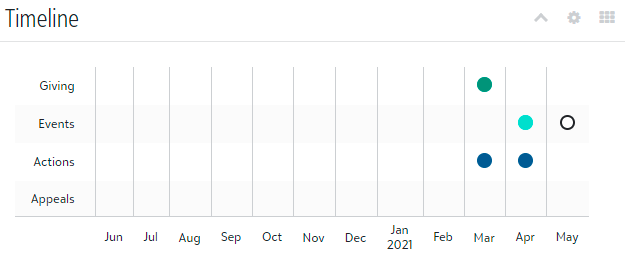
Note: To view the name and date for an event, select the dot. You can also select Work with full timeline to open a larger version of the timeline.
Unlink a payment for an event participant.
To remove the link between a payment and an event participant — such as if you inadvertently apply a payment to the wrong person — you can now unlink the payment from the participant’s record. When you unlink a payment, you only remove the association between the payment and the event — you don’t delete the payment or the gift record that’s associated with the payment.
From Events, open an event record. Under Participants, select Work with participants and select the participant’s name from the list. On the participant's record, under Fees and payments, Payment, select Unlink payment from the menu  of the payment to remove.
Tip: After you unlink a payment, check whether the participant has outstanding fees. If so, add another payment in web view or link to a gift from the participant's record in database view.
Note: Admins! To unlink gifts, users must have rights to manage participants, constituents, and gifts. For more information, see Events Security.
Redirect donors to a web page on your organization's website (for those with donation forms).
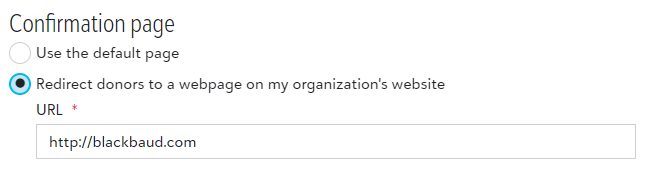
Now, choose the confirmation page your donors go to after they submit their online gifts. In Donation form designer, you can redirect donors to a web page designed by your organization that may include calls to action or continue to use the default page.
From Tools, Donation form designer, create or edit a donation form. Under Confirmations, select Redirect donors to a webpage on my organization’s website and enter the URL.
Note: Transaction details are only available on the default confirmation page.