This week,
Raiser's Edge NXT introduces enhancements for gifts and the
JustGiving integration.
Refund gifts paid by credit card (for those who use Blackbaud Merchant Services)
To streamline how you manage refund requests from donors, you can now refund a gift in the web view and it automatically adjusts to $0.00. Previously, you needed to issue a refund from the Blackbaud Merchant Services Web Portal and manually adjust the gift in the database view.
You can refund a gift if it's:
From the top of the gift record, Refund appears when it's eligible to refunded. To refund the full amount of the gift, select Refund. Under Notes, enter additional details to track the reason for the refund, then select Refund.

The gift adjusts to $0.00 and the full amount returns to the donor's original payment method. Notes that you enter display on the adjustment record in the database view.
Note: You can't refund a gift that was previously fully or partially refunded.
Send receipts for gifts-in-kind
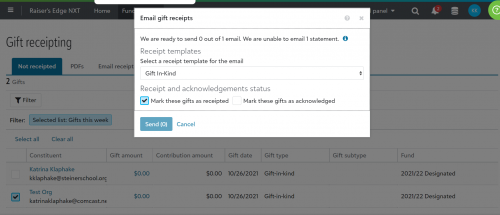
You can now send email or PDF receipts for gifts-in-kind. When you select a gift-in-kind to receipt, the Transactions details merge field automatically displays the gift type of Gift-in-kind, and includes the Comment field with the value you entered on the gift record — typically a short description of the item(s) donated.
With gifts-in-kind, you might not want to include a specific amount or value associated with the gift on the receipt. Therefore, the following the following fields are removed from the Transaction details merge field for gifts-in-kind:

Tip: Depending on your organization's processes, you might want to mention the value of gifts-in-kind on the receipt using specific contextual wording. To do this, create a separate receipt template for gifts-in-kind, and include the Gift amount merge field in the body content.
For more information, see Receipt Templates Merge Fields.
Enhancements to the JustGiving integration
You can now set additional default settings for new donors and fundraisers that are created by the JustGiving integration. From Control Panel, Settings, select JustGiving integration, Default settings, Defaults for constituents:
-
Under Primary name formats, you can now set an Addressee or Salutation format to apply to the donor's or fundraiser's record.
-
Under Consent, you can now set a default Email consent category for donors and fundraisers who opt in to communications in JustGiving.

If a donor wrote a message to the fundraiser in JustGiving, the message now automatically displays on the gift record in Raiser's Edge NXT under Custom fields, JustGiving Donor Message.

Data clean up was improved for donor and fundraiser names and addresses:
-
Double spaces are replaced with single spaces
-
Spaces at the beginning or end of fields are removed
-
First letters are capitalized
Note: Words that follow a hyphen are not capitalized
For more information, see JustGiving Integration.