Here are the latest changes in Blackbaud Raiser's Edge NXT® for February 27th, 2024.
- Review gifts received over time (for those outside the US)
- Build a qualified prospect pool (for some of you in the US)
- Add pledge gifts in web view
- Add a membership (for some of you)
- View membership records (for some of you)
- Patch 34
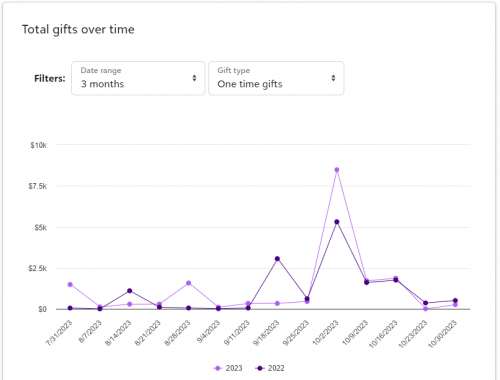
Review gifts received over time (for those outside the US)From Blackbaud Apps, Online Giving, under Total gifts over time, you can now see the total gifts received from all donation forms. You can filter by date range and gift type. For more information, see
Performance.
 Build a qualified prospect pool (for some of you in the US)Tip:
To learn more about purchasing
Prospect Insights Pro, contact your
account executive.
Use insights from Prospect Insights Pro to build a qualified prospect pool. From Fundraising, Prospect insights, under Build a qualified prospect pool, view suggested candidates to qualify and potential giving increases.
Candidates to qualify include Top prospects (formerly known as Untapped candidates), who are the most promising candidates for major gift fundraising in the near term, and Emerging prospects – those with the potential to become major gift prospects in the long term.
Add pledge gifts in web viewNow, you can add a pledge when you add a gift from
Home,
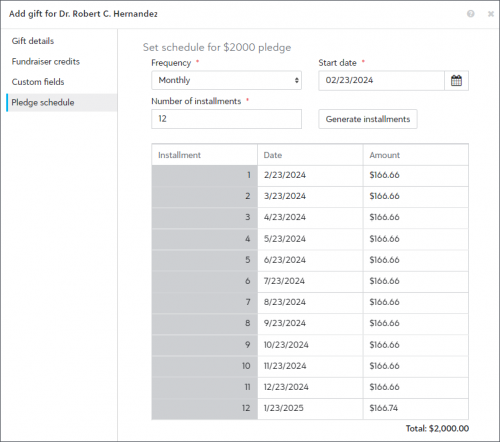
Gift management, and a constituent record in the web view. Previously, you could only add a pledge in the database view. When you add a gift, select
Pledge under
Gift type. By default, the installment schedule is set to one payment. You can change the schedule when you select
Pledge Schedule. For more information, see
Pledges.
 Add a membership (for some of you)
Now, you can add a membership, with basic membership details, from a constituent's record in the web view. Previously, you could only add a membership in the database view. To add a membership, on a constituent's record, under
Membership, select
Add membership. For more information, see
Add membership.
View membership records (for some of you)Now, you can view the membership details and membership history for each membership in web view. Previously, you could only view membership history records in database view. To view a membership record, select it from a constituent's record under
Membership. For more information, see Membership Records and
View membership details.
Patch 34Patch 34 begins releasing in February 2024 and will encrypt several fields, including birth date, in database view. For more information on how this may affect your queries, see this
Knowledgebase article.