Here are the latest changes in Blackbaud Raiser's Edge NXT for September 17th, 2024.
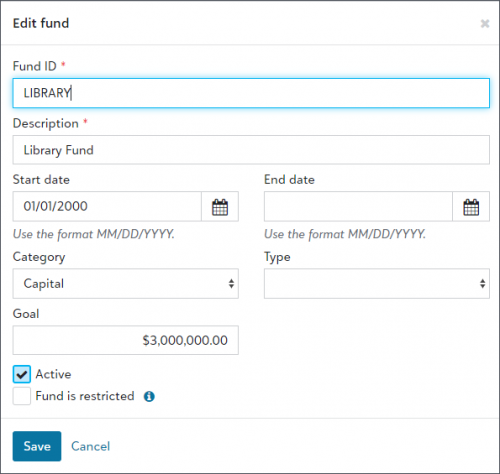
- Add and edit funds in the web view
- Pass designation name through Optimized Donation Forms (for those in the US)
- View more important details on the constituent record
- Mark constituent as having no valid address in web view
- Enhancements to merge duplicate records
- Enhancements to the help experience
Add and edit funds in the web viewTo help you manage funds in the web view, now you can add and edit them from
Fundraising,
Funds. Previously, you could only do this in the database view. For more information, see
Funds.
 Pass designation name through Optimized Donation Forms (for those in the US)
If you have too many designations to add to a form, now you can pass a designation's name through an Optimized Donation Form. Add the
desname and
desid parameters at the end of the hyperlink's URL. To learn how to pass the designation name and ID to an Optimized Form in Online Giving,
review parameters.
View more important details on the constituent recordTo help track biographical information for constituents, you can now view more important details under
Constituent Summary on the constituent record. Previously, these fields were only available on the
Bio 2 and
Org 2 tabs of the constituent record in database view.
Under
Personal info or
Organization info, you can now view the following fields:
- Birthplace
- Religion
- Ethnicity
- Income
- Parent corporation
- Target
- Number of subsidiaries
- Number of employees
- Industry
For more information, see Personal or Organization Information.
Mark constituent as having no valid address in web viewTo track who to exclude from mailings and reports, you can now indicate when constituents have no valid address on record in web view. Previously, you could only mark constituents as having no valid address in database view.
On the record of the constituent, select Mark as, Has no valid address.
For more information, see Addresses and Constituent Statuses.
Enhancements to merge duplicate records
To help improve the accuracy of your data, the following constituent biographical details and statuses are now automatically identified as possible duplicates for you to merge to a target record:
- Birthplace
- Religion
- Ethnicity
- Income
- Parent corporation
- Target
- Number of subsidiaries
- Number of employees
- Industry
- Receipt type
Note: When merging, the target record value will remain. - Has no valid address
Note: When merging, if either the source or target record has a valid address, Has no valid address will be disabled on the target record. - Requests no email
Note: When merging, if either the source or target record requests no email, Requests no email will be enabled on the target record.
You can review matches and merge records under Possible duplicates from Tools, Data health. For more information, see Duplicate Management.
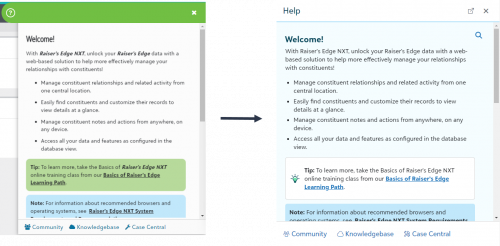
Enhancements to the help experienceTo improve how you interact with and consume help resources, we’ve made accessibility enhancements and updated the look and feel of our help:
-
Help access from the omnibar — You can now select to open help from the omnibar. Previously, you opened help from the green help invoker.
-
Help window size and style – While help still functions the same, it is now larger to make text easier to view. Also, we’ve updated the color and style to provide a more consistent experience with our solution.
- Tip style – Updated look of tips makes additional help content easier to scan.