Simplify Tasks Using Favorites and Shortcuts
Kelsey Huijgen
Blackbaud Employee
Ever find yourself scratching your head when it comes time to promote your students or generate transactions, wondering how exactly you did it last year? Or what about navigating to a report you use daily - ever wish you could get to it with one click instead of five? Favorites and Shortcuts could be your answer!
Favorites and Shortcuts allow you to create links to items you use most often or want to access quickly. Favorites come in handy for annual processes like scheduling and billing or any other tasks where you say to yourself "I know I did this last year but I can't remember how I did it". You can create folders in your Favorites for Scheduling or Reconciliation or any other process, then just save the parameters you use within that folder so you have a quick reference for next time.
To add a page (such as the Attendance Reports page or the Student Records page), record or parameter as a Favorite, simply navigate to the page or open the record or parameter then select Add to Favorites from the Favorites menu.
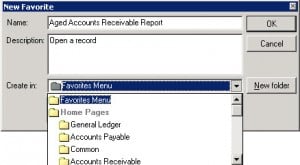
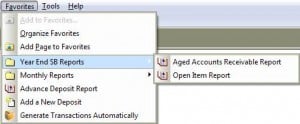
You can choose where you would like to access this Favorite from in the Create in drop down menu. If you choose to show it in the Favorites menu, then you can access it from the Favorites menu on the navigation bar:
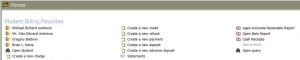
If you would prefer to see it on your home page, scroll to the Home Pages section in the drop down menu and choose which module's home page you'd like to see it on. You will then see a link for it on that home page:
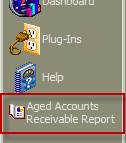
If you prefer even fewer clicks to get to your page or parameter, then you can choose to add it on the Navigation bar so it's a one-click jump. Just scroll down and select the Navigation bar section in the Create in drop down menu. The shortcut will look like this:
You can also add tasks for functions like Add a new student or Open a deposit as shortcuts on your home page. For more information about how to do that along with additional information about Favorites and folders, check out BB732586.
Favorites and Shortcuts allow you to create links to items you use most often or want to access quickly. Favorites come in handy for annual processes like scheduling and billing or any other tasks where you say to yourself "I know I did this last year but I can't remember how I did it". You can create folders in your Favorites for Scheduling or Reconciliation or any other process, then just save the parameters you use within that folder so you have a quick reference for next time.
To add a page (such as the Attendance Reports page or the Student Records page), record or parameter as a Favorite, simply navigate to the page or open the record or parameter then select Add to Favorites from the Favorites menu.
You can choose where you would like to access this Favorite from in the Create in drop down menu. If you choose to show it in the Favorites menu, then you can access it from the Favorites menu on the navigation bar:
If you would prefer to see it on your home page, scroll to the Home Pages section in the drop down menu and choose which module's home page you'd like to see it on. You will then see a link for it on that home page:
If you prefer even fewer clicks to get to your page or parameter, then you can choose to add it on the Navigation bar so it's a one-click jump. Just scroll down and select the Navigation bar section in the Create in drop down menu. The shortcut will look like this:
You can also add tasks for functions like Add a new student or Open a deposit as shortcuts on your home page. For more information about how to do that along with additional information about Favorites and folders, check out BB732586. 0
Categories
- All Categories
- 6 Blackbaud Community Help
- 211 bbcon®
- 1.4K Blackbaud Altru®
- 402 Blackbaud Award Management™ and Blackbaud Stewardship Management™
- 1.1K Blackbaud CRM™ and Blackbaud Internet Solutions™
- 15 donorCentrics®
- 360 Blackbaud eTapestry®
- 2.6K Blackbaud Financial Edge NXT®
- 656 Blackbaud Grantmaking™
- 577 Blackbaud Education Management Solutions for Higher Education
- 3.2K Blackbaud Education Management Solutions for K-12 Schools
- 941 Blackbaud Luminate Online® and Blackbaud TeamRaiser®
- 84 JustGiving® from Blackbaud®
- 6.7K Blackbaud Raiser's Edge NXT®
- 3.7K SKY Developer
- 248 ResearchPoint™
- 120 Blackbaud Tuition Management™
- 165 Organizational Best Practices
- 240 Member Lounge (Just for Fun)
- 34 Blackbaud Community Challenges
- 37 PowerUp Challenges
- 3 (Open) PowerUp Challenge: Grid View Batch
- 3 (Closed) PowerUp Challenge: Chat for Blackbaud AI
- 3 (Closed) PowerUp Challenge: Data Health
- 3 (Closed) Raiser's Edge NXT PowerUp Challenge: Product Update Briefing
- 3 (Closed) Raiser's Edge NXT PowerUp Challenge: Standard Reports+
- 3 (Closed) Raiser's Edge NXT PowerUp Challenge: Email Marketing
- 3 (Closed) Raiser's Edge NXT PowerUp Challenge: Gift Management
- 4 (Closed) Raiser's Edge NXT PowerUp Challenge: Event Management
- 3 (Closed) Raiser's Edge NXT PowerUp Challenge: Home Page
- 4 (Closed) Raiser's Edge NXT PowerUp Challenge: Standard Reports
- 4 (Closed) Raiser's Edge NXT PowerUp Challenge: Query
- 796 Community News
- 3K Jobs Board
- 54 Blackbaud SKY® Reporting Announcements
- 47 Blackbaud CRM Higher Ed Product Advisory Group (HE PAG)
- 19 Blackbaud CRM Product Advisory Group (BBCRM PAG)