Close Out Another Year with the End of Year Processing Wizard
With one academic year coming to a close, it's time to promote your students that will be returning next year and graduate the ones who are moving on. You can do this using the End of Year Processing wizard in Registrar's Office. Here are some answers to questions we commonly receive regarding this process.
How do you run the End of Year Processing wizard?
You can find this wizard in Registrar's Office under Records, Students or by going to Administration, Status Wizards.
Can I use the same parameter I used last year?
Yes! Just be sure that you update the academic year on the General tab to the current academic year. This is very important because if the wrong year is selected, students will end up having the wrong grade level listed at the end.
How does the End of Year Processing wizard know which grade level to use when promoting students?
The grade level that students are promoted to is based off of the Student Progression Entry on the student record. These Student Progression Entries are created when running the Mark for Reenrollment wizard, so the Mark for Reenrollment wizard must be run prior to running End of Year Processing.
How do I graduate my students?
You can use the options on the Additional Information tab of this wizard to update your students who are graduating from your school. Hop on over to How to Graduate Students in The Education Edge for more information.
How do you run the End of Year Processing wizard?
You can find this wizard in Registrar's Office under Records, Students or by going to Administration, Status Wizards.
Can I use the same parameter I used last year?
Yes! Just be sure that you update the academic year on the General tab to the current academic year. This is very important because if the wrong year is selected, students will end up having the wrong grade level listed at the end.
How does the End of Year Processing wizard know which grade level to use when promoting students?
The grade level that students are promoted to is based off of the Student Progression Entry on the student record. These Student Progression Entries are created when running the Mark for Reenrollment wizard, so the Mark for Reenrollment wizard must be run prior to running End of Year Processing.
How do I graduate my students?
You can use the options on the Additional Information tab of this wizard to update your students who are graduating from your school. Hop on over to How to Graduate Students in The Education Edge for more information.
Should I run the End of Year Processing wizard for all students at once?
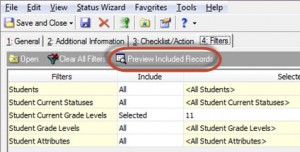
You can, but I would recommend running the End of Year Processing wizard on groups of students, starting with the highest grade level and working your way down. This will speed up the time it takes to process and let you tailor the options you're selecting in the wizard since they sometimes vary by grade. Be sure to use the Preview Included Records button on the Filters tab if you're selecting specific students. It will show you the list of students that will be included when running the wizard so you can verify you have the right group.
0
Categories
- All Categories
- 6 Blackbaud Community Help
- 213 bbcon®
- 1.4K Blackbaud Altru®
- 403 Blackbaud Award Management™ and Blackbaud Stewardship Management™
- 1.1K Blackbaud CRM™ and Blackbaud Internet Solutions™
- 15 donorCentrics®
- 360 Blackbaud eTapestry®
- 2.6K Blackbaud Financial Edge NXT®
- 656 Blackbaud Grantmaking™
- 577 Blackbaud Education Management Solutions for Higher Education
- 3.2K Blackbaud Education Management Solutions for K-12 Schools
- 939 Blackbaud Luminate Online® and Blackbaud TeamRaiser®
- 84 JustGiving® from Blackbaud®
- 6.6K Blackbaud Raiser's Edge NXT®
- 3.7K SKY Developer
- 248 ResearchPoint™
- 119 Blackbaud Tuition Management™
- 165 Organizational Best Practices
- 241 Member Lounge (Just for Fun)
- 34 Blackbaud Community Challenges
- 37 PowerUp Challenges
- 3 (Open) PowerUp Challenge: Grid View Batch
- 3 (Closed) PowerUp Challenge: Chat for Blackbaud AI
- 3 (Closed) PowerUp Challenge: Data Health
- 3 (Closed) Raiser's Edge NXT PowerUp Challenge: Product Update Briefing
- 3 (Closed) Raiser's Edge NXT PowerUp Challenge: Standard Reports+
- 3 (Closed) Raiser's Edge NXT PowerUp Challenge: Email Marketing
- 3 (Closed) Raiser's Edge NXT PowerUp Challenge: Gift Management
- 4 (Closed) Raiser's Edge NXT PowerUp Challenge: Event Management
- 3 (Closed) Raiser's Edge NXT PowerUp Challenge: Home Page
- 4 (Closed) Raiser's Edge NXT PowerUp Challenge: Standard Reports
- 4 (Closed) Raiser's Edge NXT PowerUp Challenge: Query
- 794 Community News
- 2.9K Jobs Board
- 54 Blackbaud SKY® Reporting Announcements
- 47 Blackbaud CRM Higher Ed Product Advisory Group (HE PAG)
- 19 Blackbaud CRM Product Advisory Group (BBCRM PAG)