Billing for Next Year? All You Need is a Progression Entry!
Are you trying to generate charges for your students for the upcoming year and finding yourself bugging your registrar to move students up to the next grade level so you can bill them accurately? Or maybe you are on the other end, feeling like your billing office is chomping at the bit for you to run the End of Year processing wizard before you're ready to do so.
The assumption that students need to actually be moved to the next grade level before any grade-based billing can be done, or for statements to be run and sent out is a common misconception. The Beatles said that "all you need is love", which is fine and dandy for them to say, but they never had to work in Registrar's Office or Student Billing at the beginning of the new fiscal year. For those of you who do, just know that all you need is a progression entry!
That's right folks! You can generate charges and bill your parents without moving your kids up to the next grade level. All that needs to be done is to give your students a progression entry for the upcoming year. This can be done manually one by one on student records by clicking the student progression icon that looks like a stick figure walking up a staircase (or a broken escalator if you're a glass half empty kind of person):
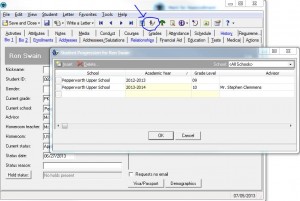
This can also be done using the Mark for Reenrollment wizard. This is the better process for updating lots of students all at once.
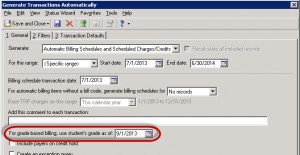
If your students have an SPE for the upcoming year, all you need to do is indicate that's the grade level you want to use when generating transactions or running statements. When generating transactions, look for the grade-based billing option on the General tab:
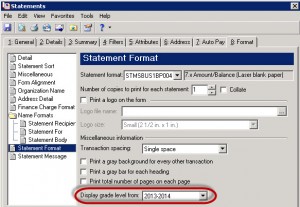
When creating statements, look for the Display grade level from option under Statement Format on the Format tab:
With either option, be sure you're selecting a specific date that's within the upcoming academic year, as defined in Configuration in Registrar's Office. The academic year usually has different dates from your fiscal year. You can check with your registrar to see exactly what those dates may be or you can choose a date you know for sure will be within the academic year, such as 10/15/2013.
The assumption that students need to actually be moved to the next grade level before any grade-based billing can be done, or for statements to be run and sent out is a common misconception. The Beatles said that "all you need is love", which is fine and dandy for them to say, but they never had to work in Registrar's Office or Student Billing at the beginning of the new fiscal year. For those of you who do, just know that all you need is a progression entry!
That's right folks! You can generate charges and bill your parents without moving your kids up to the next grade level. All that needs to be done is to give your students a progression entry for the upcoming year. This can be done manually one by one on student records by clicking the student progression icon that looks like a stick figure walking up a staircase (or a broken escalator if you're a glass half empty kind of person):

This can also be done using the Mark for Reenrollment wizard. This is the better process for updating lots of students all at once.
If your students have an SPE for the upcoming year, all you need to do is indicate that's the grade level you want to use when generating transactions or running statements. When generating transactions, look for the grade-based billing option on the General tab:

When creating statements, look for the Display grade level from option under Statement Format on the Format tab:

With either option, be sure you're selecting a specific date that's within the upcoming academic year, as defined in Configuration in Registrar's Office. The academic year usually has different dates from your fiscal year. You can check with your registrar to see exactly what those dates may be or you can choose a date you know for sure will be within the academic year, such as 10/15/2013.
0
Categories
- All Categories
- 6 Blackbaud Community Help
- 211 bbcon®
- 1.4K Blackbaud Altru®
- 402 Blackbaud Award Management™ and Blackbaud Stewardship Management™
- 1.1K Blackbaud CRM™ and Blackbaud Internet Solutions™
- 15 donorCentrics®
- 360 Blackbaud eTapestry®
- 2.6K Blackbaud Financial Edge NXT®
- 655 Blackbaud Grantmaking™
- 577 Blackbaud Education Management Solutions for Higher Education
- 3.2K Blackbaud Education Management Solutions for K-12 Schools
- 940 Blackbaud Luminate Online® and Blackbaud TeamRaiser®
- 84 JustGiving® from Blackbaud®
- 6.7K Blackbaud Raiser's Edge NXT®
- 3.7K SKY Developer
- 248 ResearchPoint™
- 119 Blackbaud Tuition Management™
- 165 Organizational Best Practices
- 240 Member Lounge (Just for Fun)
- 34 Blackbaud Community Challenges
- 37 PowerUp Challenges
- 3 (Open) PowerUp Challenge: Grid View Batch
- 3 (Closed) PowerUp Challenge: Chat for Blackbaud AI
- 3 (Closed) PowerUp Challenge: Data Health
- 3 (Closed) Raiser's Edge NXT PowerUp Challenge: Product Update Briefing
- 3 (Closed) Raiser's Edge NXT PowerUp Challenge: Standard Reports+
- 3 (Closed) Raiser's Edge NXT PowerUp Challenge: Email Marketing
- 3 (Closed) Raiser's Edge NXT PowerUp Challenge: Gift Management
- 4 (Closed) Raiser's Edge NXT PowerUp Challenge: Event Management
- 3 (Closed) Raiser's Edge NXT PowerUp Challenge: Home Page
- 4 (Closed) Raiser's Edge NXT PowerUp Challenge: Standard Reports
- 4 (Closed) Raiser's Edge NXT PowerUp Challenge: Query
- 796 Community News
- 3K Jobs Board
- 54 Blackbaud SKY® Reporting Announcements
- 47 Blackbaud CRM Higher Ed Product Advisory Group (HE PAG)
- 19 Blackbaud CRM Product Advisory Group (BBCRM PAG)