Lunch Options Available in Scheduling

Katie Burckhalter
Blackbaud Employee




Part of scheduling your students for the upcoming academic year is scheduling lunch. Depending on your school’s needs, The Education Edge has a lunch option for you.
When deciding which option is best for you when scheduling lunch, there are a few questions you should ask yourself:
So what if you don’t use a rotating pattern? Or you’re not taking attendance?
Then you can use the Lunch tab on your timetable to schedule lunch.
There are two options when setting up lunch on your timetable: using entire periods or using parts of periods. It is important to make the correct selection here before you proceed because the "Lunches will meet:" option becomes locked once information is entered in the grid below. The grid cannot be changed or deleted once a student is enrolled in a class associated with the timetable.
So which option should you choose?
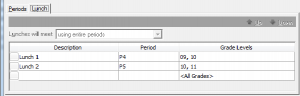
The "using entire periods" option is right for you if lunch fills a full period. For example, 9th and 10th graders are not scheduled for any classes during Period 4. They only go to lunch during this period. Then 11th and 12th graders may go to lunch during Period 5 after going to a class in Period 4.
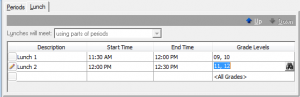
If lunches do not follow the same start and end times as periods then you will select the “using parts of periods” option. If Period 4 is 11:30-12:30 and students go to lunch from 11:30-12:00 or 12:00-12:30, this is the option for you. When students are not at lunch, they go to their Period 4 class.
For more information on scheduling lunch, check out these Knowledgebase solutions:
How to schedule lunch periods for students in The Education Edge
How to schedule a common period or mandatory course
When deciding which option is best for you when scheduling lunch, there are a few questions you should ask yourself:
- Do I use a rotating pattern where students do not have the same period free for lunch each day?
- Do I need to take attendance for lunch?
3. Do all of my students go to lunch at the same time?
If all of your students will be scheduled for lunch at the same time, you can create a Lunch period on your timetable. In your pattern, you can set up all of your blocks so they do not use the Lunch period. If you also want to take attendance during this common Lunch period, you’ll create a Lunch course and schedule a class that meets during the Lunch period each day. Then enroll all students in the class.So what if you don’t use a rotating pattern? Or you’re not taking attendance?
Then you can use the Lunch tab on your timetable to schedule lunch.
There are two options when setting up lunch on your timetable: using entire periods or using parts of periods. It is important to make the correct selection here before you proceed because the "Lunches will meet:" option becomes locked once information is entered in the grid below. The grid cannot be changed or deleted once a student is enrolled in a class associated with the timetable.
So which option should you choose?
The "using entire periods" option is right for you if lunch fills a full period. For example, 9th and 10th graders are not scheduled for any classes during Period 4. They only go to lunch during this period. Then 11th and 12th graders may go to lunch during Period 5 after going to a class in Period 4.

If lunches do not follow the same start and end times as periods then you will select the “using parts of periods” option. If Period 4 is 11:30-12:30 and students go to lunch from 11:30-12:00 or 12:00-12:30, this is the option for you. When students are not at lunch, they go to their Period 4 class.

For more information on scheduling lunch, check out these Knowledgebase solutions:
How to schedule lunch periods for students in The Education Edge
How to schedule a common period or mandatory course
1
Categories
- All Categories
- New K-12 Community Home (TEST)
- New Higher Education Home Page (Test)
- New Impact Edge Community TEST
- New YourCause Community TEST
- New SKY Community TEST
- New Grantmaking TEST Community
- New Altru Test Community
- New bbcon Community - TEST
- 12 Blackbaud Agents for Good™
- New Raiser's Edge NXT Community
- 8 Blackbaud Community Help
- 222 bbcon®
- 1.4K Blackbaud Altru®
- 411 Blackbaud Award Management™ and Blackbaud Stewardship Management™
- 1.2K Blackbaud CRM™ and Blackbaud Internet Solutions™
- 16 donorCentrics®
- 361 Blackbaud eTapestry®
- 2.7K Blackbaud Financial Edge NXT®
- 688 Blackbaud Grantmaking™
- 604 Blackbaud Education Management Solutions for Higher Education
- 3.3K Blackbaud Education Management Solutions for K-12 Schools
- 954 Blackbaud Luminate Online® and Blackbaud TeamRaiser®
- 85 JustGiving® from Blackbaud®
- 7.1K Blackbaud Raiser's Edge NXT®
- 4K SKY Developer
- 258 ResearchPoint™
- 123 Blackbaud Tuition Management™
- 165 Organizational Best Practices
- 249 Member Lounge (Just for Fun)
- 40 Blackbaud Community Challenges
- 37 PowerUp Challenges
- 3 (Closed) PowerUp Challenge: Grid View Batch
- 3 (Closed) PowerUp Challenge: Chat for Blackbaud AI
- 3 (Closed) PowerUp Challenge: Data Health
- 3 (Closed) Raiser's Edge NXT PowerUp Challenge: Product Update Briefing
- 3 (Closed) Raiser's Edge NXT PowerUp Challenge: Standard Reports+
- 3 (Closed) Raiser's Edge NXT PowerUp Challenge: Email Marketing
- 3 (Closed) Raiser's Edge NXT PowerUp Challenge: Gift Management
- 4 (Closed) Raiser's Edge NXT PowerUp Challenge: Event Management
- 3 (Closed) Raiser's Edge NXT PowerUp Challenge: Home Page
- 4 (Closed) Raiser's Edge NXT PowerUp Challenge: Standard Reports
- 4 (Closed) Raiser's Edge NXT PowerUp Challenge: Query
- 829 Community News
- 3.1K Jobs Board
- 57 Blackbaud SKY® Reporting Announcements
- 47 Blackbaud CRM Higher Ed Product Advisory Group (HE PAG)
- 19 Blackbaud CRM Product Advisory Group (BBCRM PAG)