How to use Advance Deposits


Advance deposits give parents the opportunity to send in a payment to reserve their child’s place for the next school year. Once the advance deposit is paid, a credit generates in the next academic year toward tuition charges.
Advance deposits can be created two ways: as standalone charge waiting for a payment to be applied at a later date or created when a payment is added to the deposit. The most common way that advance deposits are created is with a payment.
A deposit will need to be created for the payment. You can access a new deposit from Records by selecting add a new deposit. On the payments tab of the deposit, select add a new payment.
Once the payment information is created, at the bottom, mark the box to create advance deposits for this payment. Select your current advance deposit and the student’s name will appear.
If there are multiple students in a family that need to have advance deposit created from the payment, a line will appear for each student provided the payment is from the payer of those students.
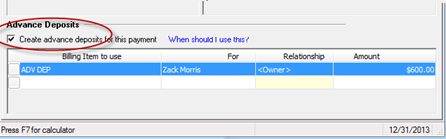
Here is a helpful tip for Advance Deposits:
The advance deposit fees in the drop-down list are based on the payment date. If the payment date is outside the valid range for the advance deposit, it will not be available.
Do you have tips for using Advance Deposits? Share them in the comments below.
Advance deposits can be created two ways: as standalone charge waiting for a payment to be applied at a later date or created when a payment is added to the deposit. The most common way that advance deposits are created is with a payment.
A deposit will need to be created for the payment. You can access a new deposit from Records by selecting add a new deposit. On the payments tab of the deposit, select add a new payment.
Once the payment information is created, at the bottom, mark the box to create advance deposits for this payment. Select your current advance deposit and the student’s name will appear.
If there are multiple students in a family that need to have advance deposit created from the payment, a line will appear for each student provided the payment is from the payer of those students.

Here is a helpful tip for Advance Deposits:
The advance deposit fees in the drop-down list are based on the payment date. If the payment date is outside the valid range for the advance deposit, it will not be available.
Do you have tips for using Advance Deposits? Share them in the comments below.
0
Categories
- All Categories
- New YourCause Community TEST
- New SKY Community TEST
- New Grantmaking TEST Community
- New Altru Test Community
- New bbcon Community - TEST
- 12 Blackbaud Agents for Good™
- New Raiser's Edge NXT Community
- 7 Blackbaud Community Help
- 218 bbcon®
- 1.4K Blackbaud Altru®
- 409 Blackbaud Award Management™ and Blackbaud Stewardship Management™
- 1.2K Blackbaud CRM™ and Blackbaud Internet Solutions™
- 16 donorCentrics®
- 361 Blackbaud eTapestry®
- 2.7K Blackbaud Financial Edge NXT®
- 680 Blackbaud Grantmaking™
- 598 Blackbaud Education Management Solutions for Higher Education
- 3.3K Blackbaud Education Management Solutions for K-12 Schools
- 952 Blackbaud Luminate Online® and Blackbaud TeamRaiser®
- 85 JustGiving® from Blackbaud®
- 7K Blackbaud Raiser's Edge NXT®
- 3.9K SKY Developer
- 257 ResearchPoint™
- 123 Blackbaud Tuition Management™
- 165 Organizational Best Practices
- 247 Member Lounge (Just for Fun)
- 40 Blackbaud Community Challenges
- 37 PowerUp Challenges
- 3 (Closed) PowerUp Challenge: Grid View Batch
- 3 (Closed) PowerUp Challenge: Chat for Blackbaud AI
- 3 (Closed) PowerUp Challenge: Data Health
- 3 (Closed) Raiser's Edge NXT PowerUp Challenge: Product Update Briefing
- 3 (Closed) Raiser's Edge NXT PowerUp Challenge: Standard Reports+
- 3 (Closed) Raiser's Edge NXT PowerUp Challenge: Email Marketing
- 3 (Closed) Raiser's Edge NXT PowerUp Challenge: Gift Management
- 4 (Closed) Raiser's Edge NXT PowerUp Challenge: Event Management
- 3 (Closed) Raiser's Edge NXT PowerUp Challenge: Home Page
- 4 (Closed) Raiser's Edge NXT PowerUp Challenge: Standard Reports
- 4 (Closed) Raiser's Edge NXT PowerUp Challenge: Query
- 822 Community News
- 3.1K Jobs Board
- 57 Blackbaud SKY® Reporting Announcements
- 47 Blackbaud CRM Higher Ed Product Advisory Group (HE PAG)
- 19 Blackbaud CRM Product Advisory Group (BBCRM PAG)