Globally Adding Attributes to Student Records
This time of year, schools are gearing up for returning students. As contracts are returned and deposits are made, data is flowing everywhere! Attributes are used to place additional information on a student record that the school wants to track. We like to think of it as the “other” place to add data when it doesn’t fit anywhere else. So what types of attributes would a school want to track?
The possibilities with attributes are almost endless. Want to track a student t-shirt size, a student contract was signed, or a field trip waiver was received? Or, maybe it’s the name of the guardian who is authorized to pick the student up. Depending on what information you want to track, attributes are a great place to store this information. Need to add the same attribute to all of your returning students next year? Let’s take a look at how to add them into the Education Edge or Student Information Systems:
The first step is to go to Globally Change Records in Administration. Once the parameter is open, select Attributes from available fields and select “Attribute” under “Attributes”.
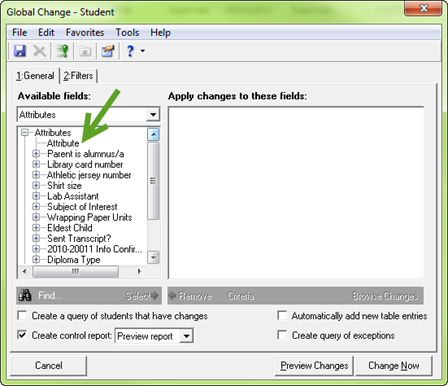
If we double-click on Attribute, another window will appear. In my example, I want to track if a transcript was sent to a college.
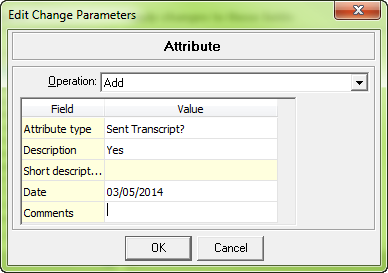
The operation is “add” because we want to add an attribute to the record. Then, fill in the type and any other information you want to populate on the record.
Using the filters tab, we can filter to a specific group of students. Finally, we can pre-process, verify the results, and add the attributes!
Does your school use Attributes in a unique way? Let me know in the comments below!
The possibilities with attributes are almost endless. Want to track a student t-shirt size, a student contract was signed, or a field trip waiver was received? Or, maybe it’s the name of the guardian who is authorized to pick the student up. Depending on what information you want to track, attributes are a great place to store this information. Need to add the same attribute to all of your returning students next year? Let’s take a look at how to add them into the Education Edge or Student Information Systems:
The first step is to go to Globally Change Records in Administration. Once the parameter is open, select Attributes from available fields and select “Attribute” under “Attributes”.

If we double-click on Attribute, another window will appear. In my example, I want to track if a transcript was sent to a college.

The operation is “add” because we want to add an attribute to the record. Then, fill in the type and any other information you want to populate on the record.
Using the filters tab, we can filter to a specific group of students. Finally, we can pre-process, verify the results, and add the attributes!
Does your school use Attributes in a unique way? Let me know in the comments below!
0
Categories
- All Categories
- 6 Blackbaud Community Help
- 206 bbcon®
- 1.4K Blackbaud Altru®
- 394 Blackbaud Award Management™ and Blackbaud Stewardship Management™
- 1.1K Blackbaud CRM™ and Blackbaud Internet Solutions™
- 15 donorCentrics®
- 357 Blackbaud eTapestry®
- 2.5K Blackbaud Financial Edge NXT®
- 646 Blackbaud Grantmaking™
- 561 Blackbaud Education Management Solutions for Higher Education
- 3.2K Blackbaud Education Management Solutions for K-12 Schools
- 934 Blackbaud Luminate Online® and Blackbaud TeamRaiser®
- 84 JustGiving® from Blackbaud®
- 6.4K Blackbaud Raiser's Edge NXT®
- 3.6K SKY Developer
- 242 ResearchPoint™
- 117 Blackbaud Tuition Management™
- 165 Organizational Best Practices
- 238 The Tap (Just for Fun)
- 33 Blackbaud Community Challenges
- 28 PowerUp Challenges
- 3 (Open) Raiser's Edge NXT PowerUp Challenge: Product Update Briefing
- 3 (Closed) Raiser's Edge NXT PowerUp Challenge: Standard Reports+
- 3 (Closed) Raiser's Edge NXT PowerUp Challenge: Email Marketing
- 3 (Closed) Raiser's Edge NXT PowerUp Challenge: Gift Management
- 4 (Closed) Raiser's Edge NXT PowerUp Challenge: Event Management
- 3 (Closed) Raiser's Edge NXT PowerUp Challenge: Home Page
- 4 (Closed) Raiser's Edge NXT PowerUp Challenge: Standard Reports
- 4 (Closed) Raiser's Edge NXT PowerUp Challenge: Query
- 778 Community News
- 2.9K Jobs Board
- 53 Blackbaud SKY® Reporting Announcements
- 47 Blackbaud CRM Higher Ed Product Advisory Group (HE PAG)
- 19 Blackbaud CRM Product Advisory Group (BBCRM PAG)