How To Enter Comments In FAWeb
Susan Sloan
Blackbaud Employee
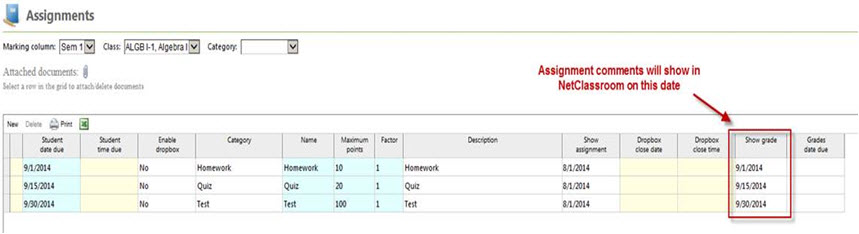
In Faculty Access for the Web (FAWeb), comments can be entered for both assignments and marking columns. Both assignment and marking column grade comments can be viewed in NetClassroom. Assignment comments become viewable in NetClassroom when assignment grades are viewable. Marking column comments only show in NetClassroom after they have been posted from FAWeb to The Education Edge. You can check the “Show grade” dates for assignments from Gradebook -> Edit assignments.
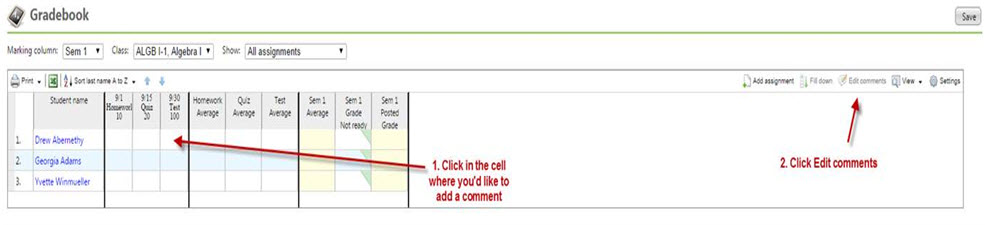
Comments can be entered from enter grades by class or from enter grades by student. To enter a comment from enter grades by class, highlight the cell and click “Edit comments”. Ensure pop-ups are turned on in your browser!
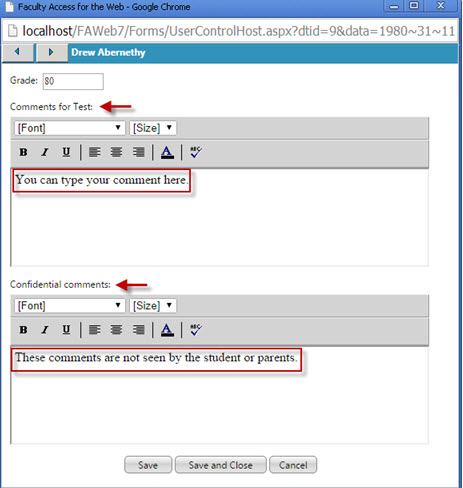
You will see a pop-up window where you can enter your comment. You also have a “Confidential comments” section that is not viewable by students or parents.
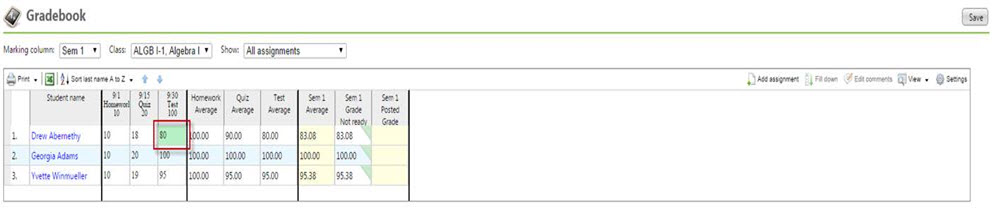
Once the comment has been saved, the cell will turn green indicating that a comment exists for this assignment.
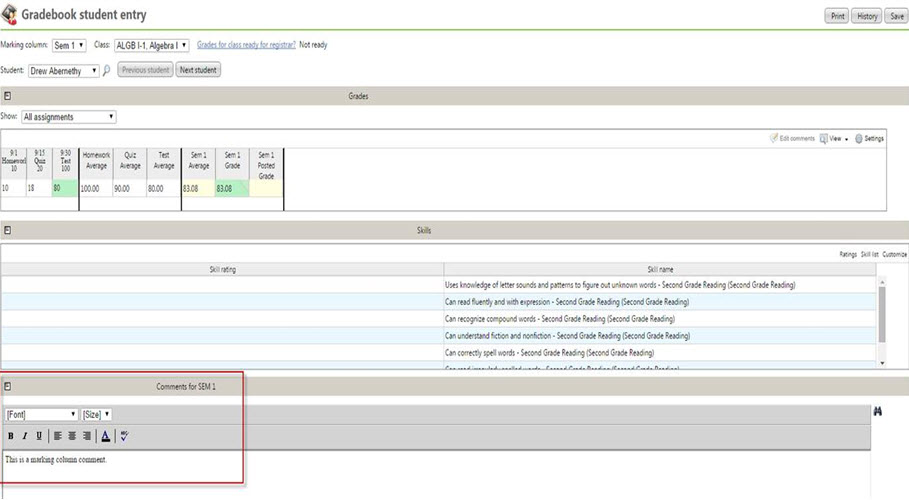
You can also add marking column grade comments by clicking in the cell and clicking on Edit comments. From enter grades by student, the steps to add assignment comments are the same. To enter marking column comments you can type directly into the comment box that displays on this screen.
I hope this helps as you begin to enter grades and comments for the new academic year!
For a chance to win a $25 Staples® gift card comment below with your Name, Email and Site ID or email backtoschoolcontest@blackbaud.com with the name of the blog in the subject line, your name, and Site ID in the body of the email. Participants must submit their entry by 11:59 pm Eastern on September 30, 2014.

Comments can be entered from enter grades by class or from enter grades by student. To enter a comment from enter grades by class, highlight the cell and click “Edit comments”. Ensure pop-ups are turned on in your browser!

You will see a pop-up window where you can enter your comment. You also have a “Confidential comments” section that is not viewable by students or parents.

Once the comment has been saved, the cell will turn green indicating that a comment exists for this assignment.

You can also add marking column grade comments by clicking in the cell and clicking on Edit comments. From enter grades by student, the steps to add assignment comments are the same. To enter marking column comments you can type directly into the comment box that displays on this screen.

I hope this helps as you begin to enter grades and comments for the new academic year!
For a chance to win a $25 Staples® gift card comment below with your Name, Email and Site ID or email backtoschoolcontest@blackbaud.com with the name of the blog in the subject line, your name, and Site ID in the body of the email. Participants must submit their entry by 11:59 pm Eastern on September 30, 2014.
0
Categories
- All Categories
- 6 Blackbaud Community Help
- 206 bbcon®
- 1.4K Blackbaud Altru®
- 394 Blackbaud Award Management™ and Blackbaud Stewardship Management™
- 1.1K Blackbaud CRM™ and Blackbaud Internet Solutions™
- 15 donorCentrics®
- 357 Blackbaud eTapestry®
- 2.5K Blackbaud Financial Edge NXT®
- 646 Blackbaud Grantmaking™
- 561 Blackbaud Education Management Solutions for Higher Education
- 3.2K Blackbaud Education Management Solutions for K-12 Schools
- 934 Blackbaud Luminate Online® and Blackbaud TeamRaiser®
- 84 JustGiving® from Blackbaud®
- 6.4K Blackbaud Raiser's Edge NXT®
- 3.6K SKY Developer
- 242 ResearchPoint™
- 118 Blackbaud Tuition Management™
- 165 Organizational Best Practices
- 238 The Tap (Just for Fun)
- 33 Blackbaud Community Challenges
- 28 PowerUp Challenges
- 3 (Open) Raiser's Edge NXT PowerUp Challenge: Product Update Briefing
- 3 (Closed) Raiser's Edge NXT PowerUp Challenge: Standard Reports+
- 3 (Closed) Raiser's Edge NXT PowerUp Challenge: Email Marketing
- 3 (Closed) Raiser's Edge NXT PowerUp Challenge: Gift Management
- 4 (Closed) Raiser's Edge NXT PowerUp Challenge: Event Management
- 3 (Closed) Raiser's Edge NXT PowerUp Challenge: Home Page
- 4 (Closed) Raiser's Edge NXT PowerUp Challenge: Standard Reports
- 4 (Closed) Raiser's Edge NXT PowerUp Challenge: Query
- 778 Community News
- 2.9K Jobs Board
- 53 Blackbaud SKY® Reporting Announcements
- 47 Blackbaud CRM Higher Ed Product Advisory Group (HE PAG)
- 19 Blackbaud CRM Product Advisory Group (BBCRM PAG)