Don’t worry! This username and password are grayed out by design. When an Education Edge record is linked to NetCommunity, the username and password become grayed out and locked in The Education Edge. This helps prevent any type of disconnect between the EE record and their NetCommunity account and users don’t have to worry about updating a username and password in both places. You may be asking, “If the password is grayed out, how am I supposed to update it?” At that point, there are two ways to update the user’s username or password:
Option 1 (the easiest option)-
- Log into the NetCommunity site as a supervisor user
- Click on Users & Security > Users
- Click the pencil icon to edit the appropriate user account
- Enter the new password in the Change Password and Confirm Password fields
- Click the Save button at the top of the page
- Log into Faculty Access for the Web with the new login credentials for the teacher, or into NetClassroom with the new login credentials for the parent or student
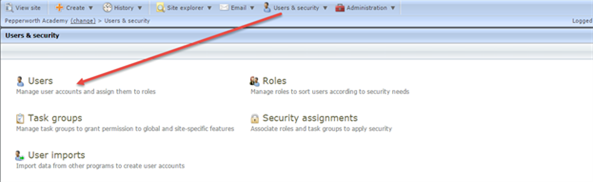
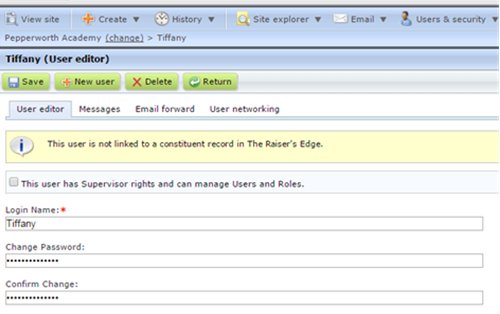
The password field is grayed out in The Education Edge:
http://www.blackbaud.com/kb/index?page=content&id=BB749836Option 2 –
- Break the link between the NetCommunity user account and The Education Edge record
- In NetCommunity, select Users & Security, Users.
- Edit the user that needs to have the link broken
- Scroll to the bottom of the profile page and click Break Link under The Education Edge linked record information section
How to break link between NetCommunity and The Education Edge record:
http://www.blackbaud.com/kb/index?page=content&id=BB720881
- Change the username and password within The Education Edge
- For a parent or student – open the Individual or Student record and manually update the username and/or password
- For a teacher – go to Administration, Set up System Security, and open the user. Manually edit the username and/or password
- Re-link the user to NetCommunity by running the Add Users to Netcommunity utility
If the user has rights to a page within NetCommunity containing a Change user ID/ Password part, they can change it themselves and it will update their password in The Education Edge. Otherwise, the two options above will allow a NetCommunity supervisor to update the username and/or password for the Faculty Access for the Web or NetCommunity user.
In our next blog learn more about FAWeb roles and what each entails!
