Show Me The Money: Copying Products And Billing Items




As I sit to write this blog, I’m reminded of what an important time of year this is for billing offices. If they haven’t started already, tuition payments for next year will start to roll in soon. Here in support, we receive many questions about tuition charges, advance deposits, and copying products and billing items. Ready to see that money? Let’s talk about a part of the process:
The first thing to be aware of is how your product and billing items are associated with dates. They can either be associated with a specific date range or a billing cycle. An example of a specific date range is 4/1/14 to 10/1/14, and an example of a billing cycle is 2014-2015. Both are valid ways of assigning the items; it will depend on the needs of the school as to which way this is setup.
Since the items are date-specific, the items need to be created or copied (shortcut!) from year to year.
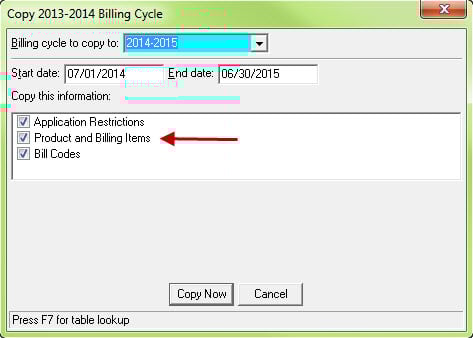
If items are associated with a billing cycle, they can be copied when copying the billing cycle by marking the box for products and billing items:
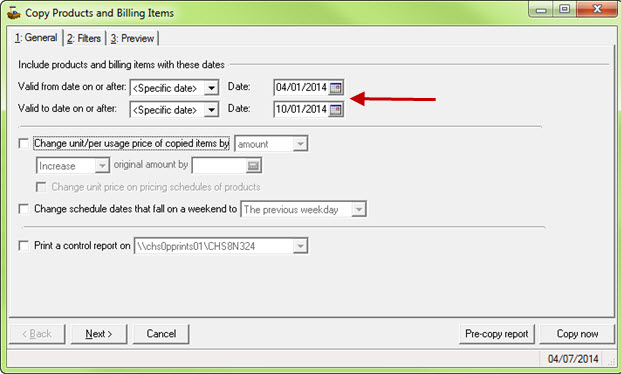
If product and billing items are assigned to a specific date range rather than a billing cycle, we’ll want to use the copy feature located in Products and Billing items within Configuration.
Are your product and billing items missing when copying billing items? Review the following Knowledgebase solutions for additional information and suggestions on troubleshooting:
Products and Billing Items missing when copying- https://www.blackbaud.com/kb/index?page=content&id=bb432482
How to copy Products and Billing Items- https://www.blackbaud.com/kb/index?page=content&id=bb230265
Interested in learning more about product and billing items? Search Training Central using the keyword SBREC to register for the "Records in Student Billing" 4 hour instructor-led training.
The first thing to be aware of is how your product and billing items are associated with dates. They can either be associated with a specific date range or a billing cycle. An example of a specific date range is 4/1/14 to 10/1/14, and an example of a billing cycle is 2014-2015. Both are valid ways of assigning the items; it will depend on the needs of the school as to which way this is setup.
Since the items are date-specific, the items need to be created or copied (shortcut!) from year to year.
If items are associated with a billing cycle, they can be copied when copying the billing cycle by marking the box for products and billing items:

If product and billing items are assigned to a specific date range rather than a billing cycle, we’ll want to use the copy feature located in Products and Billing items within Configuration.

Are your product and billing items missing when copying billing items? Review the following Knowledgebase solutions for additional information and suggestions on troubleshooting:
Products and Billing Items missing when copying- https://www.blackbaud.com/kb/index?page=content&id=bb432482
How to copy Products and Billing Items- https://www.blackbaud.com/kb/index?page=content&id=bb230265
Interested in learning more about product and billing items? Search Training Central using the keyword SBREC to register for the "Records in Student Billing" 4 hour instructor-led training.
0
Categories
- All Categories
- New YourCause Community TEST
- New SKY Community TEST
- New Grantmaking TEST Community
- New Altru Test Community
- New bbcon Community - TEST
- 12 Blackbaud Agents for Good™
- New Raiser's Edge NXT Community
- 7 Blackbaud Community Help
- 218 bbcon®
- 1.4K Blackbaud Altru®
- 409 Blackbaud Award Management™ and Blackbaud Stewardship Management™
- 1.2K Blackbaud CRM™ and Blackbaud Internet Solutions™
- 16 donorCentrics®
- 361 Blackbaud eTapestry®
- 2.7K Blackbaud Financial Edge NXT®
- 680 Blackbaud Grantmaking™
- 598 Blackbaud Education Management Solutions for Higher Education
- 3.3K Blackbaud Education Management Solutions for K-12 Schools
- 952 Blackbaud Luminate Online® and Blackbaud TeamRaiser®
- 85 JustGiving® from Blackbaud®
- 7K Blackbaud Raiser's Edge NXT®
- 3.9K SKY Developer
- 257 ResearchPoint™
- 123 Blackbaud Tuition Management™
- 165 Organizational Best Practices
- 247 Member Lounge (Just for Fun)
- 40 Blackbaud Community Challenges
- 37 PowerUp Challenges
- 3 (Closed) PowerUp Challenge: Grid View Batch
- 3 (Closed) PowerUp Challenge: Chat for Blackbaud AI
- 3 (Closed) PowerUp Challenge: Data Health
- 3 (Closed) Raiser's Edge NXT PowerUp Challenge: Product Update Briefing
- 3 (Closed) Raiser's Edge NXT PowerUp Challenge: Standard Reports+
- 3 (Closed) Raiser's Edge NXT PowerUp Challenge: Email Marketing
- 3 (Closed) Raiser's Edge NXT PowerUp Challenge: Gift Management
- 4 (Closed) Raiser's Edge NXT PowerUp Challenge: Event Management
- 3 (Closed) Raiser's Edge NXT PowerUp Challenge: Home Page
- 4 (Closed) Raiser's Edge NXT PowerUp Challenge: Standard Reports
- 4 (Closed) Raiser's Edge NXT PowerUp Challenge: Query
- 822 Community News
- 3.1K Jobs Board
- 57 Blackbaud SKY® Reporting Announcements
- 47 Blackbaud CRM Higher Ed Product Advisory Group (HE PAG)
- 19 Blackbaud CRM Product Advisory Group (BBCRM PAG)