Timetables and Patterns are the building blocks for creating the class schedule for the academic year. They can be seen as peanut butter and jelly on a sandwich, pretty good on their own but work best together. Timetables and Patterns can both be located in Configuration >Registrar Setup.
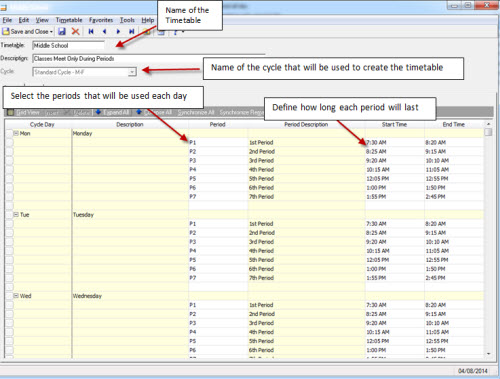
From the list on the left, select Timetables and click New Timetable on the action bar. The timetable is seen as the bell schedule for each day that you are session for the academic year and lets you know when students will be switching classes. Timetables consist of cycle days, periods and the start and end time of each period. The cycle days that are defined for the academic year provide the template of when each class can meet. Here is the basic setup of a timetable:
 Tips:
Tips:
- Timetables can also be used to schedule lunch for students using the lunch tab.
- Period start and end times cannot overlap each other.
- Once you save a timetable with the “Only allow class meetings to occur using periods” checkbox marked, you cannot unmark it. This impacts whether you can define overlapping meeting times on patterns.
- If needed, Timetables can still be edited for an academic year once the school year has begun and students have started their classes.
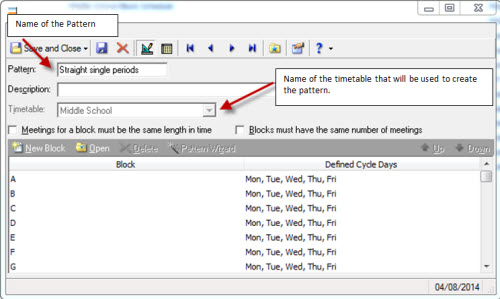
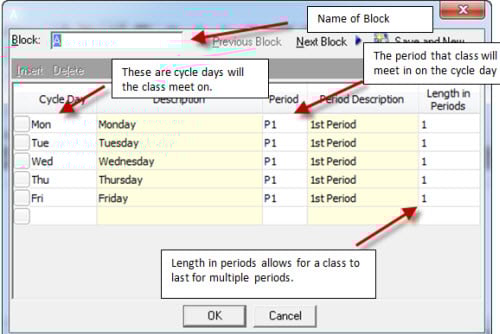
Timetables are only one half of the scheduling sandwich and Patterns are the second half of our peanut butter and jelly sandwich. They are the scheduling templates you can associate with courses to help speed up the scheduling of classes. Patterns consist of blocks and each block represents a possibility in which a class can be scheduled, such as Monday, Wednesday, and Friday in period 1 or Monday, Wednesday, and Friday in period 5.
 Tips:
Tips:
- Patterns can be created to rotate from one period to another for each cycle day.
- Multiple patterns can be used to create your schedule.
- You can use the Pattern Wizard to quickly create blocks in the pattern based on the associated timetable and selected pattern type.
- When adding Course Restriction information and not seeing the pattern(s) available to be selected from the drop-down. Make sure the patterns are activated for the academic year/session.
Have any questions? Leave a comment below!
