Generating Transactions Automatically: What It Can Do For You
Summertime for the Business Office at your school is a busy time! You’re often finishing up details from the previous school year while preparing for the next one simultaneously.
You could use a time saver and a way to automate tedious processes so you can get to the next item on the list.
Using the Generate Transactions Automatically (GTA) parameter can do that for you. GTA is most commonly used for three things:
Let’s take a look at what GTA can do for you. My student is going to pay his tuition over ten payments, and he has an Advance Deposit for $5000. Here is a before and after so you can see exactly how the student’s Activity tab will be affected after running the GTA:
Activity tab – View: Scheduled Activity - BEFORE

Activity tab – View: Scheduled Activity - AFTER

Activity tab – View: Activity – BEFORE
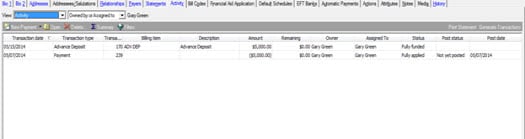
Activity tab – View: Activity - AFTER
I now have ten charges for tuition and three credits from the Advance Deposit. I generated my charges and credits for the entire year, but you can generate monthly if you prefer. Some people prefer to keep the record balance on the Activity tab consistent with the Statement balance so they generate monthly for this reason.
For more details on the GTA and related items check out these links to these other blogs:
Decoding the Generate Transactions Automatically Parameter – Part I
Decoding the Generate Transactions Automatically Parameter – Part II
Bill Codes Vs. Billing Items… What You Need To Know, And How They Make Your Life Easier!
Don’t forget to use F1 while working with GTA. There’s a lot of great information there!
Using Generate Transactions Automatically can save you a lot of time and effort. Let the software do the heavy lifting for you by utilizing this great feature!

You could use a time saver and a way to automate tedious processes so you can get to the next item on the list.
Using the Generate Transactions Automatically (GTA) parameter can do that for you. GTA is most commonly used for three things:
- Generate Credits from Advance Deposits
- Create Billing Schedules from Bill Codes
- Generate Charges from Billing Schedules
Let’s take a look at what GTA can do for you. My student is going to pay his tuition over ten payments, and he has an Advance Deposit for $5000. Here is a before and after so you can see exactly how the student’s Activity tab will be affected after running the GTA:
Activity tab – View: Scheduled Activity - BEFORE

Activity tab – View: Scheduled Activity - AFTER

Activity tab – View: Activity – BEFORE

Activity tab – View: Activity - AFTER

I now have ten charges for tuition and three credits from the Advance Deposit. I generated my charges and credits for the entire year, but you can generate monthly if you prefer. Some people prefer to keep the record balance on the Activity tab consistent with the Statement balance so they generate monthly for this reason.
For more details on the GTA and related items check out these links to these other blogs:
Decoding the Generate Transactions Automatically Parameter – Part I
Decoding the Generate Transactions Automatically Parameter – Part II
Bill Codes Vs. Billing Items… What You Need To Know, And How They Make Your Life Easier!
Don’t forget to use F1 while working with GTA. There’s a lot of great information there!
Using Generate Transactions Automatically can save you a lot of time and effort. Let the software do the heavy lifting for you by utilizing this great feature!
0
Categories
- All Categories
- 6 Blackbaud Community Help
- 211 bbcon®
- 1.4K Blackbaud Altru®
- 402 Blackbaud Award Management™ and Blackbaud Stewardship Management™
- 1.1K Blackbaud CRM™ and Blackbaud Internet Solutions™
- 15 donorCentrics®
- 360 Blackbaud eTapestry®
- 2.6K Blackbaud Financial Edge NXT®
- 655 Blackbaud Grantmaking™
- 576 Blackbaud Education Management Solutions for Higher Education
- 3.2K Blackbaud Education Management Solutions for K-12 Schools
- 941 Blackbaud Luminate Online® and Blackbaud TeamRaiser®
- 84 JustGiving® from Blackbaud®
- 6.7K Blackbaud Raiser's Edge NXT®
- 3.7K SKY Developer
- 248 ResearchPoint™
- 120 Blackbaud Tuition Management™
- 165 Organizational Best Practices
- 240 Member Lounge (Just for Fun)
- 34 Blackbaud Community Challenges
- 37 PowerUp Challenges
- 3 (Open) PowerUp Challenge: Grid View Batch
- 3 (Closed) PowerUp Challenge: Chat for Blackbaud AI
- 3 (Closed) PowerUp Challenge: Data Health
- 3 (Closed) Raiser's Edge NXT PowerUp Challenge: Product Update Briefing
- 3 (Closed) Raiser's Edge NXT PowerUp Challenge: Standard Reports+
- 3 (Closed) Raiser's Edge NXT PowerUp Challenge: Email Marketing
- 3 (Closed) Raiser's Edge NXT PowerUp Challenge: Gift Management
- 4 (Closed) Raiser's Edge NXT PowerUp Challenge: Event Management
- 3 (Closed) Raiser's Edge NXT PowerUp Challenge: Home Page
- 4 (Closed) Raiser's Edge NXT PowerUp Challenge: Standard Reports
- 4 (Closed) Raiser's Edge NXT PowerUp Challenge: Query
- 796 Community News
- 3K Jobs Board
- 54 Blackbaud SKY® Reporting Announcements
- 47 Blackbaud CRM Higher Ed Product Advisory Group (HE PAG)
- 19 Blackbaud CRM Product Advisory Group (BBCRM PAG)
