With January now behind us, Release 13.02 for the month of February is finally here.The
K12 “ON” Products are getting a number of boosts on February 7 with several important updates and changes coming for
onBoard,
onCampus, and
onRecord. There’s a few details for
Core and the upcoming Blackbaud ID EAP to discuss as well.
Here’s a quick look at a few of the new features in this release:
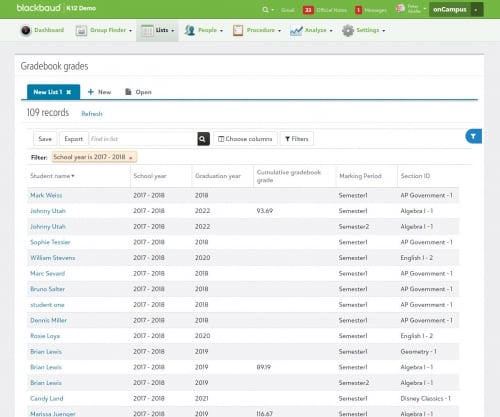
onCampus: View student performance with Gradebook List. From
onCampus >
Lists, academic managers can now use the newly added gradebook grades list to view student information related to academic performance. Information includes the marking period, cumulative gradebook grade, graduation year, and more. Just like other available lists, managers can filter information as well as save a customized layout or modified columns.
Where this list goes above and beyond typical LMS products is that Gradebook grades can also display student's athletic and extracurricular involvement if needed. This information could potentially be used in many ways by the school, such as comparing the student’s team participation to a recent trend of their grades slipping.
For now, we’ve limited this list to managers only, as the information displayed in it is especially useful for school leadership and monitoring student performance.
onRecord: View Names & Photos in Lists. List managers have new columns to utilize when working in
Requests & recommendations and
Report card grades lists. These options include a student’s
First name,
Middle name,
Last name, and
Nickname.
Not only that, a student photo can also be added as a column to the following lists:
- Infractions.
- Consequences.
- Class attendance.
- Requests & recommendations.
- Day attendance.
- Report card grades.
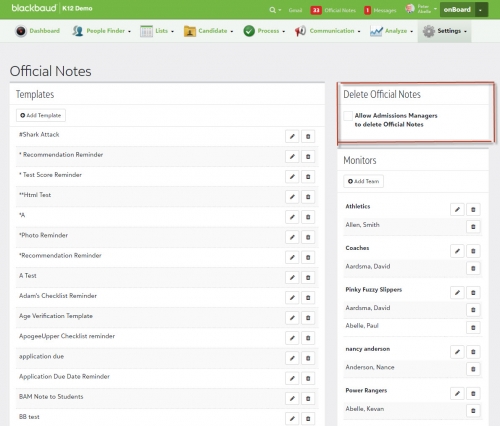
onBoard: Delete Official Notes. Previously, a data fix was required to delete an Official Note in onBoard . With this update, the
onBoard team has now made it possible for platform managers to enable a delete option.
Though the option is disabled by default, it can be enabled from
onBoard >
Settings >
Official Notes and then selcting
Allow Admissions Managers to delete Official Notes. Once enabled, admissions managers can delete Official Notes from the
Inbox or
Candidate Record.
There’s a lot more to discover with the February release, so make sure to check out our release letter for the full breakdown of all the new features and changes this month. The 13.02 release video is also available for those who are looking for a visual overview of these changes.
That’s all for this week! Make sure to subscribe to the K-12 community for all the latest blogs and discussions. We’ll be back next week with an all new blog post, so we’ll see you then!