A common problem folks have when searching our How-to help site is locating content specific to the
‘ON’ Product in which they are working. For example, a simple “Email” search returns results for Email Services, Pushpage, Sign In Notifications - all specific to
Core - in addition to a slew of other options specific to
onBoard and
onMessage.
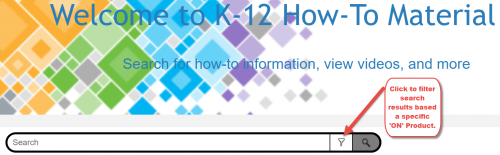
To streamline your search results to a specific product, use the new filter option available in the Search field.
You can opt to search
Core,
Integrations,
onBoard,
onCampus,
onMessage, or
onRecord. Results are then specific to the product you selected. If the results are not what you expected, simply reset the filter option to another product or
All Files to return to searching content related to all products.
Now that you're a search pro, make sure to check back next week as Part 2 of our Mastering Media series makes its anticipated return. Part 1 focused on images, so
catch up here if you missed the discussion. While you're here, don't forget subscribe to the K12 Community to stay up to date with all the latest news, discussions, and weekly blogs.
As always, thanks for reading!