Summer Navigation is finally here! And while the new navigation is definitely more intuitive, we know that changes like this can be overwhelming. So here are some tips, tools, and information to help you make the transition to the new navigation as smooth as possible for your school.
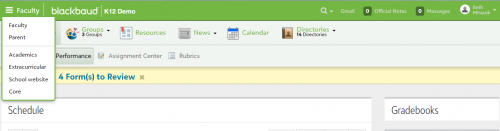
Look Left!The first thing users will probably notice about the new navigation is that the persona menu has moved from the right side of the page to the left. So looking left, and making sure other users at your school know to do the same, is the first step in navigating the new layout successfully. Moving the persona menu to the left is part of the long term Blackbaud SKY vision.
Keep in mind that the persona menu does not appear for constituent users unless they have multiple personas. For example, a Parent who is also a Faculty member or a Parent who is also an Alumnus. So most Parents, Alumni, Faculty, and Students will not notice any change in the navigation.
 There is a Map!
To make this change easier on everyone, we’ve created a searchable
mapping document to help users find tasks in the new navigation. This tool will be a go-to as you become familiar with the task locations and we strongly encourage you to share it with your colleagues. It's also a great resource for new users just getting started with the On Products.
KPI BoardsYou've probably noticed, but over the past couple of years we've added a lot of new reporting that allows you to see candidates and users that make up the numbers in the reports you’re viewing. With the addition of the new reporting you can find under Admissions > Analyze or Enrollment > Analyze, and the continued existence of the reports that the KPI board linked to, the KPI board is no longer necessary and in many cases causes a lot of confusion due to the numbers not really having any kind of explanation or drill down.
We've decided to remove the KPI boards and are encouraging and directing users to instead use the many new reporting options that we now offer. Some of the new reporting features are highlighted in
What are the best reports for viewing admissions data? Outstanding IssuesIn addition to the tips and tools above, we wanted to let you know about a few outstanding items that we’re still working to address.
The following items will be resolved in the July 11 update:
1. For schools without onMessage, the Events menu is missing under Core and School website. Prior to July 11, users can access Events with this URL:
https://[schoolname].myschoolapp.com/app/core#event/category/page2. The Mail Merge and Communication Template options are missing under Core > Communication > Mail Merge for users who do not have the Admissions Manager role. Before July 11th, users will need the Admissions Manager role, or a clone of it, with the Mail Merge and Communication Template tasks enabled.
For the July 25th release:
1. When a user selects School website from the persona menu, they currently land on the Website Redirects page. The fix will have users land on the Websites page instead.
2. On the Websites page in School website, the links for Official Notes and Messages are not active, the Help Panel icon is missing, and the user’s profile photo does not appear. These items are all functional and present on all other pages within School website.
For the August 22nd release:
1. School Forms created in onCampus prior to the navigation changes are currently available in Academics, not Extracurricular, and users need an onRecord manager role with the oR School Forms tasks enabled in order to access them. We’re going to move these forms over to Extracurricular where they will be accessible for users with onCampus manager roles and the oC School Forms tasks enabled. For now, users will need a role with the oR School Forms tasks enabled in order to access these forms via Academics.
To Be Determined:
1. In Extracurricular, Activity Management is subject to change as we receive feedback and try to handle the tasks that can be used for Academics or Activities in a consistent way.
KnowledgebaseOur Support team is working to review and update over 4,000 Knowledgebase articles to reflect the new navigation. Thank you for your patience as we work through this task!
For more information on the new navigation, please check out
Summer Updates to Blackbaud’s “ON” Product Platform.