As kids, we were always taught that sharing is a good thing. Have an extra cookie? Why not put a smile on a friend’s face and give it to them? Frankly, it’s a life lesson that still applies today.
Sharing is also a concept that the
Academics team wanted to really highlight within the
Assignment Center to make life easier for both teachers and students when working with online submissions. Perhaps a class has multiple teachers, assistants, or helpers that need access to student’s work. Maybe certain assignments get graded by a secondary teacher. Whatever the reason, online submissions now make it easier than ever to share content with other people.
When working with online submission assignment types, students first head to the
Assignment Center and then view the
Assignment Detail page to attach a file. When attaching a file, picking a
Google specific file (
Google Doc,
Slide,
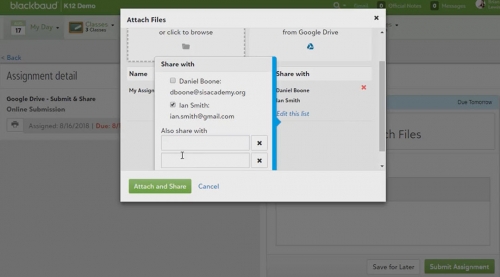
Sheet, etc) not only enables the user to select up to five files but they can also see who the file is going to be shared with. Typically, the list adds all faculty currently assigned to the active term, but by selecting
Edit this list, additional users can be added or removed.
This is a feature we originally added as part of the August release, but with the current school year still relatively young, we wanted to make sure teachers, administrators, and faculty were aware. If you want to see this feature in action, make sure to check out the
release video from August.
I do hope you’ll join us again next week as we take a closer look at all of the new content coming next week in the October release. Until then, thanks for reading!