We’re now into February and it’s already time to take a look at what’s new for
Blackbaud’s Cloud Solution for K-12 Schools!
Update 14.02, which arrives on February 6, may not have another massive new feature addition like last month, but we’re releasing new content for nearly every product in the solution. There are a lot of new features to discuss with this release like the updates to data imports, website searches, bulk printing, and plenty more.
Here’s a quick look at a few of the items included in the February 6 release:
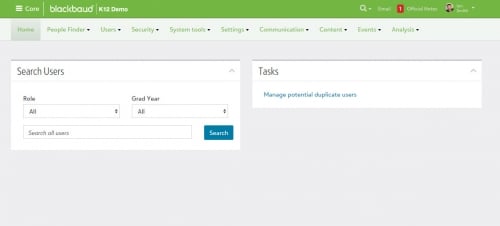
Core: User List Enhancements. We have a lot of good stuff for list managers this month! The
User List is now easier to access thanks to two new additions. On the
Core homepage, a
Search Users tile is now available. User the search bar and filters like
Roles or
Grad year to pull up the
User list with the matching or related results.
The second addition this month is the option to go directly to the
User list from
People Finder. This functionality mirrors how you can access
Groups list from
Group Finder.
For a greater, in-depth look at these updates and changes to
Edit User Profile Data, check out last week’s blog post. Don't forget to then participate in the poll on the homepage of this K-12 Community to let us know what change/update you like best!
School website: Updates to Search. We’ve also made a number of changes to website search in this update as well. When using a website search, we’ve expanded the functionality to now include
News content types within the results in addition to expected pages.
In addition, website pages no longer contain or render with /page in them. Firewall rules have been implemented that handle the “what to do” with existing bookmarks or redirects that contain /page in the URL. By getting rid of /page, we’re able to ensure that all SEO and
Google Analytics data are correct, no matter how the page is accessed.
Keep in mind that this is a change that will be released incrementally over the next couple of weeks. It’s not going to be fully implemented on the February 6 release.
Enrollment management: More column options. In this release, we’ve expanded the amount of column options for admissions managers when working with the
Visits, Interviews, and Events list.
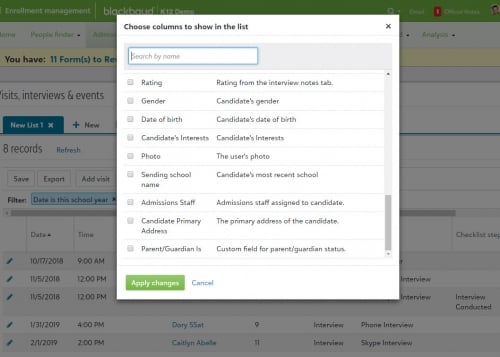
New fields include:
- Candidate Photo
- Candidate User ID
- Candidate Sending School Name
- Candidate Gender
- Candidate Date of Birth
- Candidate Interests
- Admissions Staff
- Candidate Primary Address
- Parent/Guardian Is
As always, make sure to check out the all new and completely renovated
February 6 release notes over on our main online help. You can also find the release notes within the solution itself through the embedded help panel.
We’ve also readied a new release video to show off everything in this release, so make sure to hit play to get a visual rundown. Don’t forget to like the video and subscribe to our channel for all of our latest video content.
 https://www.youtube.com/watch?v=oBjUhf_Bhjs
Can’t access YouTube? Not a problem, we’ve also uploaded the video content to our other video channel on
Wistia.
That’s going to do it for this release blog! Leave a comment below if you have any questions, comments, or just want to say hey! Feel free to click the
Like button below the post as well to let us know if you thought the information was helpful.
Thanks for stopping by the
Tips and Tricks section of the K-12 Community. Next week, we’ll be right back here with new K-12 details to discuss with you so don’t miss it. See you next week!
Thanks for reading everyone!