We have some very exciting news to share regarding a complete evolution and redesign of the Education management online help website.
Over the years, we’ve continued to evolve the way in which we deliver new help-based content to you. From the classic help systems like the in-product panel and full online help, we’ve grown over the years to include new methods like videos, guides, and even the blogs here in the community. So, while we’ve continued to advance, one area that started to fall behind was the look and feel of our online help page.As of the July 14th update, we’ve finally addressed this. Our site has been completely redesigned from the ground up to be more sleek, modern, and a centralized location where you can go to easily find all of our content in one convenient place. Have a look yourself here. In the meantime, let's take a look at all the new content for you.What’s FamiliarUpon loading up the page, the first thing you’ll see is the search bar, right smack in the middle of the screen. We didn’t want to remove or obscure this part of the experience, so we kept it largely as it was on the old site. At the top of the screen is the traditional navigation, so if you know which product you’re seeking help for, you can use the menu system at the top to drill down. Essentially, this is similar to how it was in the past, except we’ve moved it from the left side of the screen to the top.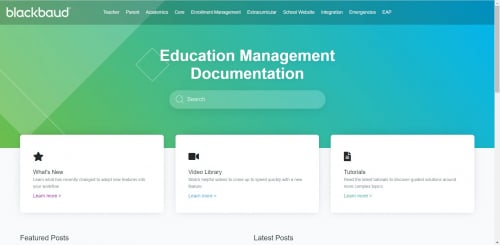 What’s NewNow, the fun and new stuff. Under the search bar are three tiles, each containing important information. The first takes you to our “What’s New” page which is updated each Monday with the latest releases. The second is a link to our Education management video playlist, containing a ton of helpful content on new features, how something works, and more. Make sure to subscribe to the channel while you’re there to stay up to date on all of our latest content. Finally, the last tile takes you to our tutorials.
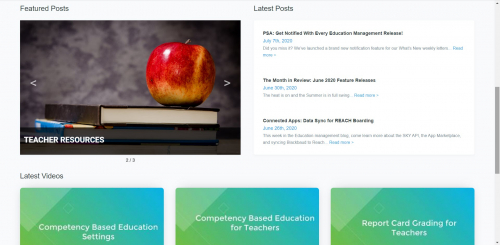 Below that is a running timeline of community blog posts. The three most recent topics are always shown with a short blurb, the title, and a link to the full post. Next to that are resources to things that are a bit more time sensitive. We’ll be updating this throughout the year so keep an eye on it.Finally, the last section before you get to the footer links is an area for our latest and greatest video content. Unlike the tile above, these won’t redirect you to YouTube. Instead, selecting one will open it in a new modal window on your current screen with full video controls.And that’s the rundown of our brand-new online help website. We hope you enjoy it as much as we do and that it continues to serve you well. Thanks for reading everyone and we’ll talk soon!