My Community
YourCause®
Impact Edge™
All-Star Lounge
Member Lounge (Just for Fun)
Community News
Community Manager
Groups
Browse Products
Members
Community All-Stars
Monthly Challenges
Member Search
Jobs Board
Help
Using the Blackbaud Community
Blackbaud Support
Knowledgebase
Blackbaud University
Discussions
Categories
Groups
Home
ResearchPoint™
ResearchPoint™ Blog
ResearchPoint June 2017 (4.96) Release
Sandra Stagner
This past weekend (June 10), we updated
ResearchPoint
standalone customers to the June 2017 (4.96) release. Here is a summary of the new features.
New Constituent Merge Feature
In this release, we're introducing our new Constituent Merge feature that enables you to merge duplicate constituent prospect records in your
ResearchPoint
database. After you find duplicate constituents saved in your database, you can remove duplicates by consolidating information on matched records through merge processes. You can configure how merge processes handle conflicting data on duplicates.
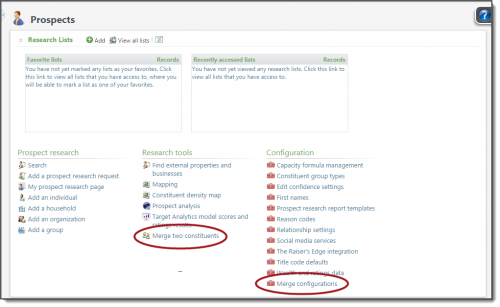
The Prospects page now includes links to merge two constituents and to set up a merge configuration.
Use the
Merge
configurations
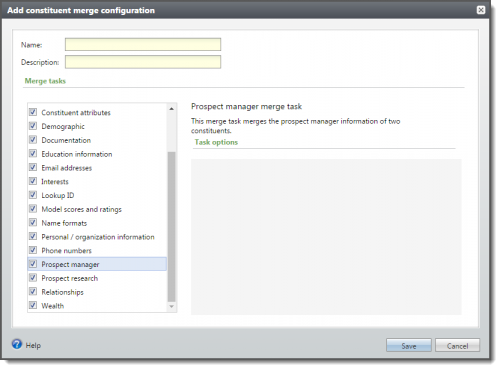
link under Configurations to add or edit a merge configuration. Merge configurations determine the data that is merged from source constituent records to target constituent records when a merge process is run. When you add or edit a configuration, you can specify the type of information that is merged by a process.
To merge different types of constituent information, you can add multiple merge configurations and select different merge tasks for each.
To merge two constituents, use the
Merge two constituents
link under Research Tools.
ResearchPoint
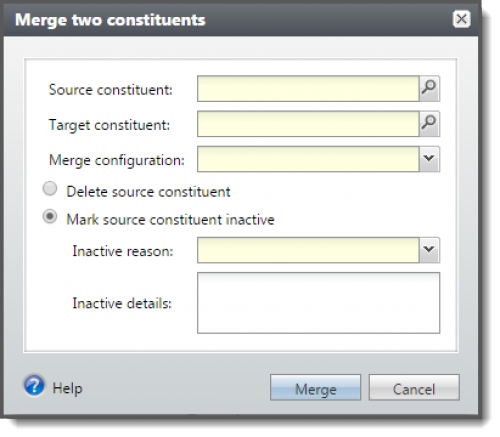
removes duplicates by consolidating information on matched records through merge processes. On the
Merge two constituents
screen, you can configure how a merge process handles conflicting data. For example, if names are different on matched constituents, you can choose whether to keep the target's name, source's name, or whichever name is most complete. You can also choose whether to delete the source constituent or mark it inactive after the merge.
For more details about merging constituents, see the
ResearchPoint
online help.
New Configure Inactive Reason Codes
In preparation for using the new merge functionality, you'll need to configure ResearchPoint to specify a reason code for constituent records that are marked as inactive. Since ResearchPoint requires you to select a reason code from an existing list, you'll need to add Inactive reason codes to your ResearchPoint database ahead of time. For detailed instructions, check out the blog post.
ResearchPoint Training Update
ResearchPoint
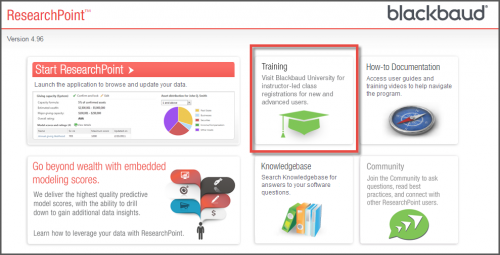
training is now available through Blackbaud University. We've updated the
ResearchPoint
start page so when you select the Training link, you're connected directly to Blackbaud University, where you can get information or take a class.
For more details, visit the
ResearchPoint Training Renovation
blog post.
Geocode Issue Resolved
We resolved the periodic failure that was occurring when attempting to geocode addresses.
Target Analytics Data Updates
Since our 4.95 release, we have refreshed the data for NOZA, CoreLogic, Dun & Bradstreet, Federal Elections Commission (FEC), Who's Who, and Thomson Reuters Business Intelligence (TRBI) in our Target Analytics database. Now, when you perform WealthPoint screenings on a prospect's wealth and
ratings
record, or when you perform a screening on your research lists, you'll have the latest philanthropic gifts, real estate assets, business assets, political donations, biographical data for industry leaders, and income records.
ResearchPoint Feedback
Do you want to influence the direction of the product? You can in the
Target Analytics Community
. We're there with you in the community and we're listening for which features you
want added
or which existing functionality needs to be improved. You can add a new idea, vote for ideas you want to see implemented, or respond to an existing idea with comments about what you need specifically. The more you tell us, the better we can prioritize and design the product around your organization’s needs.
How do ideas get implemented? Ideas with the most likes are more heavily favored when we consider what we should put on our roadmap for
ResearchPoint
. To see all the current user-posted ideas, from the Target Analytics Community home page, in the
Navigation Menu
, click
Ideas
. We look forward to hearing from you on how you need
ResearchPoint
improved!
Need a PDF version of these release notes?
View and save a printer-friendly copy of the new features!
Find more posts tagged with
Comments
There are no comments yet
Quick Links
All Categories
Recent Posts
Activity
Unanswered
Groups
Help
Best Of