Impersonation: A Payer’s View Of Blackbaud Tuition Management™
Derek Nichols
Blackbaud Employee
Impersonation is now available inside of Blackbaud Tuition Management™ and here is everything you need to know about it!We are very excited to announce the release of Blackbaud Tuition Management’s new impersonation feature! With impersonation, school users can easily view an account from the payer’s perspective, empowering school staff to confidently guide payers through various processes and provide efficient assistance.
Who can impersonate a payer?
Impersonation is only available to users with any of the following roles:
How do I impersonate a payer?

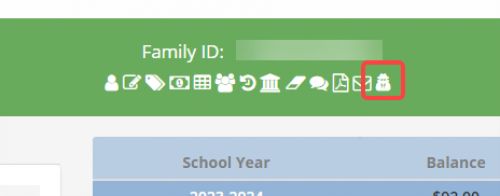
You can also impersonate a payer by selecting the Impersonate shortcut in the green banner:
Or by selecting a family, then selecting Families > Impersonate.
Once you’re done impersonating, simply close the impersonation browser tab.
You can only impersonate one payer at a time. If you attempt to open a second impersonation without closing the first one, you will receive a message indicating that only one impersonate window can be open at a time.
What can I do when impersonating a payer?
You can navigate as the payer to view billing details, invoices, contact information, and more. You can even add items to the shopping cart.
What can’t I do while impersonating?
While impersonating a payer, you cannot make any changes to their payment, personal, or contact information. You cannot stop or resume auto debit payments on behalf of the payer. And you cannot submit payments.
Additionally, if the payer you’re impersonating has accounts at multiple schools, you cannot select Switch school account to access their account at another school.
Is there an audit log for impersonation?
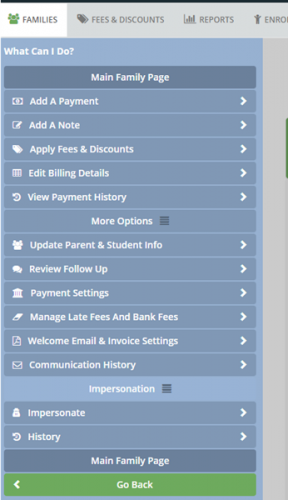
Yes, you can view past impersonations for a payer by selecting Impersonation > History from the blue flyout menu.
We hope you find impersonation to be a helpful and time-saving feature! Let us know what you think in the comments below!

Who can impersonate a payer?
Impersonation is only available to users with any of the following roles:
- School Administrator
- School Finance User
- Enterprise User
- Enterprise Finance User
How do I impersonate a payer?
- Select Families > View All Families.
- Search for and select the family of the payer you want to impersonate.
- Hover over the blue arrow on the left to expand the flyout menu.
- Select Impersonation > Impersonate.

You can also impersonate a payer by selecting the Impersonate shortcut in the green banner:

Or by selecting a family, then selecting Families > Impersonate.
Once you’re done impersonating, simply close the impersonation browser tab.
You can only impersonate one payer at a time. If you attempt to open a second impersonation without closing the first one, you will receive a message indicating that only one impersonate window can be open at a time.
What can I do when impersonating a payer?
You can navigate as the payer to view billing details, invoices, contact information, and more. You can even add items to the shopping cart.
What can’t I do while impersonating?
While impersonating a payer, you cannot make any changes to their payment, personal, or contact information. You cannot stop or resume auto debit payments on behalf of the payer. And you cannot submit payments.
Additionally, if the payer you’re impersonating has accounts at multiple schools, you cannot select Switch school account to access their account at another school.
Is there an audit log for impersonation?
Yes, you can view past impersonations for a payer by selecting Impersonation > History from the blue flyout menu.
We hope you find impersonation to be a helpful and time-saving feature! Let us know what you think in the comments below!
0
Categories
- All Categories
- 6 Blackbaud Community Help
- 206 bbcon®
- 1.4K Blackbaud Altru®
- 394 Blackbaud Award Management™ and Blackbaud Stewardship Management™
- 1.1K Blackbaud CRM™ and Blackbaud Internet Solutions™
- 15 donorCentrics®
- 357 Blackbaud eTapestry®
- 2.5K Blackbaud Financial Edge NXT®
- 646 Blackbaud Grantmaking™
- 561 Blackbaud Education Management Solutions for Higher Education
- 3.2K Blackbaud Education Management Solutions for K-12 Schools
- 934 Blackbaud Luminate Online® and Blackbaud TeamRaiser®
- 84 JustGiving® from Blackbaud®
- 6.4K Blackbaud Raiser's Edge NXT®
- 3.6K SKY Developer
- 242 ResearchPoint™
- 117 Blackbaud Tuition Management™
- 165 Organizational Best Practices
- 238 The Tap (Just for Fun)
- 33 Blackbaud Community Challenges
- 28 PowerUp Challenges
- 3 (Open) Raiser's Edge NXT PowerUp Challenge: Product Update Briefing
- 3 (Closed) Raiser's Edge NXT PowerUp Challenge: Standard Reports+
- 3 (Closed) Raiser's Edge NXT PowerUp Challenge: Email Marketing
- 3 (Closed) Raiser's Edge NXT PowerUp Challenge: Gift Management
- 4 (Closed) Raiser's Edge NXT PowerUp Challenge: Event Management
- 3 (Closed) Raiser's Edge NXT PowerUp Challenge: Home Page
- 4 (Closed) Raiser's Edge NXT PowerUp Challenge: Standard Reports
- 4 (Closed) Raiser's Edge NXT PowerUp Challenge: Query
- 777 Community News
- 2.9K Jobs Board
- 53 Blackbaud SKY® Reporting Announcements
- 47 Blackbaud CRM Higher Ed Product Advisory Group (HE PAG)
- 19 Blackbaud CRM Product Advisory Group (BBCRM PAG)