Using Page Context to filter embedded power BI report

Hi Everyone,


We're trying to use page context to filter a power bi dashboard we are embedding using page designer. However, the filtering part doesn't seem to be working. We're using the constituent GUID as the parameter. Any ideas?

https://www.youtube.com/watch?v=S5sCmQIIIEY

Answers

  • Hi @Elaine Lofton - I moved this over to the Sky Developer - Blackbaud CRM APIs general discussion for more eyes. Thanks!

  • Rebecca Sundquist
    Rebecca Sundquist Blackbaud Employee
    Seventh Anniversary Kudos 2 Name Dropper Participant

    @Elaine Lofton , @Peggy Parviainen , the SKY Add-in is leveraging the Power BI Host SPA, which taps into Power BI's url parameters through query parameters datasetName and datasetField.

    Check out the example here: Power BI add-ins with context values

    Hint: If your datasetName or datasetField have spaces or special characters, you'll need URL encoding!

    &contextField=recordId&datasetName=Constituent&datasetField=Constituent%20Record%20ID

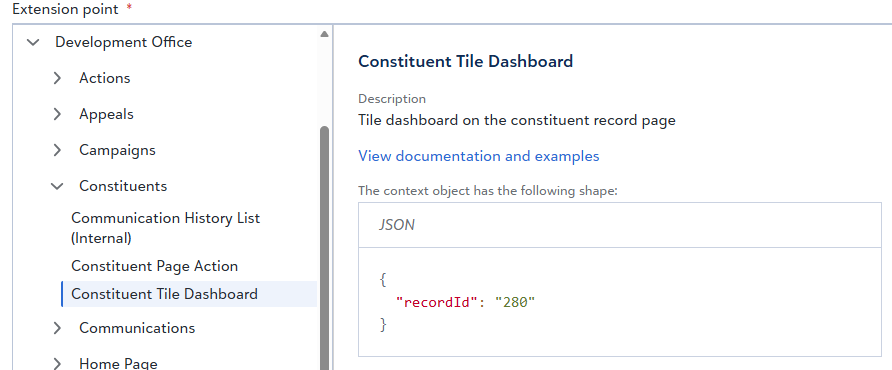
    When you are adding the Constituent Title Dashboard extension point to a SKY Add-in, you'll see the propertyName for how to reference the record ID. Here it is "recordID."

    image.png

Categories