SKY API Bad Request in Power Automate.

I have a SKY API account with Client ID and 2 secret codes. I have my app registered. I have my scope and Redirect URI defined. I have created a flow in Power Automate manually triggered for 10 records just to test and I keep getting errors when testing. The last one was bad request even though I confirmed the client id and secret codes.


Answers

  • Clarification

    I am using the client_credentials grant type to request an access token via a HTTP POST in Power Automate.
    The request URI is https://oauth2.sky.blackbaud.com/token, method is POST, and the header Content-Type: application/x-www-form-urlencoded.
    Body is:
    grant_type=client_credentials&client_id=<my_client_id>&client_secret=<my_primary_secret>
    I still get Bad Request (400) immediately.
    The app is set as Confidential Client, the scope is Full Data Access, and IT confirms my account has no tenant restrictions.
    I suspect this may be related to Blackbaud requiring explicit consent for the app, but I am unsure how to grant it for my account/tenant.

  • Alex Wong
    Alex Wong Community All-Star
    Tenth Anniversary Kudos 5 Facilitator 4 bbcon 2025 Attendee Badge

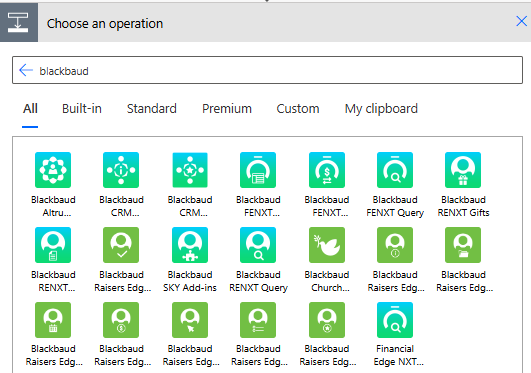
    If you are using Power Automate, there is no need for you to handle OAUTH2 to get the authorization token to make API calls.

    You can use the Blackbaud connector that has built in authorization handling.

    image.png

    If for some reason you must use regular HTTP action to call Blackbaud SKY API endpoint, then you will want need to get auth token/refresh token outside of Power Automate to begin with (i.e. Postman). Then you can use Power Automate and the Auth API endpoint to refresh the token for use every 60 minutes. (auth token is only good for 60 minutes, refresh token is good for 365 days to refresh an auth token). You can search for "headless" on community to get post that teach you how to do it.

Categories