Power Automate help - Add fund desciption to Flow
Hi - I am being asked to add fund description to an email notification flow that sends an email to fundraisers when their assignees give a gift the previous day. I was able to initialize and create an array, but I can't seem to find/use it as an option to add to my email body. I don't know if it is related to it auto-generating an "Apply to each" section within an already existing "Apply to each" or if it is something else I did wrong. We don't use split gifts - so I really only need 1 fund per each gift.
I am pretty new to Power Automate and inherited this flow from a former co-worker. Including some screenshots of the current state of the flow that gave me an error. I tried pulling the Expression from a different flow that I found in the community: RENXT Large Gift Notification. However, I only get errors when I try to run it. Error:
ExpressionEvaluationFailed
The execution of template action 'Apply_to_each' failed: the result of the evaluation of 'foreach' expression '@items ('Process_each_gift')' is of type 'Object'. The result must be a valid array.
Any help would be great - thanks!
Best Answer
-
since your org does not use split gift, there will be no situation where more than one fund for a gift, so here's what you can do in this order
- Add a Parse JSON action after Format gift amount for display
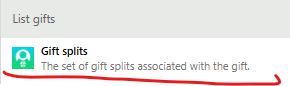
- Content: search for dynamic content "split" and select the Gift splits dynamic content under the list gift action with description under it that say The set of gift splits associated with the gift.
- Content: put your type cursor in the Content text field, and do Ctrl-A to select all, then Ctrl-X to cut (copy and delete). open a Notepad and paste it there, it should look something like this:
@{items('Apply_to_each')?['gift_splits']}(don't worry if yours does not say Apply_to_each, as it is likely another name for the loop that is looping each gift). What you want to do is add first() to it to have something like this@{first(items('Apply_to_each')?['gift_splits'])}. Then copy this whole thing and paste into the Content text field.
- Schema: Paste this code
{"type":"object","properties":{"id":{"type":"string"},"amount":{"type":"object","properties":{"value":{"type":"number"}}},"campaign_id":{"type":"string"},"fund_id":{"type":"string"},"appeal_id":{"type":"string"},"package_id":{"type":"string"},"gift_aid_amount":{},"gift_aid_qualification_status":{}}}
- Content: search for dynamic content "split" and select the Gift splits dynamic content under the list gift action with description under it that say The set of gift splits associated with the gift.
- Delete the Apply to each action that contains the Get a fund action
- Delete the action that initialize variable Fund
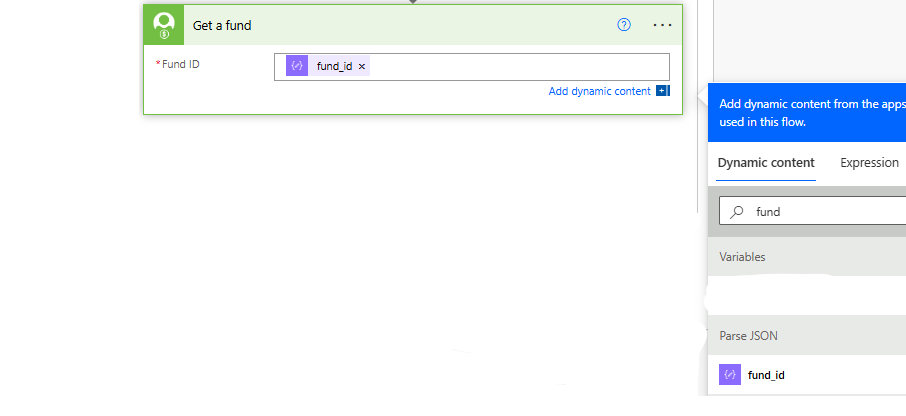
- Add Get a fund after the Parse JSON action and search "fund" from dynamic content and select the fund_id from the Parse JSON action.
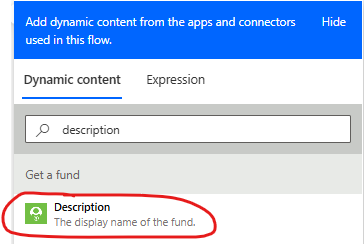
- You can use Description directly from the Get a fund action in your Send an email to the fundraisers action, replacing what you have there now that has the "join()" expression.
0 - Add a Parse JSON action after Format gift amount for display
Answers
-
Hi Alex - Thank you for responding so quickly! I had a little issue at step 1b with the updated Parse JSON formula as it was giving me an error saying it wasn't a valid JSON formula - but I was able to work through that and got the fund description to pull in. Thank you so much for your help!
2 -
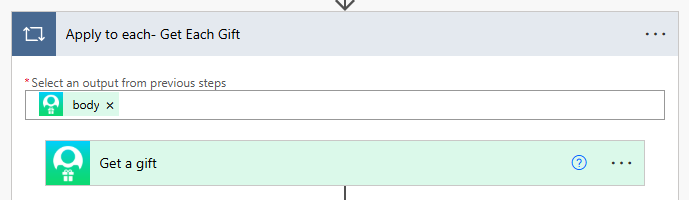
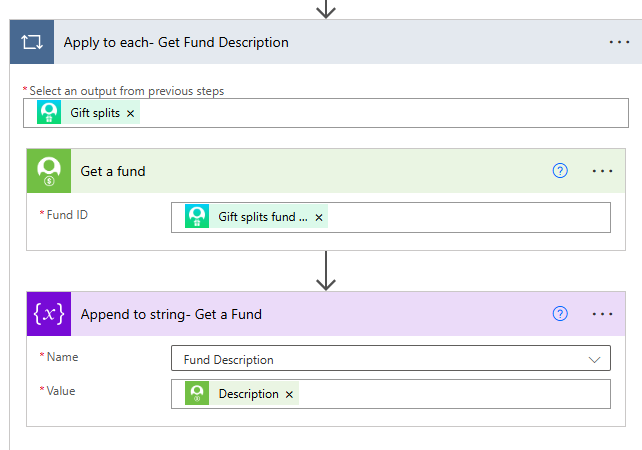
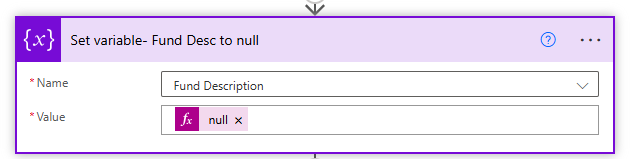
@Kelsey Van Peursem I have a different way to do this. I pull in Get a Gift which loops around each gift in List Gifts. Get a Gift has the Fund ID in the Gift Splits which makes it easier than having to parse json. I created a string variable called Fund Description.
For reference, the Gift Splits in the top is: outputs('Get_a_gift')?['body/gift_splits']
In the Get a Fund is this field which will appear under Get a Gift.
Then Append to the string variable is the Fund Description which is under Get a Fund. Make sure to clear out your string variable at the end of the loop for each gift.
1 -
@Carol Grant - Thank you for this alternate solution. I wonder if my issue was that my "get a fund" was retrieving data from the wrong section. Alex's solution is working, so I think I will be keeping it for this one, but I like the idea of not needing to use a Parse JSON on any future automations that might need this. I appreciate the alternate solution!
Kelsey1
Categories
- All Categories
- 6 Blackbaud Community Help
- 213 bbcon®
- 1.4K Blackbaud Altru®
- 402 Blackbaud Award Management™ and Blackbaud Stewardship Management™
- 1.1K Blackbaud CRM™ and Blackbaud Internet Solutions™
- 15 donorCentrics®
- 360 Blackbaud eTapestry®
- 2.6K Blackbaud Financial Edge NXT®
- 655 Blackbaud Grantmaking™
- 576 Blackbaud Education Management Solutions for Higher Education
- 3.2K Blackbaud Education Management Solutions for K-12 Schools
- 939 Blackbaud Luminate Online® and Blackbaud TeamRaiser®
- 84 JustGiving® from Blackbaud®
- 6.6K Blackbaud Raiser's Edge NXT®
- 3.7K SKY Developer
- 248 ResearchPoint™
- 119 Blackbaud Tuition Management™
- 165 Organizational Best Practices
- 241 Member Lounge (Just for Fun)
- 34 Blackbaud Community Challenges
- 34 PowerUp Challenges
- 3 (Open) PowerUp Challenge: Chat for Blackbaud AI
- 3 (Closed) PowerUp Challenge: Data Health
- 3 (Closed) Raiser's Edge NXT PowerUp Challenge: Product Update Briefing
- 3 (Closed) Raiser's Edge NXT PowerUp Challenge: Standard Reports+
- 3 (Closed) Raiser's Edge NXT PowerUp Challenge: Email Marketing
- 3 (Closed) Raiser's Edge NXT PowerUp Challenge: Gift Management
- 4 (Closed) Raiser's Edge NXT PowerUp Challenge: Event Management
- 3 (Closed) Raiser's Edge NXT PowerUp Challenge: Home Page
- 4 (Closed) Raiser's Edge NXT PowerUp Challenge: Standard Reports
- 4 (Closed) Raiser's Edge NXT PowerUp Challenge: Query
- 792 Community News
- 2.9K Jobs Board
- 54 Blackbaud SKY® Reporting Announcements
- 47 Blackbaud CRM Higher Ed Product Advisory Group (HE PAG)
- 19 Blackbaud CRM Product Advisory Group (BBCRM PAG)