Summary
This flow checks all records in the selected Action List, stores the records with an Action Attachment in an array, and will send an email with hyperlinks to the records which have an Action Attachment.
Note that I have shared a similar flow which searches for Constituent Attachments.
I'd like to thank the BB Power Automate User Group for their help with this project.
Required Connections
- Outlook 365
- Blackbaud Raisers Edge NXT Interactions
Suggested Skill Level
Beginner/Intermediate
Configuration Needs
Create a, Action List which has no more than 5,000 records in it. (You would have to create a loop to search more than 5,000 records.) You can use Filters in your list to adjust the number of actions in your List. One idea would be to use the filter of Action Date to limit the actions being checked.
Within the flow, determine the trigger. Currently this runs when manually triggered.
In the variable for EnvID, you should enter your organization's Environment ID.
In the List Actions step, identify the Action List in the Parameters>List area.
An array is used to hold the information on all records that have an Action Attachment.
Update what appears in the email table by clicking on the Append to array variable, and editing the Value:
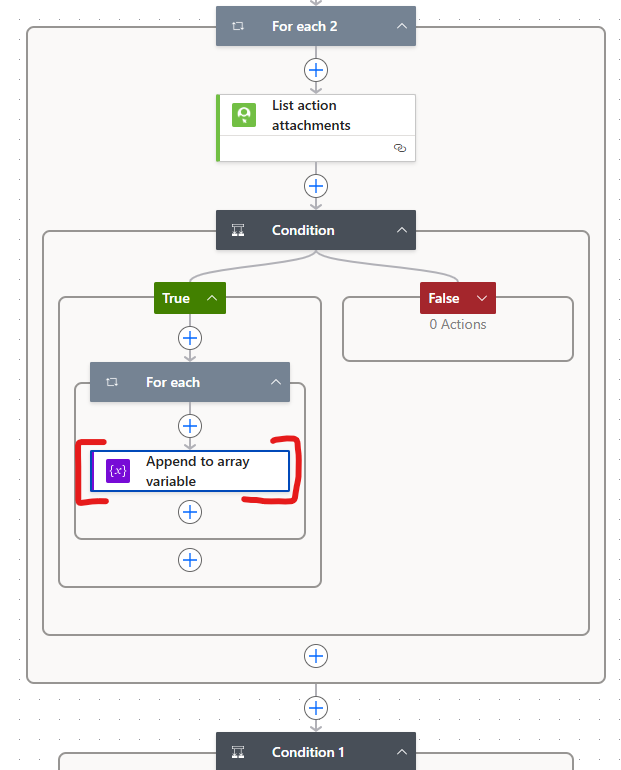
Within the final Condition, you will see an action to Send an email (V2). Click on this to change where the email is sent. Enter the recipient's email in the To field. Change the text in the Body to include other text in the email that is sent.
Finally, save and test this. Update any connection to your local environment.
Flow file to import