What's New In Blackbaud Raiser's Edge NXT® — May 12, 2026






Here are the latest changes in Blackbaud Raiser's Edge NXT for May 12, 2026.
The following feature is generally available to everyone!
Redesigned Campaign, Fund, and Appeal Records for Faster Insight
We’ve redesigned and modernized the Campaign, Fund, and Appeal record experience in Raiser’s Edge NXT to make it easier to understand performance, uncover trends, and take action. The updated records use a focused tab layout and new data visualization tiles to surface what matters most — so you can see fundraising progress, donor engagement, and momentum at a glance.
Instant Performance Visibility
Each record now opens with an Overview that surfaces key metrics, trends, and progress indicators at a glance, including Projected revenue, Cumulative giving, Revenue by month or Revenue by year, and Donors by month or Donors by year depending on the time period selected. You can quickly see how an initiative is performing and identify where attention is needed — without digging into reports or rebuilding filters.
Actionable Insight Without Extra Navigation
From a single record, you can move seamlessly from:
- High-level performance (Overview)
- To transaction-level detail (Gifts)
- To donor participation and engagement (Donors)
- To deeper visual analysis (Analysis)
This makes it easier to validate results, explore patterns, and act — all without leaving the record.
Fund-specific Additions
Fund records include two additions built with finance collaboration in mind. The Gift list now displays Fund ID alongside Fund description, making it faster to cross-reference with your finance team without manual lookups. A dedicated GL Distributions tab and list gives finance partners direct visibility into how fund activity maps to your general ledger — all within the record.
Appeal and Package Additions
Appeal records include a Package list, giving you a clear view into the components driving your appeal's performance. Additional package analysis and comparison tiles are planned for a future release.
A Record You Can Extend
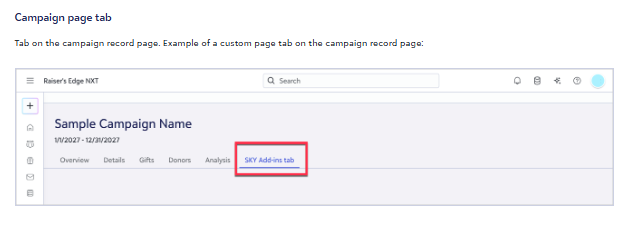
You can now add new tabs to Campaign, Fund, and Appeal records to surface the information that matters most to your organization — so the record works the way your team works.
The redesigned Campaign, Fund, and Appeal records are available now and integrate seamlessly into your existing workflows. Open a record to explore the new experience and see how much easier it is to understand performance at a glance.
The following features are available for some or more of you:
Manage planned gifts in web view for Planned Gift Tracker users
Add planned gifts, link one-time gifts, and manage records without leaving web view.
Customize Giving Statements
Now you can customize your giving statements with your organization's logo, signature image, signatory name, and signatory title. From Gifts, Giving statements, select the Settings gear icon, then PDF.
Enter a custom logo, signature image, signatory name, and signatory title to match your organization's branding.
Create legacy recognition programs for giving societies
Recognition goes beyond saying "thank you" - it allows you to steward lasting relationships with your most engaged supporters. From Constituents, Recognition, you can create legacy programs, the first of four distinct program types to be offered, for your legacy donors that have given your organization a planned gift or bequest. You can define rules based on your program's needs, automate qualification, and manage recognition lists.
Comments
-
I checked a Fund record that has received 89 gifts this fiscal year, but nothing showed on the Analysis or Details tab. I believe it is because I switched to Tab view, because when I switched back to Tile view there is information showing. It is glitchy moving from Tab to Tile view - I had to re-select the environment, which returned me to the home page. I also had to do that three times before I finally got back to tile view.
Could you clarify this statement: "You can now add new tabs to Campaign, Fund, and Appeal records to surface the information that matters most to your organization — so the record works the way your team works." Does that mean developers Tabs along the top navigation, or that users can configure their own tabs? It sounds like a potentially useful feature.1 -
How do we switch to tab view?
0 -
It appears that the Analysis tile doesn't allow clicking on to get a list of the gifts represented by the bar on the chart — is that correct, or am I missing something? It would be a huge shame to make this backward step to summary reporting that we can't see the details for. This works in the Dashboards, why doesn't it here?
0 -
I (mostly) love this new feature, but yes as Bill says, please let us click through the bar to find out who a particular donor is. When I see that one person with cumulative giving of $250K gave to a direct mail appeal, you can bet I want to know who that is!
Also please include the revenue by package in the analysis as we have in database view. There is a package tab, but revenue received for that package should be a column I can choose and it doesn't appear either there or on any of the other tabs.
1 -
I love the new view of Fund record in RENXT. We need the basic details to display Fund Type. Our fundraisers really rely on Fund Type to group the funds that fall into their areas of priority. Without the ability to see Fund Type on the fund record, their frequent questions will fall to admins.
0 -
@Kellie Dentler - thanks for your feedback. We will work to add that back into the Basic info tile on the Fund record. I'm curious how your fundraisers use Fund type?
1 -
@Heather McLean We use Fund Type as another way to group our funds; fundraisers can use Fund Type to identify which funds fall into their area of fundraising focus. For example, one team of fundraisers focus on raising money for funds that support children's health. All of those funds have a Fund Type of Children's Health. This way, we can easily create lists of gifts to Children's Health, and fundraisers can visit fund records to see if a specific fund has a Fund Type of Children's Health and therefore a fundraising priority for them.
0 -
@Patty Driscoll - We are currently adding more drill-throughs. We are adding total revenue and total gifts to the package list in upcoming release.
0 -
@Karen Diener - Yes, developers can now extend Campaign, Appeal and Fund records to add their own tab that can be a collection of tiles. So, for example, you build a custom Power BI dashboard and wanted to embed it in a tab on the record page, you could do that.
 0
0 -
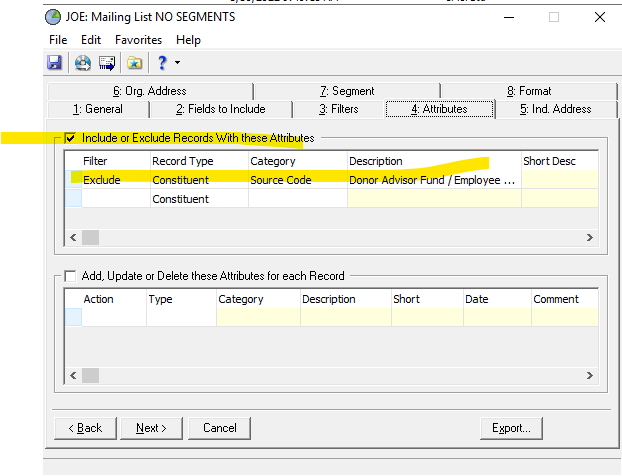
For all you folks that get excited about some of the new features, like the Recognition Program, have you even tested it out (right now they only have Legacy Recognition). I tested it and while you can choose certain things, including soft credit to Donors or Soft Credit Recipient or Both (which both you would need to choose to capture hard credits from DAVF and the donor), there is no exclusion like attributes, where you can, at least for us, remove a source attribute of Donor Advisor Fund. So you will have a recognition of Legacy for DAVF. And you cannot report off of this or query off of it as well, since Recognition is just a tile in RE NXT to just view. If you choose Donor, you just have the DAVF (the hard credit). If you choose Soft-Credit Recipient (you may get the spouse and not the main person or the employee and not the ORG, So you want to choose Both, but you do not want a DAVF to have the recognition, just the donor who was soft credited.
This needs to be thought out more.
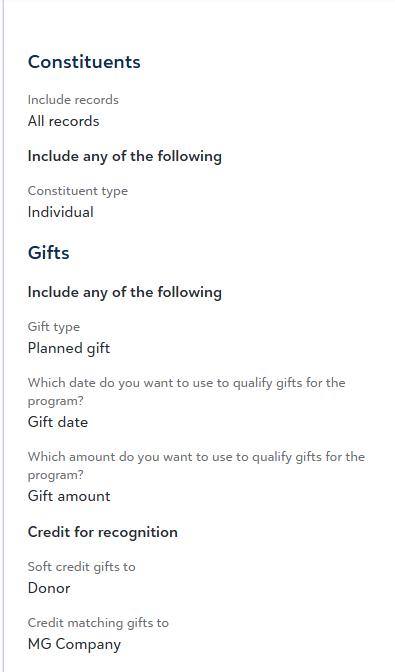
In Database view, you can remove such items like in RE Mail or Query:
RE MAIL:
Query:
 0
0 -
I appreciate that I can now see account numbers in web view, but some of my colleagues are frustrated by no longer being able to just click on a fund record and see the total gifts to that fund. With these changes, you now have to add a goal for each fund in order to see a total of all gifts to this fund. This is especially troublesome for legacy funds where there was no goal set, or funds where a goal was already met at the time of creation. Is there any way to see all cumulative gifts to the fund under the "Gifts" tab by default?
0 -
This doesn't answer my question. I'm not trying to do anything to extend RENXT. I'm trying to use the functionality that was announced in this post.
1






















Categories
- All Categories
- New Impact Edge Community TEST
- New YourCause Community TEST
- New SKY Community TEST
- New Grantmaking TEST Community
- New Altru Test Community
- New bbcon Community - TEST
- 12 Blackbaud Agents for Good™
- New Raiser's Edge NXT Community
- 8 Blackbaud Community Help
- 221 bbcon®
- 1.4K Blackbaud Altru®
- 410 Blackbaud Award Management™ and Blackbaud Stewardship Management™
- 1.2K Blackbaud CRM™ and Blackbaud Internet Solutions™
- 16 donorCentrics®
- 361 Blackbaud eTapestry®
- 2.7K Blackbaud Financial Edge NXT®
- 686 Blackbaud Grantmaking™
- 603 Blackbaud Education Management Solutions for Higher Education
- 3.3K Blackbaud Education Management Solutions for K-12 Schools
- 953 Blackbaud Luminate Online® and Blackbaud TeamRaiser®
- 85 JustGiving® from Blackbaud®
- 7K Blackbaud Raiser's Edge NXT®
- 4K SKY Developer
- 257 ResearchPoint™
- 123 Blackbaud Tuition Management™
- 165 Organizational Best Practices
- 247 Member Lounge (Just for Fun)
- 40 Blackbaud Community Challenges
- 37 PowerUp Challenges
- 3 (Closed) PowerUp Challenge: Grid View Batch
- 3 (Closed) PowerUp Challenge: Chat for Blackbaud AI
- 3 (Closed) PowerUp Challenge: Data Health
- 3 (Closed) Raiser's Edge NXT PowerUp Challenge: Product Update Briefing
- 3 (Closed) Raiser's Edge NXT PowerUp Challenge: Standard Reports+
- 3 (Closed) Raiser's Edge NXT PowerUp Challenge: Email Marketing
- 3 (Closed) Raiser's Edge NXT PowerUp Challenge: Gift Management
- 4 (Closed) Raiser's Edge NXT PowerUp Challenge: Event Management
- 3 (Closed) Raiser's Edge NXT PowerUp Challenge: Home Page
- 4 (Closed) Raiser's Edge NXT PowerUp Challenge: Standard Reports
- 4 (Closed) Raiser's Edge NXT PowerUp Challenge: Query
- 828 Community News
- 3.1K Jobs Board
- 57 Blackbaud SKY® Reporting Announcements
- 47 Blackbaud CRM Higher Ed Product Advisory Group (HE PAG)
- 19 Blackbaud CRM Product Advisory Group (BBCRM PAG)