InsideTrack Scoop: The Future of Constituent Data—Smarter Records, Healthier Data





The InsideTrack to the Unified View for Blackbaud Raiser’s Edge NXT® webinar series is designed to give you clear, reliable updates from our product management team that help you plan and adapt your processes to use current web viewfeatures.
Our July InsideTrack session focused on constituent record refresh and data health updates including Address Accelerator. While we couldn’t address every question during the live discussion, we’ve gathered the most common ones to keep you informed and ready.
Constituent Record Refresh
Release Timing
What is the confirmed release timeline and opt-in process for tabbed constituents in the unified view?
We’re planning to start early adoption in late August or early September, with a broader release expected in September-October. Solution administrators can choose the timing that works best for their organization. We will introduce this feature gradually, rolling it out in waves to ensure a smooth transition for all users.
What user-level customization will be available for tabs, tiles, columns, default tabs, and display order?
The Personal Information tile on the Overview tab will be fully customizable per user. You’ll be able to move tiles within each tab, while new list tabs (actions, gifts, attachments, notes) will offer filtering and searching just like other lists.
Will regional or specialized needs be addressed, including Canadian release timing, UK Gift Aid/vouchers, non-US addresses, and GDPR questions?
The tabbed constituent view will feature all options available today and account for regional differences.
Will users be able to keep their current view?
Everyone will use the new view, giving you access to updated features.
Tabbed View, Navigation and Customization
How will the tabs appear on a small screen?
On smaller screens, dropdown menus will replace horizontal tabs for easier navigation.
Will I be able to customize the order of tabs?
The option to customize the tab order will not be available during the initial release.
Will the new tabs have checkmarks?
The new tabs will have checkmarks. 😊
Will web view reduce clicks, improve speed, and make high-use data like contact info, ID, fundraiser, and giving summaries visible at a glance?
Yes.
Record Content and Relationships
Where will custom fields, attributes, major gift/prospect management, relationships, schools, opportunities, and gift aid declarations live?
- Biographical tab: Custom fields/attributes, relationships, education
- Prospect management tab: Opportunities, prospect management
- Giving tab: Gift aid declarations
Will relationships and non-constituent records be improved, including linked relationships and relationship-address handling?
Improvements are coming to relationships, including custom fields, ability to view all relationships, and viewing reciprocal relationships.
Relationship addresses will be enhanced in the same way as constituent addresses with the tabbed constituent release.
Security, Fields and Migration
Can admins set organization-level tab, tile, field, and personal-information defaults for all users?
This is currently not planned.
What is the migration path for social security number/employee IDs, aliases, renamed fields, and alternate ID use cases?
The SSN/SIN field will be brought into web view as an Alternate ID field. Existing values will automatically populate from the database view, and it will respect Personal Information permissions. Renamed fields won’t transition to web view at this time.
Operations, Integrations and Partners
How will plug-ins and partner tools such as ImportOmatic, Importacular, Omatic Cloud, Luminate Online, Papersave, and marketplace apps appear in the new Constituent experience?
By default, partner tiles appear on the Add-ins tab.
Will contact information include source fields, comments/notes, last-updated dates, and separate query tables for email/phone/address?
There are no plans today to change the current structure of phones within the Query tree. Once backward compatibility with database view queries is no longer required, modifying this structure will become more feasible. We recommend adding this idea to the Idea Bank. The other fields are planned for constituents, but not part of the initial tabbed constituent release.
Address Accelerator and Data Health
How do I access Address Accelerator in web view?
If you have the Address Accelerator entitlement enabled, the new Address Accelerator tile will appear on your Data Health page.
How will Address Accelerator differ from Address Finder, and will it be included for current users?
Address Finder helps users find and enter addresses, while Address Accelerator focuses on improving the quality of addresses that are already stored in your database.
Address Accelerator is a data hygiene tool designed to validate, standardize, certify, and update existing addresses in bulk to help improve mailing accuracy and deliverability. It is intended for ongoing database maintenance and large-scale address cleanup workflows.
Address Accelerator will continue to be available as an optional Data Health add-on. If you already have Address Accelerator today, you'll retain access to the functionality when it's brought to web view and is surfaced as a new tile on the Data Health page.
How will Address Accelerator handle updates: inline validation, batch/workflow, add vs. overwrite, and repeated runs?
The Address Accelerator workflow in web view will handle these updates just as they do in database view today. The initial release will focus on the batch address hygiene workflow. Users will be able to run an Updated Address Report to identify addresses that may need attention and then run Validate Addresses to validate and update addresses in bulk for all records, selected records, or individual records.
Add vs overwrite is a selection option prior to running the validate addresses workflow.
Repeated runs are also accepted.
Which regions will have access to Address Accelerator first?
Availability will begin with a United Kingdom and Europe followed by North American and Australia.
Will Address Accelerator support counties, international addresses, USPS standards, source fields, and problem cases like apartment/unit changes?
Yes.
Will I be able to validate a single address from a constituent record?
Not during the initial release, but constituent-level validation is planned.
Learn More
For a deeper look you can watch the session recording: InsideTrack to the Unified View-The Future of Constituent Data: Smarter Records, Healthier Data.
Don’t miss August’s InsideTrack session on Smarter Online Giving: Membership Forms and Donation Recovery.
Comments
-
I can't wait for Address Accelerator! 🤩
🎉Kudos to @Danielle VanHorn and team for developing this!🎉
One of the best things about Address Accelerator is the ability to query on the Custom Fields (Attributes) so that I can exclude addresses which I know are not deliverable due to things like Failed DPV because of invalid required secondary when pulling lists for direct mail, newsletters, or a magazine.
Maybe Danielle can speak to the following:
1) When will Address Custom Fields (Attributes) will be available in WebView?
2) Is it safe to assume that we will be able to query and export the Address Custom Fields?
3) Will Address Finder move to a model where Custom Fields will be added directly to the address so that we can query as needed on them?
🎉Thanks much for bringing this important and much loved tool to the WebView! 🎉1 -
I am hopeful that the redesign will result in faster-loading pages and more accessible information without so many clicks, so am looking forward to seeing the redesign.
Curious to watch this statement - "The Personal Information tile on the Overview tab will be fully customizable per user" - because I feel like I have heard differently in some other webinars / presentations. To me, "fully customizable" means I can put anything on that tile, but I may be mixing this up with a default tab that was mentioned before. Will there still be a default tab, and what will be included on that? Can users declare their own default tab?
I am also very pleased to see the idea below, but have a follow-up question:
What is the migration path for social security number/employee IDs, aliases, renamed fields, and alternate ID use cases?
The SSN/SIN field will be brought into web view as an Alternate ID field. Existing values will automatically populate from the database view, and it will respect Personal Information permissions. Renamed fields won’t transition to web view at this time.
One of the reasons why the SSN field works so well as an alternate ID is that you can look up records using it, and can - sometimes more importantly - use it as an ID when using import to update and add data. I know that import for webview is in the very early stages of development, but will users have the ability to use it for lookups and imports?
2 -
What does it mean to "have the Address Accelerator entitlement enabled"? Where/how would we do that, or check if it is done?
0 -
You could check your contract. But here is a way to manually check if you have it:
You do not need an unlock code if you are hosted, but you will need to set the path for the file as outlined in the Knowledge Base Solution. Then, if you go to an address in DBV and click the envelope icon on either the constituent record or the address record it will validate the address and update County along with a few other fields.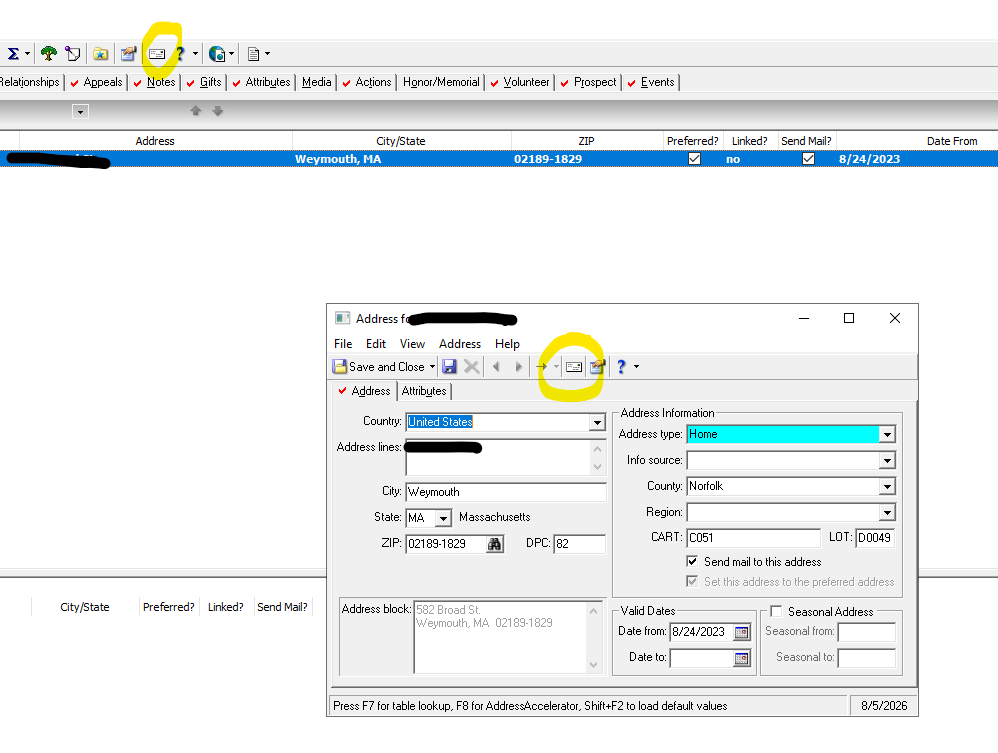 3
3 -
Love to see the support and enthusiasm for Address Accelerator! 😍
1) When will Address Custom Fields (Attributes) be available in Web View? You'll be able to add Address Custom Fields through the Address Accelerator Validate Addresses workflow. It’s also planned work for Q4 to be able to manually add address custom fields to addresses from the address tile.
2) Is it safe to assume that we will be able to query and export Address Custom Fields? Yes. Address Custom Fields can be queried on today and will be available for export.3) Will Address Finder move to a model where Custom Fields are added directly to the address so they can be queried as needed? The ability to add custom fields directly to address records as part of Address Finder is not currently planned but we'll keep that under consideration for future enhancements.
2 -
@Danielle VanHorn - can you speak to when the County field will be available? Will that be coming BEFORE Address Accelerator? Or is that a field which will be surfaced in webview prior to the release of Address Accelerator.
There are many folks who are hoping the field can be available sooner so they don't have to wait for Address Accelerator.0












Categories
- All Categories
- New K-12 Community Home (TEST)
- New Higher Education Home Page (Test)
- New Impact Edge Community TEST
- New YourCause Community TEST
- New SKY Community TEST
- New Grantmaking TEST Community
- New Altru Test Community
- New bbcon Community - TEST
- 12 Blackbaud Agents for Good™
- New Raiser's Edge NXT Community
- 8 Blackbaud Community Help
- 222 bbcon®
- 1.4K Blackbaud Altru®
- 410 Blackbaud Award Management™ and Blackbaud Stewardship Management™
- 1.2K Blackbaud CRM™ and Blackbaud Internet Solutions™
- 16 donorCentrics®
- 361 Blackbaud eTapestry®
- 2.7K Blackbaud Financial Edge NXT®
- 687 Blackbaud Grantmaking™
- 604 Blackbaud Education Management Solutions for Higher Education
- 3.3K Blackbaud Education Management Solutions for K-12 Schools
- 954 Blackbaud Luminate Online® and Blackbaud TeamRaiser®
- 85 JustGiving® from Blackbaud®
- 7K Blackbaud Raiser's Edge NXT®
- 4K SKY Developer
- 258 ResearchPoint™
- 123 Blackbaud Tuition Management™
- 165 Organizational Best Practices
- 248 Member Lounge (Just for Fun)
- 40 Blackbaud Community Challenges
- 37 PowerUp Challenges
- 3 (Closed) PowerUp Challenge: Grid View Batch
- 3 (Closed) PowerUp Challenge: Chat for Blackbaud AI
- 3 (Closed) PowerUp Challenge: Data Health
- 3 (Closed) Raiser's Edge NXT PowerUp Challenge: Product Update Briefing
- 3 (Closed) Raiser's Edge NXT PowerUp Challenge: Standard Reports+
- 3 (Closed) Raiser's Edge NXT PowerUp Challenge: Email Marketing
- 3 (Closed) Raiser's Edge NXT PowerUp Challenge: Gift Management
- 4 (Closed) Raiser's Edge NXT PowerUp Challenge: Event Management
- 3 (Closed) Raiser's Edge NXT PowerUp Challenge: Home Page
- 4 (Closed) Raiser's Edge NXT PowerUp Challenge: Standard Reports
- 4 (Closed) Raiser's Edge NXT PowerUp Challenge: Query
- 829 Community News
- 3.1K Jobs Board
- 57 Blackbaud SKY® Reporting Announcements
- 47 Blackbaud CRM Higher Ed Product Advisory Group (HE PAG)
- 19 Blackbaud CRM Product Advisory Group (BBCRM PAG)