Here are the latest changes in Blackbaud Raiser's Edge NXT for August 11, 2026.
Gift Processing
Configure journal references in web view
Configure custom journal reference field names and lengths directly from Post gifts settings. These settings are applied during gift posting, making it easier to align posting workflows with your organization's accounting and export requirements.
Edit details on every gift record
You can now edit details on every gift record directly from web view, whatever its type or status. Select Gift details — previously Gift amount — to update the gift's amount, gift date, subtype, post status, post date, splits, and credits, without leaving the record. What you can update depends on the gift's status. Support for editing locked information through gift adjustments arrives in an upcoming release.
Standard Reports
Run the Past Due Report in web view
You can now run the Past Due Report in web view to see which pledge and recurring gift payments are past due as of a date you choose, grouped by the number of days overdue. As in database view, this report is found under Pledge and Recurring Gift Reports.
Online Engagement
Pre-fill gift amounts with URL parameters
To create a more personal experience and help donors get started with a suggested giving amount, you can now pass gift amounts directly through a donation form or webpage URL. To use a gift amount parameter, configure the applicable gift type on the donation form. Supported gift types include one-time gifts, recurring gifts, and pledge amounts. To make URL creation easier, use the link builder to generate the correct parameters automatically.
Query
Identify soft credits and matching gifts in query results
Add the Soft Credit/Matching Gift Flag field to Gift queries to identify how each result row relates to a soft credit or matching gift. When soft credit or matching gift processing options return multiple rows for the same gift, the flag identifies the purpose of each row, such as a matching gift company's pledge, a donor's matching gift payment, or a soft credit recipient.
Use the flag to interpret query results more easily when a single gift generates multiple records. It helps you validate query output, investigate unexpected results, and identify why each related record appears in query results.
Your existing queries continue to work without changes. Add the field with your soft credit and matching gift processing options to quickly distinguish related records and better understand how gifts are represented in query results.
Import ID and System Record ID added for query record types
You can now include Import ID and System Record ID in query results, which makes it easier to validate imported data, troubleshoot record issues, and match records across systems without opening other areas of Raiser's Edge NXT.
In web view, Import ID is available for applicable record types. Some Import ID fields are available only in web view queries.
System Record ID is available across fields and node locations in both single-row and multi-row query results. This provides a consistent way to identify records across query layouts and record locations. For example, you can include System Record ID in a query result to reference a unique identifier in another system. As with Import ID fields, some System Record ID fields are available only in web view queries.
Prospecting and Fundraising Intelligence
Prospect Insights Pro: use AI Chat to create Action Plans for Opportunities
(US only; premium feature)
Wherever you create an Opportunity, you can now launch Chat for Blackbaud AI to instantly generate a comprehensive action plan, no manual planning required. On the Optimized Opportunities modal, select the new Save and create an action plan button, and the chat opens with the opportunity already in context, and suggests an action plan of up to seven steps. You can converse with the AI to adjust the plan if the suggestions don't fit.
Note: If you haven't enabled Prospect Insights yet, go to Portfolio, Prospect Insights.
Agents for Good
Focus on the Development Agent communications that matter most
(US only; for those with Development Agent)
Upcoming messages are now grouped by engagement type, making it easier to identify and review the communications most important to your organization. View scheduled and unreviewed message counts for each engagement type, then preview messages, provide feedback, and approve messages individually or in bulk.
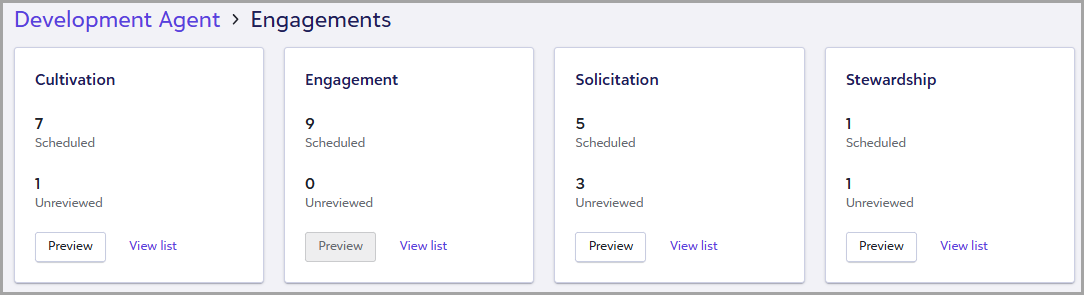
Note: Review notifications and Needs attention items for messages awaiting review no longer appear. Instead, review upcoming messages by engagement type to focus on the communications most important to your organization.