Since @Stacy Cope and I learned about the Microsoft Power Automate and Blackbaud’s Raiser’s Edge NXT connectors, we have gotten so excited about the possibilities. Over the past few months, we’ve responded to inquiries from literally hundreds of individuals at so many different nonprofit, faith-based, and educational organizations. With this post, we hope to provide a quick resource for some of the most frequently asked questions about getting started with Microsoft Power Automate (PA). In addition to generating acknowledgement letters, PA can save you time by automating other repetitive tasks (emailing major gift notifications to the Executive Director!) and adding processes to enhance productivity or donor stewardship (checking the database for duplicates or automatically assigning phone calls to fundraisers).
Here are a few of the most frequently asked questions we’ve seen about getting started.
Do I really need to pay for a Power Automate license? What if we already have Office 365?
A basic version of Power Automate is often included in Microsoft packages like Office 365, but an additional “per user” license is required to use Blackbaud’s premium connectors. This license can be purchased at TechSoup if you have Microsoft nonprofit status, or here if not. If you are not sure if you have the appropriate license, set up a simple flow using a Blackbaud connector and run or test the flow. If you have the correct license, it will run normally. If you do not, you will get a pop-up message telling you that you need to purchase a license or start a free trial before running the flow.
What resources are available?
Blackbaud has put together some really helpful resources for getting started with Power Automate. We reference these pages daily for documentation, resources, and ideas.
Some of the resources on this site include videos of a great training course called Accelerator 101, step-by-step instructions for setting up automatic acknowledgements, and the template showcase with some super useful flows created by other Blackbaud staff and customers that you can download and import into your Power Automate. Also be sure to check out the Microsoft Power Automate User Group hosted by the Blackbaud team, time set aside to bring your questions to the experts and share feedback with other users.
What do I need to do before importing a flow?
When importing flows, it’s helpful to set up all the connections to applications needed before importing the flow. In Power Automate you navigate to Data > Connections in the left navigation. Your list of established connections is there. If you need to add a new one, click the “New connection” button in the upper left, use the search in the upper right, select the application you wish to connect to, and follow the instructions to enter your credentials for that application.
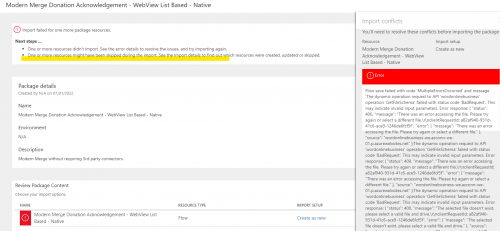
I’m getting an error and it won’t let me import a flow! What do I do?
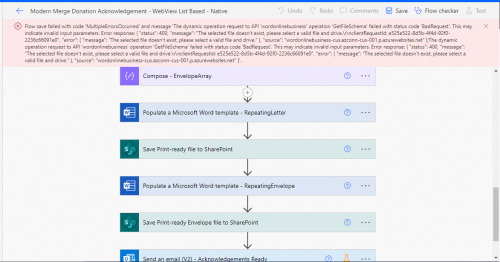
Occasionally when importing a flow you will get an error message indicating that the import failed. This can be corrected by clicking on the tiny “Save as a new flow” link in the error message.

Once you click the link, it will open the flow in edit mode but connections will be missing, indicated by the yellow caution icon. Click each of those actions, select the connections, and enter information specific to your organization, such as navigating to template documents. Once all connections are set up, you can save and run the flow.
Be sure to click on each action in the flow to expand it. Some action types contain more actions inside and there may be a connection that you miss if you don’t click each one.
When importing flows, always check for helpful information from the creator of the flow in a “README” step at the beginning of the flow!
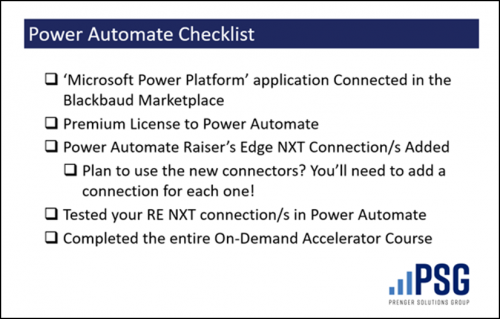
Here’s a checklist!
We’ll be sharing more practical guidance at #bbdevdays! Blackbaud Developers’ Conference June 3-5, 2025 will be an amazing time to learn from other Blackbaud customers and partners. All change architects are welcome! We hope to see you there!
Edits: Updated Office Hours link to new PA User Group & Updated bbdevdays dates/link. & The links to buy premium Power Automate licenses.