Reporting tab only showing one tab

Elaine Tucker
Community All-Star




Somehow my reporting tab in nxt is only showing one item at a time

if I click the down arrow next to actions I can select something else
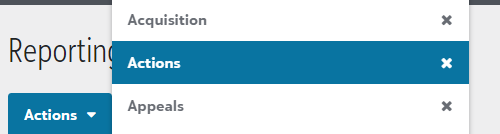
However, I can't get them to show across the screen like it "used to" (Not sure what happened to my settings)
I've been in contact with support, but everything they have told me is not working to show all the tabs across the screen like this (taken from a co-workers set up)


if I click the down arrow next to actions I can select something else

However, I can't get them to show across the screen like it "used to" (Not sure what happened to my settings)
I've been in contact with support, but everything they have told me is not working to show all the tabs across the screen like this (taken from a co-workers set up)

1
Comments
-
It's like it's acting like you've made your browser window small or something. Does zooming out to 50% and making everything small do anything?0
-
I actually just had this happen to myself a few days ago... Thankfully, it automatically reverted to the multiple tab view before too long without any actions of my own doing.0
-
Great question and sorry that you haven't received a helpful answer yet.
This is actually a design in the way that multiple tabs work. If you have say 1-6 reports open you will see these tabs spread across the window like you are use to. In the updated design for how these tabs work in NXT, once you have enough tabs to expand across the screen they then change to a drop down like you are seeing.
If you close some of your open reports (tabs) by hitting the X, you will eventually get to having a # of reports that can be supported on one row of tabs.
Hope that's helpful.
Blake4 -
Hi Elaine,
Like others above, this has happened to me before, and Blake is correct. Whether your tabs are show lined up across the top or gathered in a drop down is dependent on how wide your screen is. Did you recently set up a new computer monitor or adjusted your screen resolution?
As an example, I have an extra monitor and when I'm viewing Fundraising > Reports on that wide screen, I see them like:
When I disconnect my laptop (which has a smaller screen) from the external monitor I see them like:
One solution might be to adjust your screen resolution so that the tabs show across the top once more?
Hope this helps, and Happy Friday!
0 -
Shout out and a huge Thank you to Alyssa Nerio in support. She stuck with me until I understood what was happening; basically I had too many "reports" open, so if I clicked on the "x" next to some of the reports in the "drop down" list, that freed up enough room for the reports to show across the tab.
Blake Moody - exactly what you said, I just wasn't understanding the "x" part of the whole thing. ?.(color me embarrassed)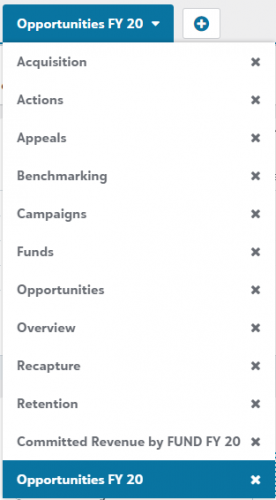 Click the "x" and it goes away from the drop down
1













Categories
- All Categories
- New YourCause Community TEST
- New SKY Community TEST
- New Grantmaking TEST Community
- New Altru Test Community
- New bbcon Community - TEST
- 12 Blackbaud Agents for Good™
- New Raiser's Edge NXT Community
- 7 Blackbaud Community Help
- 218 bbcon®
- 1.4K Blackbaud Altru®
- 409 Blackbaud Award Management™ and Blackbaud Stewardship Management™
- 1.2K Blackbaud CRM™ and Blackbaud Internet Solutions™
- 16 donorCentrics®
- 361 Blackbaud eTapestry®
- 2.7K Blackbaud Financial Edge NXT®
- 681 Blackbaud Grantmaking™
- 599 Blackbaud Education Management Solutions for Higher Education
- 3.3K Blackbaud Education Management Solutions for K-12 Schools
- 952 Blackbaud Luminate Online® and Blackbaud TeamRaiser®
- 85 JustGiving® from Blackbaud®
- 7K Blackbaud Raiser's Edge NXT®
- 3.9K SKY Developer
- 257 ResearchPoint™
- 123 Blackbaud Tuition Management™
- 165 Organizational Best Practices
- 247 Member Lounge (Just for Fun)
- 40 Blackbaud Community Challenges
- 37 PowerUp Challenges
- 3 (Closed) PowerUp Challenge: Grid View Batch
- 3 (Closed) PowerUp Challenge: Chat for Blackbaud AI
- 3 (Closed) PowerUp Challenge: Data Health
- 3 (Closed) Raiser's Edge NXT PowerUp Challenge: Product Update Briefing
- 3 (Closed) Raiser's Edge NXT PowerUp Challenge: Standard Reports+
- 3 (Closed) Raiser's Edge NXT PowerUp Challenge: Email Marketing
- 3 (Closed) Raiser's Edge NXT PowerUp Challenge: Gift Management
- 4 (Closed) Raiser's Edge NXT PowerUp Challenge: Event Management
- 3 (Closed) Raiser's Edge NXT PowerUp Challenge: Home Page
- 4 (Closed) Raiser's Edge NXT PowerUp Challenge: Standard Reports
- 4 (Closed) Raiser's Edge NXT PowerUp Challenge: Query
- 822 Community News
- 3.1K Jobs Board
- 57 Blackbaud SKY® Reporting Announcements
- 47 Blackbaud CRM Higher Ed Product Advisory Group (HE PAG)
- 19 Blackbaud CRM Product Advisory Group (BBCRM PAG)