Anyone Connecting Zoom to Assignments?
If it's school based - I know what to do. But if teachers have created individual accounts - can I still create a Zoom integration in Core? The connections would be per link?
My IT guys are under a lot of stress - and not very Blackbaud friendly to begin with - so I want to know that I'm asking for the right thing.
Wondering if anyone has connected with Zoom for their teachers.

Comments
-
I contacted Zoom support on this on Monday and they have not replied. In their documentation individual accounts do not have the LTI option available. If I hear anything I will post it back here.0
-
MJ Galat:
I contacted Zoom support on this on Monday and they have not replied. In their documentation individual accounts do not have the LTI option available. If I hear anything I will post it back here.Jackie Christensen - any clarification for us?
0 -
Hi There,
If your teachers are using personal accounts, then they'll just want to post their meeting links directly into any content type that supports Links. Assignments, Text, Link, Announcements, Events, etc. The benefit of this is you can minimize clicks if you put the Zoom link in the title of an Assignment. There is not a way for Teachers to hook up their individual accounts via LTI.
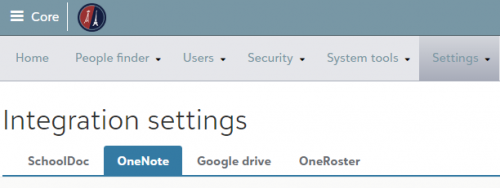
If you have a school account from Zoom you should be able to get LTI credentials from Zoom and Platform Managers can plug those credentials into Core > Settings > Integration Settings > Learning Tools. Then Teachers will see Zoom as an option in the Learning Tools drop down when creating an assignment. And students will see the Launch link from the Assignment detail. The benefit of this is it works as a single sign on into the Zoom account.
Here's the video referenced above that shows both approaches https://k12hub.blackbaud.com/coronavirus-resources/how-to-display-video-conference-links-in-blackbauds-lms
Hope that helps! But let me know if you still have questions.
Jackie1 -
Jackie Christensen:
Platform Managers can plug those credentials into Core > Settings > Integration Settings > Learning Tools.
Hope that helps! But let me know if you still have questions.
JackieHi Jackie I don't have Learning Tools as an option under Integration Settings? Also it seems like the different tabs in Integration Settings bounce between podium stuff and new stuff. The styling changes as you hop around?
0 -
Hi Jackie I don't have Learning Tools as an option under Integration Settings? Also it seems like the different tabs in Integration Settings bounce between podium stuff and new stuff. The styling changes as you hop around?
Hi Brian,
That was a weird one. I just updated your configuration and you should now see Learning Tools under Integration Settings.
Thanks!
Jackie2 -
Hi there. This is a good thread. Is there any way to connect a recurring Zoom link to a class section? I see that we can link them in assignments and topics, but what I really need is for the zoom link simply to be associated with a given class's meeting times.0
-
Hi! Christopher, did you ever figure this out? I've made our Zoom meetings recurring meetings with no set time and then the teachers can put those in as Class Events on the Bulletin Board and they show up in the calendar - which is great. But what would be even better is if we go to remote learning, the link is just in the schedule. I am not a fan of putting the Zoom in as an assignment...
Let me know if you found an alternative! Thanks!1 -
Thanks Tracey, that's helpful. I have not had a response, but would love one. It would be great to link a recurring meeting to a given class section. I would also like to be able to have the zoom recordings from each day land on the class pages somewhere without having to manually post them every day. Please let me know if you find out anything else, and I will do the same. Cheers! Chris1
Categories
- All Categories
- 6 Blackbaud Community Help
- 210 bbcon®
- 1.4K Blackbaud Altru®
- 395 Blackbaud Award Management™ and Blackbaud Stewardship Management™
- 1.1K Blackbaud CRM™ and Blackbaud Internet Solutions™
- 15 donorCentrics®
- 360 Blackbaud eTapestry®
- 2.5K Blackbaud Financial Edge NXT®
- 649 Blackbaud Grantmaking™
- 567 Blackbaud Education Management Solutions for Higher Education
- 3.2K Blackbaud Education Management Solutions for K-12 Schools
- 937 Blackbaud Luminate Online® and Blackbaud TeamRaiser®
- 84 JustGiving® from Blackbaud®
- 6.5K Blackbaud Raiser's Edge NXT®
- 3.7K SKY Developer
- 247 ResearchPoint™
- 119 Blackbaud Tuition Management™
- 165 Organizational Best Practices
- 239 The Tap (Just for Fun)
- 33 Blackbaud Community Challenges
- 31 PowerUp Challenges
- 3 (Open) PowerUp Challenge: Data Health
- 3 (Closed) Raiser's Edge NXT PowerUp Challenge: Product Update Briefing
- 3 (Closed) Raiser's Edge NXT PowerUp Challenge: Standard Reports+
- 3 (Closed) Raiser's Edge NXT PowerUp Challenge: Email Marketing
- 3 (Closed) Raiser's Edge NXT PowerUp Challenge: Gift Management
- 4 (Closed) Raiser's Edge NXT PowerUp Challenge: Event Management
- 3 (Closed) Raiser's Edge NXT PowerUp Challenge: Home Page
- 4 (Closed) Raiser's Edge NXT PowerUp Challenge: Standard Reports
- 4 (Closed) Raiser's Edge NXT PowerUp Challenge: Query
- 785 Community News
- 2.9K Jobs Board
- 53 Blackbaud SKY® Reporting Announcements
- 47 Blackbaud CRM Higher Ed Product Advisory Group (HE PAG)
- 19 Blackbaud CRM Product Advisory Group (BBCRM PAG)