My Community
YourCause®
Impact Edge™
All-Star Lounge
Member Lounge (Just for Fun)
Community News
Community Manager
Groups
Browse Products
Members
Community All-Stars
Monthly Challenges
Member Search
Jobs Board
Help
Using the Blackbaud Community
Blackbaud Support
Knowledgebase
Blackbaud University
Discussions
Categories
Groups
Home
Blackbaud CRM™ and Blackbaud Internet Solutions™
Blackbaud CRM™ General Discussions
How do you group constituent records?
David Wanless
Hi everyone,
One of our major donor team asked me recently how we could group all donors who have been engaged around an ask to give for a campaign so that we can easily identify them all for impact reporting, communication and reporting? We may use the group to select people for event invitations, to send them updates on a campaign, or to report on their donations. We may want to write notes about what treatment the group has had. When we’re clearly engaging with the people, we can then add a Prospect Plan. We may also want to remove people from a group.
We may want to do this for multiple campaigns at a time.
The following possibilities have occurred to me: Interest codes (not my preference), Research lists (although some donors will be organisations, so I don't think Research Lists would work), Queries, Constituencies (I suspect a group is too temporary and low level to use this), Plans, Philanthropic interests, Interactions, Constituent Attributes, Flagged Prospect (but I think this works only for an individual staff member so is not useful for this purpose) or a Constituent of type Group.
The most attractive options so far seem to be an Attribute or a Group.
If you've tried doing this, which options have you tried and how well did it work?
Kind regards,
David.
{Ref: CRMSUPP-5077}
Find more posts tagged with
Comments
Michael Simion
Hi David,
The constituent group type sounds like it might give you the flexibility you're looking for. One thing I really like is that you can track historical group membership by setting start/end dates for the individual constituents (members) and assign roles. You'll also see this group membership information on each individual's constituent record. In addition, since groups act like its own constituent, you already have a nicely laid out interface to work with if you wanted to easily add some customizations or reports that target groups of this particular type (new tabs, summaries, tiles, etc).
Brian Soucie
Hi David,
In addition to the good suggestions already provided, a recognition program could also work as it's intended purpose is to group donors together. You can add and remove people manually from the program and then use the program members to feed into selections for communications, event invites, etc. I've played around with the idea of using the recognition program to identify a group of donors who will be stewarded collectively and then using the stewardship plan functionality as a way of tracking the engagement since it has the ability to add steps in bulk to a selection and because you can link those steps to events or comms already in the system. I haven't used it beyond testing so don't know if it works in practice!
Cheers,
Brian
David Wanless
Thanks, Brian and Michael.
Groups would certainly work, but I'm experimenting with Recognition Programs. Brian, how did you go with them? Is it possible to import them or globally add them to Constituent records? It seems to me that the Recognition Processes only work for new revenue, not existing revenue. We won't be solely basing our groups on revenue, but that would be one important way of someone getting into a group.
Ciao,
David.
Rick Root
I think we do a lot of this with a customization called "Special Codes".
Unfortunately, the way it was built doesn't allow us to have date ranges, but nobody has been desperate enough to ask me to expand it. We use special codes so heavily, it would be quite an undertaking to deal with all the queries!!
Basically, our Special Codes are a short character code (like "EWP") and a description ("Emerging Wealth Prospect"), so it doesn't use a regular CRM code table spec... and then there's a CONSTITUENTSPECIALCODES table... each constituent can have multiple special codes.
I do like the idea of using constituent groups though. I could automate the population of certain special codes that have been converted to constituent groups through a nightly process, which would prevent me from having to modify a ton of queries....
Liz Hackett
Hi
David Wanless
Just to throw another option into the mix and I only discovered this function this week!
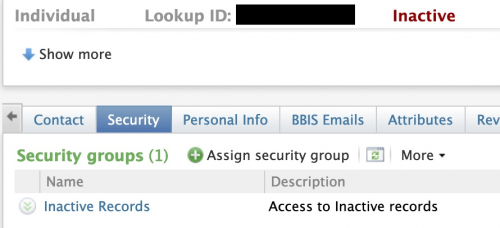
Security groups. They are mainly used to restrict who can see what record. For instance, if you had famous people on the crm and only certain staff should see their details, you can set up a query, pull them into a selection and add them to a security group. Then on the user security record, you can give access to all records, those with or those without security groups and which groups.
It's not really for the purpose you're suggesting and we would probably use an attribute in your circumstance, but I thought I'd throw it into the mix
Cheers, Liz
Brian Soucie
Hi David,
Unfortunately, I left my last role before I could move this beyond testing. In my new position, we're in the middle of BBCRM implementation and will not be looking at recognition programs until after we go live. However, I believe you can assign the members of a program based on a selection so there shouldn't be an issue with including historical donors.
Cheers,
Brian
Lois Smith
Recognition Programs operate, apparently on yearly giving, which doesn't work for us. BrightVine created a custom global change for us that would assign a recognition program based on a selection. Talk to them to find out more.
Ellen Morrissey
We wrote a Global Change that will assign a recognition program based on a selection. It was the only way to make our 5-year rolling recognition program work in CRM. It runs every week on a schedule. We have another for a situation similar to what you are talking about here, where it's top prospects for Athletics. We load them into an Import Selection, and use that in the Global Change to assign the recognition program. This one is populated annually.
Quick Links
All Categories
Recent Posts
Activity
Unanswered
Groups
Help
Best Of