Can You Have Multiple TeamRaiser Events with Different Layouts?



Hey guys! My organization is new to TeamRaiser. We are in the process of getting help setting up with our first TeamRaiser event.
In the future when we would like to have multiple events happening at the same time each utilizing a different TeamRaiser page, can they each have a unique layout?
I am mostly focusing on the components of the navigation tabs & their connections, the call to action buttons, slideshow images items, etc.
Thanks everyone for your help. Let me know if you need me to go into more detail.
In the future when we would like to have multiple events happening at the same time each utilizing a different TeamRaiser page, can they each have a unique layout?
I am mostly focusing on the components of the navigation tabs & their connections, the call to action buttons, slideshow images items, etc.
Thanks everyone for your help. Let me know if you need me to go into more detail.
Tagged:
0
Comments
-
You can! You'll very likely need a new PageWrapper, the template that typically stores the header/footer, navigation and look/feel of each page of your TeamRaiser event.3
-
Hi, Daniel. Congrats on joining the TeamRaiser family! The short answer is, yes, you can have multiple TeamRaisers live at the same time... and they each can have a completely different/unique look and feel. That includes any navigation, call to action buttons, and slideshows. This can be controlled in the Page Wrapper... but also somewhat in each TeamRaiser as well. It'll all make more sense once you dig in further on your first build out... and start to understand the relationship between the Page Wrappers and the TeamRaisers. - Jon
--
Jon Reich * Partner * Cathexis Partners * jon@cathexispartners.com * p.605.377.8147 1
1 -
Derek beat me to it!
 1
1 -
Thanks for reaching out Jon and Derek! When you refer to the Page Wrapper, would that be found in PageBuilder or on TR's step 13 for Customize Pages substep?0
-
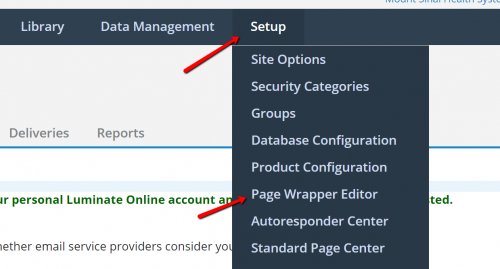
PageBuilder is where you can create actual page content, but the overall design (header/footer/nav/etc) is controlled higher up in the Page Wrapper. You can edit this (if you have proper Admin permissions) under Setup. See below. It's typically associated with the TeamRaiser based on the Security Category assigned... but if you do go to that Step 13. for Customize Page, you'll see at the very bottom of that left side nav under Related Actions, there is a way to override the default Security Category wrapper. Hope that helps. It can be a bit confusing at first, but once you get your head wrapped around the pieces and where they live, it's not too bad. - Jon
 0
0 -
Hey, thank you for your help!
I'm working with Daniel on this, and your advice helped but we're hitting some more roadblocks... I finally have access to the Page Wrapper Editor, and it's all starting to make sense. But our issue is we want to modify the slideshow component in our TeamRaiser.
Inside the Page Wrapper Editor, I see that I can select different components to include in the Page Wrapper. By default, our wrapper has the slideshow component called "reus_Teamraiser_slideshow_TR_2020". So that we wouldn't modify the slideshow for every TeamRaiser, we copied it into a new one called "Trek4Missions_reus_Teamraiser_slideshow_TR_2020" and we made the changes we need to that one.
Now inside the Page Wrapper Editor, I'm trying to update it so it points to Trek4Missions_reus_Teamraiser_slideshow_TR_2020 rather than reus_Teamraiser_slideshow_TR_2020. When I go into the HTML view and simply update the name of the component, nothing happens - I don't have an option to save it, and when I leave the page and come back to the HTML Body section of the Page Wrapper Editor, it reverts back to reus_Teamraiser_slideshow_TR_2020. From the WYSIWYG view, I click the Components button, and from there I can navigate to Content > Reusable Page and there I see all the reusable pages - but not the custom one we created. How can I add a custom page component to our page wrapper?
Sorry if that was a confusing description, but hopefully it made sense - and let me know if you need me to clarify anything. Thanks again for your help!0 -
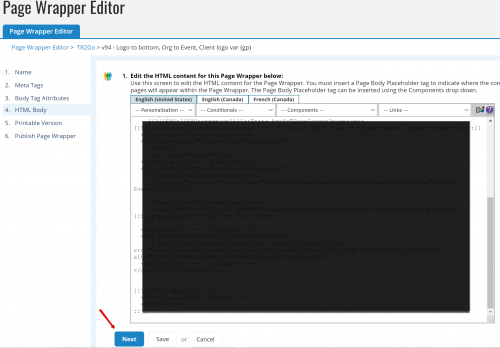
Hi, Nicholas. It sounds like you're on the right path, but odd that you're not able to save the changes to the Page Wrapper. At the bottom of the editor, there should be a "Next" and "Save" button (maybe it's just hidden off the bottom of your screen view?). See my screenshot below. Once you save this version, you will then need to make sure you publish it (so the new version is the "live" wrapper). There's a little nuance that can sometimes cause an issue, where a draft wrapper that is "Previewed" will stick in the browser, even if not live. So if you're not seeing the live changes, maybe just try to "Preview" the new version to see if you can force your browser to use it (or test the live site in another browser). Hope that helps. - Jon
--
Jon Reich * Partner * Cathexis Partners * jon@cathexispartners.com * p.605.377.8147 0 -
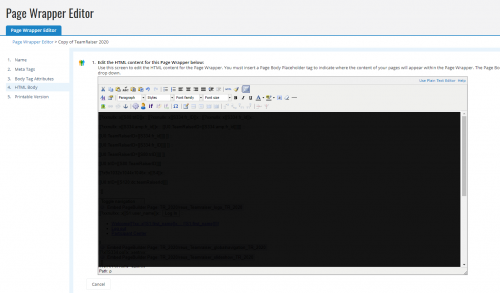
Thanks for the quick reply Jon! Yeah, your screenshot is exactly what I was expecting to see, but attached is a screenshot of what I actually see - with no Next or Save buttons, only Cancel. Let me know if you have any ideas as to how I can get them to appear.
0 -
Hi, Nicholas. Ahhh.. I believe the problem is that you're trying to edit the Active Version. That isn't allowed. So, instead of clicking on "View Active Version," you'll want to click on "Manage Versions"... and then copy the active version (or unpublish it if you'd like you edit it). Hope that does the trick! - Jon
--
Jon Reich * Partner * Cathexis Partners * jon@cathexispartners.com * p.605.377.8147 1









Categories
- All Categories
- 6 Blackbaud Community Help
- 211 bbcon®
- 1.4K Blackbaud Altru®
- 403 Blackbaud Award Management™ and Blackbaud Stewardship Management™
- 1.2K Blackbaud CRM™ and Blackbaud Internet Solutions™
- 16 donorCentrics®
- 360 Blackbaud eTapestry®
- 2.6K Blackbaud Financial Edge NXT®
- 661 Blackbaud Grantmaking™
- 581 Blackbaud Education Management Solutions for Higher Education
- 3.2K Blackbaud Education Management Solutions for K-12 Schools
- 944 Blackbaud Luminate Online® and Blackbaud TeamRaiser®
- 84 JustGiving® from Blackbaud®
- 6.7K Blackbaud Raiser's Edge NXT®
- 3.8K SKY Developer
- 250 ResearchPoint™
- 120 Blackbaud Tuition Management™
- 165 Organizational Best Practices
- 242 Member Lounge (Just for Fun)
- 37 Blackbaud Community Challenges
- 37 PowerUp Challenges
- 3 (Closed) PowerUp Challenge: Grid View Batch
- 3 (Closed) PowerUp Challenge: Chat for Blackbaud AI
- 3 (Closed) PowerUp Challenge: Data Health
- 3 (Closed) Raiser's Edge NXT PowerUp Challenge: Product Update Briefing
- 3 (Closed) Raiser's Edge NXT PowerUp Challenge: Standard Reports+
- 3 (Closed) Raiser's Edge NXT PowerUp Challenge: Email Marketing
- 3 (Closed) Raiser's Edge NXT PowerUp Challenge: Gift Management
- 4 (Closed) Raiser's Edge NXT PowerUp Challenge: Event Management
- 3 (Closed) Raiser's Edge NXT PowerUp Challenge: Home Page
- 4 (Closed) Raiser's Edge NXT PowerUp Challenge: Standard Reports
- 4 (Closed) Raiser's Edge NXT PowerUp Challenge: Query
- 802 Community News
- 3K Jobs Board
- 56 Blackbaud SKY® Reporting Announcements
- 47 Blackbaud CRM Higher Ed Product Advisory Group (HE PAG)
- 19 Blackbaud CRM Product Advisory Group (BBCRM PAG)