My Community
YourCause®
Impact Edge™
All-Star Lounge
Member Lounge (Just for Fun)
Community News
Community Manager
Groups
Browse Products
Members
Community All-Stars
Monthly Challenges
Member Search
Jobs Board
Help
Using the Blackbaud Community
Blackbaud Support
Knowledgebase
Blackbaud University
Discussions
Categories
Groups
Home
Blackbaud Education Management Solutions for K-12 Schools
Blackbaud K–12 Education Solutions™ General Discussions
Are Worklists Going Away in Enrollment Management?
Sylvie Andrews
Hi all, desperately combing the release notes and posts here to try to figure out where I saw news that Worklists might be going away? And that we would be encouraged to use Candidate Lists, instead? Or do I have that backwards?
Someone please point me in the right direction-- we are trying to plan...
Find more posts tagged with
Comments
Sarah Bienvenue
Hi Sylvie, worklists will be going away and we are encouraging our admissions managers to make use of the candidate list. If you run into any filters or columns that you need for your candidate lists please let me know.
thank you,
Sarah
Angie Stalquist
Hi Sarah,
Do you have a timeline on when they will disappear?
Thank you!
Angie
Sylvie Andrews
Thanks Sarah!
Sorry if I've missed something, but our school relies heavily on Worklists to be able to send our admissions decisions! (We use the Compose Official Note button on the Worklist to send an Official Note & Email to those accepted, etc).
I know that's not how most schools do it but we don't use the Decisions tab and greatly prefer sending these emails. We philosophically didn't want the dopamine-hit, keep-refreshing-the-Decisions-tab-on-decisions-day effect for our applicants-- email just seemed a little more personal.
If Worklists go away, is there some other bulk-official-notes tool?
Sarah Bienvenue
Hi Sylvie, we have feature parity with the candidate list, so you'll still be able to pull by decision and bulk send an official note. Take a spin around candidate lists, I think you'll find they're similar and in some cases offer more than the worklists.
Angie- to answer your question, we'll be removing them from the navigation by the end of August, you'll still be able to access them from the candidate list, but will no longer see them in the drop down. We'll pull all access toward the end of September.
thank you,
Sarah
Angie Stalquist
Thank you Sarah for the information and the clarification on where the worklists will be moved to! What a big help. Have a great day!
Sarah Bienvenue
Hi Corrine, we will remove access from the regular navigation on September 2nd, at that point the only way to access the worklists will be from a link on the candidate list. We will remove all access to the worklists on September 29th. Unfortunately we cannot move this time line, as we have been communicating that this change would happen for several months. I understand that this will be a potentially disruptive change, hopefully this advanced notice and having both sets of lists available, is enough time for our users to make the switch. Please let me know if you run into any additional columns or filters they feel might be missing from the candidate list so that we can make it as smooth a transition as possible. I will make sure to post here in the community with additional help documentation as well. Let me know if there is anything in addition to the above that I can do to help with this change.
thank you,
Sarah Bienvenue
Sandra Ross
Thanks Sarah, in worklists we could narrow down candidates
by country and/or state
but I'm not finding that option in Candidate List. Will it be added before September?
Thanks!
Sandra Ross
One more field on the worklist but not on checklist - Educational Support. Could not find it as a filter on the Candidate list and it is very useful to isolate those who are marked yes on their record.
Thanks!
Sylvie Andrews
Sarah, when you say there will be "feature parity" between what has been available in Worklists and what we can do in Candidates lists, the "feature" I'm most interested is a "Compose Official Notes" button, in the Candidates list, which will let you start drafting an Official Note to anyone in the Candidate list I've filtered.
Where is that button?
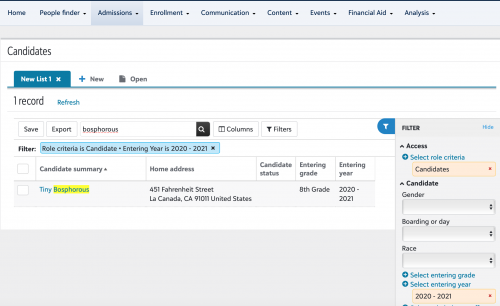
Screenshot of Candidate lists as they currently appear:
Screenshot of Worklist list (which we currently use to send Official Notes to all accepted candidates):
Sarah Bienvenue
Hi Sandra- we'll work on getting those added. Thanks for the feedback!
Hi Sylvie- in order for those bulk options to appear you have to select at least one user on the list. They will then show on the bottom.
Kathy Steinman
We use worklists to send Official Notes to people that attended admission events because we've never been able to figure out where else we can pull a clean list of admission event attendees to whom we want to send an Official Notes. Specifically we're interested in sending an Official Note to those people that
attended
an event.
Hoping someone might be able to suggest a solution for easily communicating with families that attend events before worklists disappear.
Thanks in advance!
Kathy
Sarah Bienvenue
Hi Kathy, good catch! We show them in the visits interviews and events list, but there's not bulk send option. We'll work on getting these added to the candidate list.
thanks,
Sarah
Kathy Steinman
Thanks - this is a fairly critical element of our process as we work very hard to give families a very personalized admission experience and one way we do that is after an event we send an Official Note to each attendee. We like using Official Notes because we can easily customize the message if we choose or we can send it as-is. For those that didn't attend we can easily send a 'sorry we missed you but join us for our next event' message. Arguably we could do something similar in Pushpage (we already have it set up) but of course we can't customize messages by family and it doesn't record the message sent to the Candidate's record so it's hard for the team to know what messages were sent. Official Notes are great because in a glance anyone on my team can see all the communications a family has received from us but as you know - for visits, interviews and events we can't send Official Notes.
Do you think it's possible that you will have that set up before pulling the plug on Worklists?
Thanks Sarah!
Kathy Jacquier
In the candidates list - candidate decision - please add "no decision" to the candidate decision types. In worklists we currently have a worklist called accepted-no candidate decision. We choose no decision so we can get a list of candidates accepted but haven't given us a decision yet. We use this list all the time! Please add "no decision" to the candidate decision types. Thank you!!
Rachael BellIrving
This is disappointing news.
Two questions for using Candidates/features to be added
1. Is it possible to delete a candidates list? i created a duplicate by accident and now i can't get rid of the old ones
2. is it possible to reorganize the order of the tabs? I notice every time i edit one it changes position, but it would helpful to keep our most used ones in the front.
Thank you
JT Amirault
To delete a candidate list head to
Enrollment management > Analysis > Manage lists
Find your list and click the tree dots to the left of the list name, then
Delete
For ordering, they show alphabetically ... i include a prefix to sort the ones I want to see the most at the top (a-NAME1, b-NAME2, c-NAME3, etc.)
Cheers, JT
Kathy Jacquier
In the output column I am not seeing where you can add parent cell phone numbers. I only see student cell phone and home phone as options. We need to be able to export information that includes parent cell phones. Thank you!
Kathy Jacquier
I am not finding a place to add name of an educational consultant. We currently have a worklist set up so we can search for candidates by educational consultant.
How would I set up a candidate list for candidates who have applied but not yet interviewed?
Is there a way to search by interview date in candidates lists? I am not finding that.
Someone else here mentioned about adding a filter for "educational support" field.
Kathy Jacquier
In the updates I thought I saw where "No Decision" was added as an option for Candidate Decision. But I am not seeing that. Here is my original message:
In the candidates list - candidate decision - please add "no decision" to the candidate decision types. In worklists we currently have a worklist called accepted-no candidate decision. We choose no decision so we can get a list of candidates accepted but haven't given us a decision yet. We use this list all the time! Please add "no decision" to the candidate decision types. Thank you!!
Sarah Bienvenue
Hi Kathy, we have not yet added no candidate decision. We added no school decision. No candidate decision will be added in the coming weeks.
thanks,
Sarah
Kathy Jacquier
OK, thank you Sarah. Is there an issue with Candidates Lists right now? Some of the lists I had set up previously are now not showing correct results?
Vicky Lopuchowycz
Hi Kathy! Yes, I called Support the other day and they were going to look into it because one of my lists that once had over 150 students had only 64. I got an e-mail today that it's been passed on to the Product Development team for "further review." My list went back to normal the next day. I hope this helps.
Kathy Jacquier
Has there been any updates to adding a filter for the "educational support" field? I am not finding it.
Kathy Jacquier
Also, how does the filter for educational consultant work? Does it relate to the field under Candidate Information? I added the name of a consultant that I know we have connected to students but nothing comes up when I run a list?
Sarah Bienvenue
Kathy Harding
it works based on the people who have the education consultant role in your system, which is also who would be showing in the candidate information field as well. I just tested it and it did work for me. If it's not working for you, definitely contact support.
There is a column for receiving educational support that you can pull in. You can use the search feature at the top of the list to further filter down "yes" answers.
thank you,
Sarah
Kathy Jacquier
Hi Sarah - thanks for the info on educational consultant. My bad, it was a user error. All set on that part now. Regarding the "educational support":
I do see that in the column, but I am asking about it being in the filter - so that we can find only candidates that we have marked as needing educational support. I am not seeing it in the filter section.
Sarah Bienvenue
Kathy Harding
- we don't have a filter yet, but if you add the column and then put "yes" in the search bar at the top of the list, it will show you all of your candidates with yes answers.
thank you,
Sarah
Kathy Jacquier
In worklists we were able to filter on event registered and also event attended. We like to keep track of who has registered and then who actually attends. I am not finding a filter for registered and/or attended. Along those lines, is it possible to add no show under events - both in the filter and in the event section on a candidate's record? Similiar to how it is done for visits and interviews? Thank you.
Rachael BellIrving
I second Corrine Duncan's comment. Worklists are also far more user friendly and intuitive, at least for our team, and we've been given no explanation for the change. Surely we could have both, and allow users to continue with their preference. There are many other areas of blackbaud that could be targeted and improved before this.
Sarah Bienvenue
Hi
Rachael BellIrving
, our worklists will unfortunately be going away as planned tomorrow morning. Worklists have not received any significant updates in well over 4 years and there are many tasks that the candidate lists can do that worklists cannot. While we understand that change is not always easy, maintaining both areas is no longer feasible and causes significant confusion for our new schools coming in. We are always working on improving the software, if there are columns or filters that you feel we are still missing or anything else you feel we could add to the candidate list to help your transition, we'd love your feedback.
thank you,
Sarah Bienvenue
Senior Product Manager, Enrollment Management
Quick Links
All Categories
Recent Posts
Activity
Unanswered
Groups
Help
Best Of