Add Assignments - 2 different windows?

My faculty has pointed out that the methods of adding assignments from 2 different places brings up 2 different add assignments modal windows.  


1) From the Assignments tab (List View) -  the add assignments there brings up a window that is the updated version and seems to work well for them.

2) From the Calendar - add an assignments.  Im guessing this is the older add assignment feature that seems to be confusing them.  Its probably the same one they are used to use prior to this summers changes however, two different add assignments screens is causing confusion.  They claim that one requires a date and time and one does not..... ?  I see that one populates a due date and the other doesn't but they do not appear to be required.


Is there any movement to use one or the other of these screens instead of both? 

Comments

  • The add assignment screen from the assignment page (list) or assignment center is the "new" way of adding assignments. The add assignment screen from the "calendar" view OR the gradebook is the "old" way. It's incredibly confusing and annoying. While in theory I like the "new" way, there are a ton of bugs that are making the start of the year SOOOOOO hard for our teachers.


    Be aware that with "in-system submissions", the "old" way defaults to allowing 1 file, the "new" way defaults to "0". I've had a ton of teachers email me about this because they created an assignment the "new" way and didn't notice that it wasn't accepting file submissions. In the "new" way, teachers can't delete links from assignments.... they can try and try but they still show up. The teacher has to go to the assignment in their gradebook, edit the assignment from there, and THEN they can delete links. The "new" way also doesn't show teachers the days when the classes meets when they click on the calendar icons to set the Assigned and Due dates. The "old" way still shows their class schedule. 


    From what I've gathered from support, eventually they will all be the "new" way but I don't know when that will be and I personally would prefer they hold off on updating everything if the "new" way is broken. 
  • Makes total sense and I felt that was the issue here.  I hadn't been involved with the teacher assignments part much since we have a dedicated instructional faculty member that helps train teachers over the summer. With all the new changes to assignments, she was caught off guard with the whole import assignments wizard / assignments thing. 


    Great input.  Thanks so much for confirming my assumptions.
  • Hi all, yes the older screens like gradebook and the calendar view aren't compatible with the new ones so until all features that can launch from each other are converted then there is some old/new mix there. We have commitments to launch new feature/functions that prevent us from waiting until all features are done to release anything. Gradebook, student gradebook, assignment lists for all roles, assignment details for all roles, rubrics would all have to be done so you wouldn't see anything new from us in a quite a while. What we could do in the meantime, is remove the ability to add assignments from gradebook and calendar view so that there is only one experience from list view. Would that help alleviate the confusion? The other issue noted here on submission counter is being fixed in our current sprint so will be set back to 1 hopefully in our next release.
  • Thanks Angie - I don't know that limiting the way they enter assignments forcing them to 1 way will make them any happier.  I was told by several teachers that they use both ways depending on the "flavor of the day".  Creatures of habit, I feel that they will eventually find the one that works for them right now and go with it.  They seem to like the flow of the new add assignments screen so far.  Explaining to them about the functionality needing to be offset for a short term will probably be acceptable for now if I deliver it in the way you explained so well below. 

    Taking away something at this point will just aggravate the current situation.  They were already thrown a curve ball coming back to the new import wizard being completely different a week before classes started.  I had no documentation to help smooth that over so they are already on edge having to do things differently. 


    They are constantly asking if I can provide some tutorials, training, documentation on the new Import Process Wizard for them. I know in the past you have had youtube videos on certain huge changes such as this.  This would go over TONS for my teachers as they had to consume so very very much that first week of in-service. 
  • Please do NOT take away the older ways to add assignments until you resolve the bugs!!!!!!!!!!!  Please please please. 

    I have two cases open with support as to bugs I have found, and I am telling all my teachers to NOT use the new view.


    Bugs in the new screen:

    You cannot add assignments to classes you have content editor access for.  We use content editor access heavily in our school, and it simply does not work. 

    The assignment types drop down does not correctly reflect the assignments chosen in the gradebook setup.


    I'm seriously begging here.  Don't take the old way away until you fix the new way!

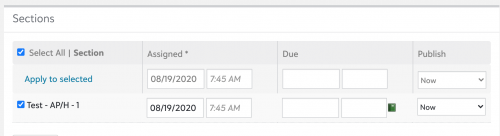
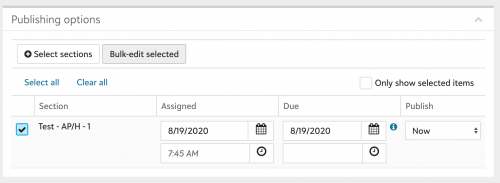
  • Angie Addison‍ Please do not remove the ability to add/edit assignments from the gradebook/calendar view as this is currently the ONLY way that teachers can delete links from an assignment once they've added them. If they don't have this workaround, they will have to completed recreate an assignment when they make a mistake. The gradebook/calendar view is also currently the only way for them to see the days the class meets. As we're on a rotating schedule, this is very important for our teachers. I also had two teachers complain yesterday about how there are now more clicks to bulk assign publishing settings. They miss the ability to just set the assigned date/time at the top and then click "Apply to selected". 


    Old Way:
    bb79168c445745d08190bc13ec4b6e91-huge-sc


    With the new way, they have to open "Bulk-edit selected", set the dates/times (which aren't partially pre-populated like they are on the main screen) and then "Apply". 

    New Way:
    6e80a2add5a54478d4026650642ad714-huge-sc

     
  • I'm on the phone with support right now for another bug.  Teachers cannot copy their assessments they create.  When they click copy, it just gives a locked, grayed out screen.  This cannot be done from either the gradebook nor can it be done from the calendar view, which is a massive bummer as well.

    The only thing I can think of is to have them go through the import assignment wizard.... 


    I'm really hoping all of these issues as a priority.  Fix what you released please. We currently have less functionality than before, which I'm sure is not what you intended.


    Nancy


    Nancy Kierstead:

    Please do NOT take away the older ways to add assignments until you resolve the bugs!!!!!!!!!!!  Please please please. 

    I have two cases open with support as to bugs I have found, and I am telling all my teachers to NOT use the new view.


    Bugs in the new screen:

    You cannot add assignments to classes you have content editor access for.  We use content editor access heavily in our school, and it simply does not work. 

    The assignment types drop down does not correctly reflect the assignments chosen in the gradebook setup.


    I'm seriously begging here.  Don't take the old way away until you fix the new way!