My Community
YourCause®
Impact Edge™
All-Star Lounge
Member Lounge (Just for Fun)
Community News
Community Manager
Groups
Browse Products
Members
Community All-Stars
Monthly Challenges
Member Search
Jobs Board
Help
Using the Blackbaud Community
Blackbaud Support
Knowledgebase
Blackbaud University
Discussions
Categories
Groups
Home
Blackbaud Raiser's Edge NXT®
Raiser's Edge NXT Discussions
Date Formatting for Donation Letter in Microsoft Word
Alexandra Logan
Hello Blackbaud Community!
I've been tasked to create a new letter template for gifts we receive from our donors. I have the body of the letter and the appropriate RE fields inserted in the document. What I'm struggling with is getting the correct date pulled each time a donation is made. We like to have our letters dated with Month, Date, Year. I've been doing a lot of trial and error and still haven't been able to find a way to solve my issue. So far, I've run into one of two problems:
1. I use the long date format field that comes with RE but it reads, eg. Tuesday, October 21, 2020. Right date, wrong format. ?
or
2. I use the insert date field from Microsoft, but it pulls the date that the letter was created. eg, September 28, 2020. Right format, wrong date. ?
For the time being, I'm just going with the first option, but taking the day of the week out with each letter. It's an extra step that I feel like could be streamlined better.
I would love to hear your suggestions.
Thank you!
Alex
Find more posts tagged with
Reporting
Comments
Dariel Dixon
I think you can change the date format from RE. The long and short date are based on the window control panel. You can change it there to control what the date format looks like.
Elizabeth Johnson
Hi
Alex Logan
, To add on
Dariel Dixon
's response
I have a memory of having to set this up in my
Windows system preferences
. I did find this
knowledgebase article
you may want to check out.
This article
gives instructions on how to use the switches.
One thing to keep in mind when you have the system auto-populate the date fields you run the risk of losing the date of the actual letter should you need to pull it back up for the auditors or the constituent. There are ways to do it but I'm often creating a letter for future use so I just type in the date I expect the letter(s) to drop.
Let us know how it goes.
La Donna Borth
Hi Alex,
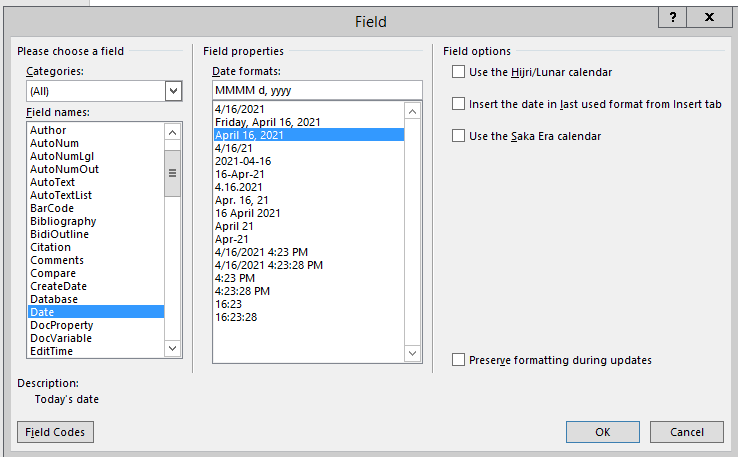
Microsoft Word has "switches" for merge fields. When you are in your letter set-up, you can highlight your merge field for the date, right click and choose Edit Field. In the Field names box, find "Date" and it will give you options under the Field properties for Date formats. Here's the window that opens when you click on Edit Field:
Catherine Burns
Fields from RE may not be identified as dates so the date options may not be available from the Edit Field menu but you can manually add word switches by typing Alt + F9 to turn on field codes and then adding the switch to the merge field. To display October 21, 2020 add the switch \\
@MMMM dd, yyyy
after the field name e.g. {MERGEFIELD Gf_FirstInstDue\\
@MMMM dd yyyy
}
Quick Links
All Categories
Recent Posts
Activity
Unanswered
Groups
Help
Best Of