Hi @Lisa Dziepak!
I got your reply. I don't see it on the site anymore. So I'm not sure if that's a glitch or if you figured what you had mentioned.
I have not run into that issue personally. I don't deal with memberships in that way. And we don't count those memberships toward their annual charitable giving totals (basically, we don't count the membership when compiling the donor recognition lists you mentioned).
But I can imagine what you're describing being a challenge. I believe I have noticed what you mentioned as well. That only the Order gets recognition credit. The Payment on the Order does not get recognition credit. So your Smart Field does need to be based on the Order and not the Payment on the Order. And that would create the Discount problem you mentioned.
@Lisa Dziepak, you shouldn't doubt yourself for a second! You are right on! The credits are a little weird. And pulling Revenue versus Cash (the Pledges versus the Pledge Payments), can definitely be a little tricky.
I'll quickly say that I don't really have as much experience with the membership side of things. But I can see the challenges you're talking about. I'd have to play around a little to see just exactly how a refund behaves and how to capture that in your reporting. My suggestion is to reach out to your Blackbaud Customer Success Manager. They may be able to get you connected to someone who can help with your membership revenue reporting.
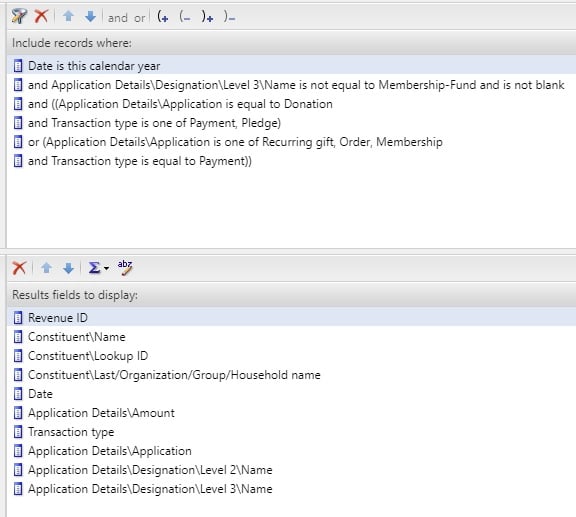
Regarding pulling Pledges versus Pledge Payments, I use a Revenue query source view. Here is a screenshot of the Transaction Types and Applications I use to pull Revenue.
Since this is a Revenue query, it's worth noting that this is giving me a look at the source of the funds. I'm not looking at Recognition here. So this is what I would use if I was putting together my year-to-date revenue report.
Just looking at the criteria:
Your report may need to take into consideration Gift in Kind payments. It really just depends on how you record those. For me Gift in Kind is its own Initiative. That's why I have the Level 2 designation name in my output. This allows me to group by my reporting categories.
You may also need to think about other Applications, like Matching Gift. We handle Matching Gifts a different way, so that's why it's not in that list.
And this is also ALMOST the same setup as you would have for a Cash report. Like if you wanted to see the Pledge Payments instead of Pledges. You would keep the first two pieces of criteria the same. 1. Date is This Year and 2. Designation is Not Blank (block other hierarchies if needed). The third is just Transaction Type equals Payment. That's it. I don't care beyond that. It's a payment to a designation, so it's cash and it's a donation (again, you may need to be mindful of Gift in Kind).
Your output needs might be different to mine. I've found that I like to have Revenue ID in the first column. I like having column A in my Excel spreadsheet to be full of data, no blank cells. It just makes things easier. So that's why I like Revenue ID first.
Regarding, the Pivot Table. That really isn't too hard. It may just be new. I could help walk you through that, if you'd like. It'd probably just be easiest and clearest to hop on a Zoom and I can share my screen, if that works for you. If you aren't available for that, then I could write out the steps. Whichever you would prefer.
I hope this helps get you a little closer.
Chris